.v-v.diff.txt` and `.svg`. It lints each spec, relays the advisories as `diago-render: lint …` lines on stderr, and prints one line per slug with the text art’s width, such as `architecture v2 (diff v1->v2) width=87 diff-width=95 ok`. The output is deterministic: identical inputs give byte-identical files.
* `--embed ` replaces everything between each `` and `` pair in the document with the text art in a fenced block and a link to the image. A `.diff` marker embeds the latest diff. It is idempotent.
* `--png` writes and links PNGs instead of SVGs, which needs `resvg` on `PATH`. Use it when the folder is tracked by git, since each SVG embeds its font and runs around 500 KB.
* `--strict` turns any lint warning into a failure.
# Other agents
> Any agent with a shell can run diago: an instruction block for AGENTS.md, CLAUDE.md, GEMINI.md or Cursor rules, the llms.txt files, and why diago is a CLI and not an MCP server.
Any agent with a shell can run diago. It reads a spec file and writes a diagram to stdout, so there is nothing to connect: the agent needs `diago` on its `PATH` and an instruction that says when to use it.
## The instruction block
[Section titled “The instruction block”](#the-instruction-block)
Put this in your project’s `AGENTS.md`, `CLAUDE.md`, `GEMINI.md` or `.cursor/rules`:
```markdown
## Diagrams
Use diago (https://diago.dev) to show structure: components and how they connect, a request
path, task order, a data model, states, or a change to any of these.
- Write each diagram as a JSON spec file, with an explicit, stable `id` on every node and edge.
Spec reference: https://diago.dev/docs/reference/flow-spec/ (and sequence-spec, class-spec).
- Run `diago check -strict ` and fix every finding before showing anything.
- In a terminal, show `diago render -format text ` in a fenced `text` block, at most 100
columns wide; elsewhere, also render SVG, or PNG with `-format png` (needs resvg).
- When something changes, copy the spec to a new version, keep the ids of everything that stays,
and show `diago diff old.json new.json -format text`.
- Never fall back to Mermaid or hand-drawn ASCII; if `diago` is missing, say that
`go install github.com/oxforge/diago/cmd/diago@latest` installs it.
```
The block asks for stable ids so that a later revision can be shown as a [diff](/docs/guides/diffs/), and for `check -strict` so the agent fixes its own spec before you see it. The spec references are the [flow](/docs/reference/flow-spec/), [sequence](/docs/reference/sequence-spec/) and [class](/docs/reference/class-spec/) pages. In Claude Code, the [plugin](/docs/agents/claude-code/) does this and more without an instruction block.
## Docs for agents
[Section titled “Docs for agents”](#docs-for-agents)
The site publishes its documentation as plain text for an agent to read:
* is an index: it points to the two files below.
* holds every docs page in full, in one file.
* is a shorter version of it.
## Why a CLI and not an MCP server
[Section titled “Why a CLI and not an MCP server”](#why-a-cli-and-not-an-mcp-server)
Agents run diago as a binary rather than through an MCP server, for three reasons:
* A spec lives in a file, so a revision is a small edit, and `diago diff old.json new.json` costs two paths. An MCP tool takes the whole spec as arguments on every render, and both specs for a diff, which the agent pays for in output tokens.
* Images go to disk and never pass through the agent’s context.
* Every agent with a shell can run it. An MCP server would serve only hosts without one.
# Class diagrams
> How to draw class diagrams that read well: members, the six relation kinds, cardinalities, packages and the legend.
A class diagram is UML: classes drawn as boxes with attribute and method compartments, joined by typed relations. It suits a data model, a type hierarchy or the implementations of an interface. The [class spec reference](/docs/reference/class-spec/) lists every field and its allowed values.
## Classes and members
[Section titled “Classes and members”](#classes-and-members)
A class has an `id`, a `label`, and optionally `attributes` and `methods`. Each member has a `visibility` of `+` (public), `-` (private), `#` (protected) or `~` (package), and its `text`. A method may be `static`, drawn underlined, or `abstract`, drawn in italics. A `stereotype` adds a line such as `«interface»` above the name, and `type_params` adds `` to it.
members.json
```json
{
"type": "class",
"direction": "RIGHT",
"classes": [
{
"id": "repository",
"label": "Repository",
"stereotype": "interface",
"type_params": ["T"],
"methods": [
{"visibility": "+", "text": "find(id: string): T", "abstract": true},
{"visibility": "+", "text": "save(item: T)", "abstract": true}
]
},
{
"id": "orders",
"label": "OrderStore",
"attributes": [
{"visibility": "+", "text": "name: string"},
{"visibility": "-", "text": "cache: Map"},
{"visibility": "#", "text": "limit: int"},
{"visibility": "~", "text": "version: int"}
],
"methods": [
{"visibility": "+", "text": "find(id: string): Order"},
{"visibility": "+", "text": "open(): OrderStore", "static": true}
]
}
],
"relations": [
{"id": "orders-repository", "from": "orders", "to": "repository", "kind": "realization"}
]
}
```
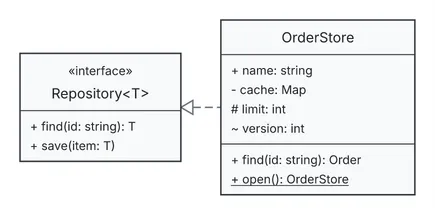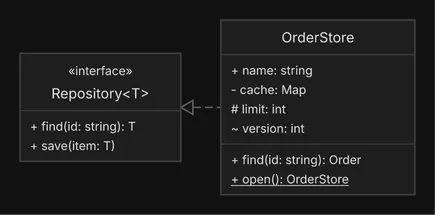
```
┌────────────────────────────┐
│ OrderStore │
┌──────────────────────────┐ ├────────────────────────────┤
│ «interface» │ │ + name: string │
│ Repository │ │ - cache: Map │
├──────────────────────────┤◁╌╌╌│ # limit: int │
│ + find(id: string): T * │ │ ~ version: int │
│ + save(item: T) * │ ├────────────────────────────┤
└──────────────────────────┘ │ + find(id: string): Order │
│ + open(): OrderStore $ │
└────────────────────────────┘
```
Text art has no underline or italics, so it marks a static member with a `$` suffix and an abstract one with `*`, as in the art above.
Show only the members the reader needs. `check` reports `god-class` above 15 members, and `overlong-member` for a member line over 40 characters, which widens the box.
## Relations and how to choose
[Section titled “Relations and how to choose”](#relations-and-how-to-choose)
There are six kinds of relation. Pick by what the two classes mean to each other:
| Kind | Use it for | Drawn as |
| ------------- | ---------------------------------------------- | ----------------------------------------------- |
| `inheritance` | a subtype of a supertype | a hollow triangle at the supertype |
| `realization` | a class implementing an interface | a dashed line, hollow triangle at the interface |
| `composition` | owned parts: the part cannot outlive the whole | a filled diamond at the whole |
| `aggregation` | shared parts: the part exists on its own | a hollow diamond at the whole |
| `dependency` | uses: a parameter, a call | a dashed line with an arrowhead |
| `association` | anything else (the default) | a plain line |
relations.json
```json
{
"type": "class",
"direction": "RIGHT",
"legend": true,
"legend_labels": {"inheritance": "is a"},
"classes": [
{"id": "animal", "label": "Animal"},
{"id": "dog", "label": "Dog"},
{"id": "pet", "label": "Pet", "stereotype": "interface"},
{"id": "owner", "label": "Owner"},
{"id": "kennel", "label": "Kennel"},
{"id": "collar", "label": "Collar"},
{"id": "vet", "label": "Vet"}
],
"relations": [
{"id": "dog-animal", "from": "dog", "to": "animal", "kind": "inheritance"},
{"id": "dog-pet", "from": "dog", "to": "pet", "kind": "realization"},
{
"id": "kennel-dog",
"from": "kennel",
"to": "dog",
"kind": "aggregation",
"from_card": "1",
"to_card": "*"
},
{
"id": "dog-collar",
"from": "dog",
"to": "collar",
"kind": "composition",
"from_card": "1",
"to_card": "1"
},
{"id": "vet-kennel", "from": "vet", "to": "kennel", "kind": "dependency"},
{
"id": "owner-vet",
"from": "owner",
"to": "vet",
"kind": "association",
"from_card": "1",
"to_card": "*"
}
]
}
```
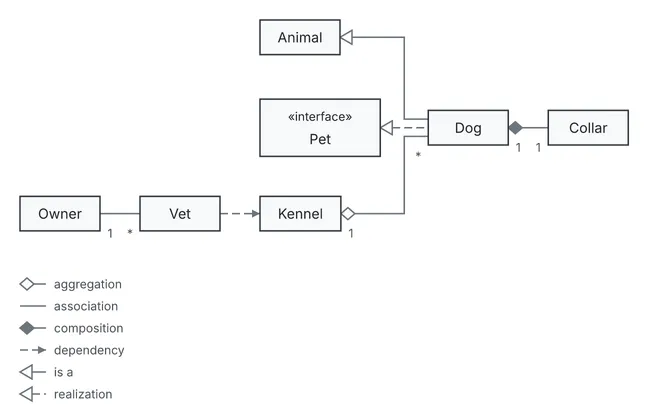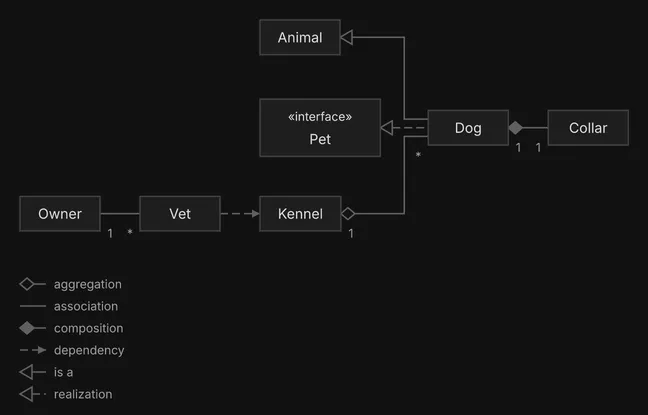
```
┌────────┐
│ Animal │◁────────┐
└────────┘ │
│
│
┌──────────────┐ │ ┌──────┐
│ «interface» │ └──│ Dog │ 1 ┌────────┐
│ Pet │◁╌╌╌╌╌│ │◆───│ Collar │
└──────────────┘ ┌──│ │ 1 └────────┘
│ └──────┘
│ *
┌────────┐ * ┌──────┐ ┌────────┐ │
│ Owner │────│ Vet │╌╌╌►│ Kennel │◇────────┘
└────────┘ 1 └──────┘ └────────┘ 1
◇── aggregation
─── association
◆── composition
╌╌► dependency
◁── is a
◁╌╌ realization
```
When two classes could be joined by more than one kind, choose the one with the strongest ownership that is true, and leave `association` for relations that fit none of the others.
### Which end is `from`
[Section titled “Which end is from”](#which-end-is-from)
For `inheritance` and `realization`, `from` is the subtype (or the implementing class) and `to` is the supertype or interface: `dog-animal` above reads “Dog inherits from Animal”. The engine lays the supertype out first and draws the hollow triangle at its end. For the other kinds the adornment sits at the `from` end of a composition or aggregation: `from` is the whole.
### `directed`
[Section titled “directed”](#directed)
`directed` puts an arrowhead at `to`. It is on by default for `dependency` and off for `association`, and you may set it on an `association` to draw an arrowhead at `to`. It is not allowed on the four adorned kinds (`inheritance`, `realization`, `aggregation`, `composition`), whose adornment already says it.
### Cardinalities
[Section titled “Cardinalities”](#cardinalities)
`from_card` and `to_card` are free text placed beside the wire ends: `1`, `*`, `0..*`. Use them where multiplicity is the point, such as the `1` to `*` between Kennel and Dog.
Give every relation an `id`, as you would a flow edge, so that `diago diff` and `render -previous` can match relations across versions.
## Packages
[Section titled “Packages”](#packages)
A package groups related classes in a labelled frame. It follows the same rules as a flow [group](/docs/guides/flow/#groups), under the key `packages`: nesting up to 3 levels and an optional `color`. A package of one class only adds a frame, so give it at least 2.
packages.json
```json
{
"type": "class",
"direction": "DOWN",
"classes": [
{"id": "order", "label": "Order", "attributes": [{"visibility": "-", "text": "id: string"}]},
{"id": "line", "label": "OrderLine"},
{
"id": "invoice",
"label": "Invoice",
"attributes": [{"visibility": "-", "text": "total: Money"}]
},
{"id": "payment", "label": "Payment"}
],
"relations": [
{
"id": "order-line",
"from": "order",
"to": "line",
"kind": "composition",
"from_card": "1",
"to_card": "*"
},
{
"id": "invoice-order",
"from": "invoice",
"to": "order",
"kind": "association",
"label": "bills"
},
{
"id": "invoice-payment",
"from": "invoice",
"to": "payment",
"kind": "aggregation",
"from_card": "1",
"to_card": "*"
}
],
"packages": [
{"id": "sales", "label": "Sales", "contains": ["order", "line"]},
{"id": "billing", "label": "Billing", "color": "gray", "contains": ["invoice", "payment"]}
]
}
```
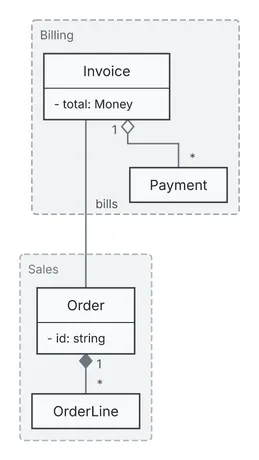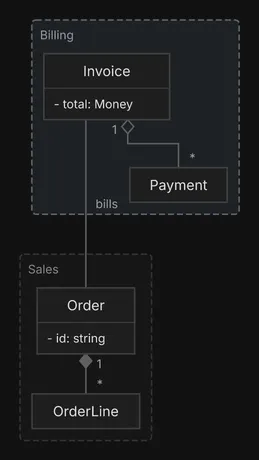
```
┌─ Billing ─────────────────┐
│ │
│ ┌────────────────┐ │
│ │ Invoice │ │
│ ├────────────────┤ │
│ │ - total: Money │ │
│ └────────────────┘ │
│ │ ◇ 1 │
│ │ │ │
│ │ └────┐ │
│ │ │ * │
│ │ ┌──────────┐ │
│ │ │ Payment │ │
│ bills │ └──────────┘ │
└───────┼───────────────────┘
│
│
│
┌─ Sales ──┼─────────┐
│ │ │
│ ┌──────────────┐ │
│ │ Order │ │
│ ├──────────────┤ │
│ │ - id: string │ │
│ └──────────────┘ │
│ ◆ 1 │
│ │ │
│ │ * │
│ ┌────────────┐ │
│ │ OrderLine │ │
│ └────────────┘ │
└────────────────────┘
```
Use a package for a boundary that means something to the reader, and keep its label to one short word in text art, since a long one widens the frame.
## The legend
[Section titled “The legend”](#the-legend)
`"legend": true` adds one row per relation kind present, which helps once 3 or more kinds appear and the reader may not know the notation. `legend_labels` overrides a row’s text: the `relations` diagram above renames the inheritance row to `is a`. An empty value hides a row. In text art the legend is printed under the diagram, as above.
For every field and value, see the [class spec reference](/docs/reference/class-spec/).
# Diffs
> Draw what changed between two versions of a diagram: added, removed and changed elements in one picture, with the change list under it.
`diago diff old.json new.json` draws one picture of what changed between two specs of a flow, sequence or class diagram: the union of both, with every element marked.
```sh
diago diff old.json new.json > diff.svg
diago diff old.json new.json -format text
```
Here is a flow diagram, drawn as text art. Version 2 adds a Metrics node and the edge to it, removes the SMTP Relay and its edge, relabels the gateway, and makes the database edge dashed.
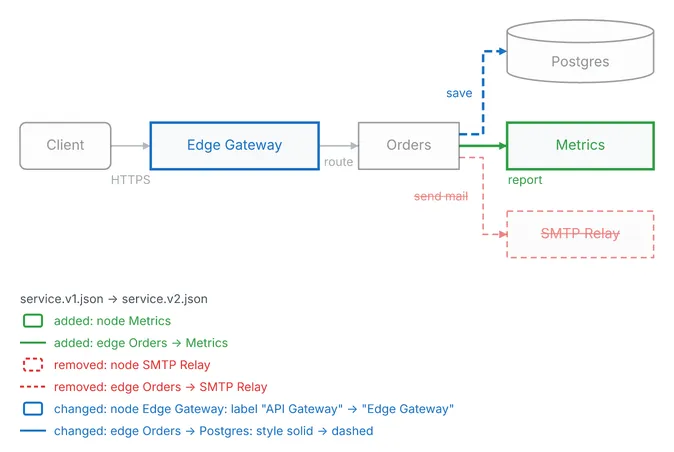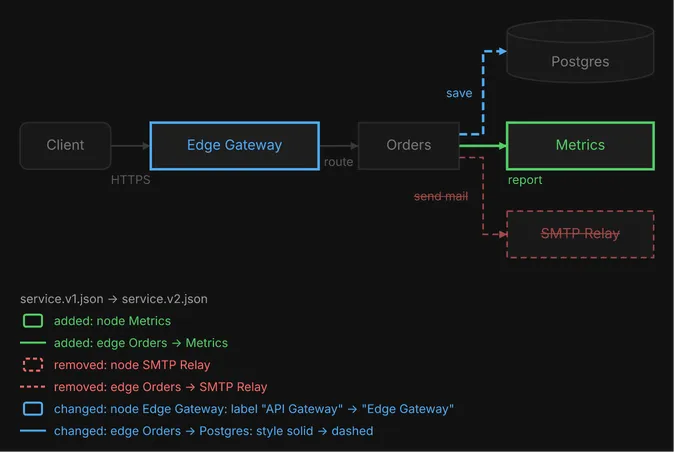
```
save ╒══════════════╕
┌╌►│ Postgres │
╎ └──────────────┘
╎
┌────────┐ ╎
╭────────╮ ┌────────────────┐ │ │╌╌╌┘ ┌──────────────┐
│ Client │───►│ ~ Edge Gateway │───►│ Orders │─────►│ + Metrics │
╰────────╯ └────────────────┘ │ │───┐ └──────────────┘
HTTPS route └────────┘ │ report
│
│ ┌──────────────┐
└─►│ - SMTP Relay │
send mail └──────────────┘
service.v1.json → service.v2.json
added: node Metrics
added: edge Orders -> Metrics
removed: node SMTP Relay
removed: edge Orders -> SMTP Relay
changed: node Edge Gateway: label "API Gateway" → "Edge Gateway"
changed: edge Orders -> Postgres: style solid → dashed
```
In text art a status shows as a marker on the label: `+` added, `-` removed, `~` changed. In SVG and PNG it shows as color, and the theme’s palette sets it:
* **Added** elements are green.
* **Changed** elements are blue.
* **Removed** elements are red, dashed, faded and struck through, and still take up their own space in the picture, never overlapping an element that stays.
* **Unchanged** elements are faded in the theme’s neutral colors.
Color carries the status only. An element keeps its own fill, but its own `color` never reaches its outline, wire or label, so avoid `green`, `blue` and `red` in a spec you plan to diff.
## The change list
[Section titled “The change list”](#the-change-list)
Every diff lists its changes, one line each: under the picture in SVG and PNG, each line led by a sample in its status’s style, and as a footer in text art. A changed line names the fields that differ, as `old → new`, by their spec keys:
```text
service.v1.json → service.v2.json
added: node Metrics
removed: node SMTP Relay
changed: edge Orders -> Postgres: style solid → dashed
```
An element with no `label` reads `none → "read/write"` when one is added.
The first line is a caption naming the two sides: a file by its base name, a revision as `arch.json @ HEAD~3 (a1b2c3d)`. It is there even when nothing changed.
## Ids decide what changed
[Section titled “Ids decide what changed”](#ids-decide-what-changed)
A diff matches elements by `id`, which is why each node and edge should have one of its own (see [flow diagrams](/docs/guides/flow/)). Change a label and keep the id, and the element is reported as changed. Change the id, and the old element is reported as removed and a new one as added. An edge without an `id` is matched by its ends, as `from->to#n`, which breaks when you rename a node, and a labeled edge without an `id` raises the `edge-without-id` [advisory](/docs/reference/advisories/) in a diff.
## Unchanged boxes stay close
[Section titled “Unchanged boxes stay close”](#unchanged-boxes-stay-close)
A flow or class diff is laid out anchored on the old diagram: each box that did not change keeps its row (its column, in a diagram drawn `RIGHT` or `LEFT`) and its order within it wherever the new structure allows. It does not keep its exact position, since an added box can widen a row and move its neighbors, but it stays close to where it was, so the eye goes to what changed. The same anchoring is available to an ordinary render: a later version of a diagram keeps its surviving nodes close to where they were, instead of the layout starting over.
```sh
diago render -previous v1.svg v2.json > v2.svg
```
`-previous` takes an SVG that diago rendered, a layout JSON saved on its own, or the previous spec. It works on flow and class diagrams. A sequence diff is not anchored: it draws the actors and messages of both versions, every message on a row of its own, removed ones included, so an added message moves the rows after it down. The messages keep the new version’s order, and a removed message stays between the neighbors it had.
## A sequence diff
[Section titled “A sequence diff”](#a-sequence-diff)
Version 2 of this login adds an SMS actor, the two messages to it, and an `alt` fragment around them. A removed message would keep its row but open no activation bar.
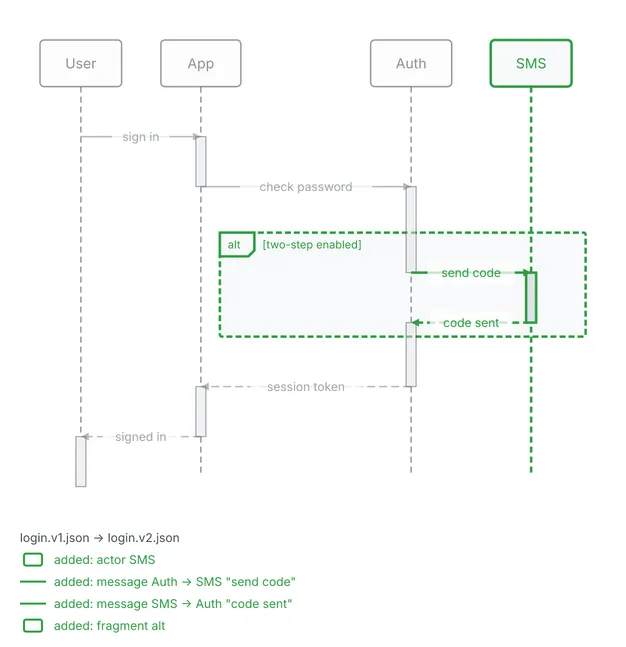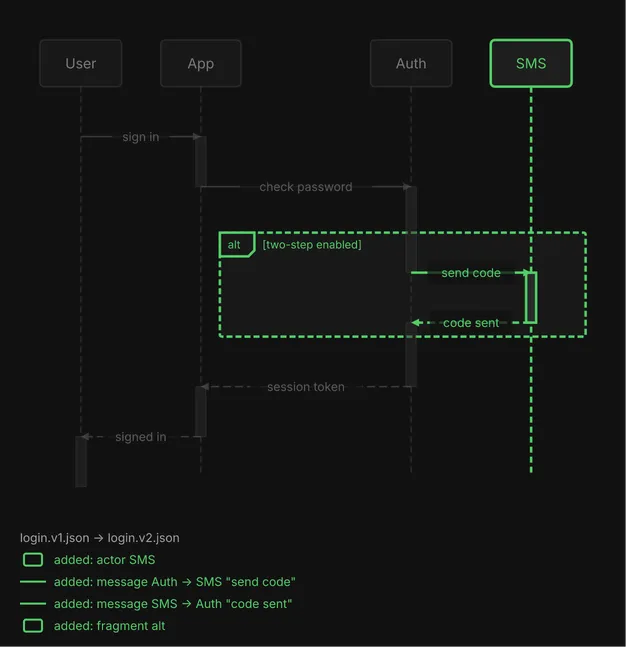
```
┌──────┐ ┌──────┐ ┌──────┐ ┌────────┐
│ User │ │ App │ │ Auth │ │ + SMS │
└──────┘ └──────┘ └──────┘ └────────┘
│ │ │ │
│ │ │ │
├─ sign in ──► │ │
│ ┃ │ │
│ ├ check password ─► │
│ │ ┃ │
│ │ ╔══ alt [+ two-step enabled] ══╗
│ │ ║ ├ + send code ─► ║
│ │ ║ │ ┃ ║
│ │ ║ ◄ + code sent ╌┤ ║
│ │ ╚══════╪══════════════╪════════╝
│ │ ┃ │
│ ◄╌ session token ╌┤ │
│ ┃ │ │
◄ signed in ╌┤ │ │
┃ │ │ │
┌──────┐ ┌──────┐ ┌──────┐ ┌────────┐
│ User │ │ App │ │ Auth │ │ + SMS │
└──────┘ └──────┘ └──────┘ └────────┘
login.v1.json → login.v2.json
added: actor SMS
added: message Auth -> SMS "send code"
added: message SMS -> Auth "code sent"
added: fragment alt
```
In text art the stamps go on actor labels, message labels and fragment guards. An unlabeled changed message shows the bare marker.
## A class diff
[Section titled “A class diff”](#a-class-diff)
In a class diff every member line of every class has a two-character status column before its visibility glyph: `+ `, `- `, `~ `, or two spaces when unchanged. A removed member keeps its row, and the change list adds one line per changed member. This is a class whose `amount` attribute is removed and which gains a `refund` method:
```text
┌────────────────────┐
│ ~ Payment │
├────────────────────┤
│ - - amount: Money │
├────────────────────┤
│ + pay(): void │
│ + + refund(): void │
└────────────────────┘
changed: class Payment, removed attribute - amount: Money
changed: class Payment, added method + refund(): void
```
Relations in the list are named in the spec’s orientation: `from` then `to`.
## Versions in git
[Section titled “Versions in git”](#versions-in-git)
A spec kept in a git repository can be diffed across revisions without copying files out:
```sh
diago diff arch.json # its latest change
diago diff HEAD~3:arch.json arch.json # three commits ago against the file on disk
diago diff v1.2:arch.json HEAD:arch.json # a tag against the last commit
```
With one path, diago draws the file’s latest change: the newest version committed along first parents from HEAD whose content differs from the file on disk, against the file on disk. Uncommitted edits show against HEAD; a clean file shows what its last change did, and a commit that only renamed the file is skipped. A symbolic link is refused, on disk or at a revision: git keeps the link’s text, not the spec it points to, so pass that file instead. Any spec argument can be `REV:PATH`, `render`’s and `-previous` included. PATH is relative to the current directory, and the repository is the one that contains it. The caption says which versions were compared: `arch.json @ a1b2c3d → arch.json`.
## Flags and exit codes
[Section titled “Flags and exit codes”](#flags-and-exit-codes)
`-format` takes `svg` (the default), `png` or `text`, and `-theme`, `-scale` and `-width` work as they do for `render`; `-theme` overrides the new spec’s `theme` field. draw\.io and Excalidraw are not available for diffs.
| Exit | Meaning |
| ---- | -------------------------------------------------------------------------------------------------------------------------------------------------------------------------- |
| 0 | the diff was drawn; identical inputs draw everything unchanged, with the caption alone |
| 1 | an invalid spec on either side (not JSON, a missing or unknown `type`, a field of the wrong JSON type, or a validation error), with fields prefixed `before.` and `after.` |
| 2 | a usage or internal error, such as a file that cannot be read, a git failure, or a diff stopped after 10 seconds |
The full flag list is in the [CLI reference](/docs/reference/cli/).
# Flow diagrams
> How to draw flow diagrams that read well: shapes, edges, direction, groups, decisions, flat edges, color and size.
A flow diagram shows structure: components and how they connect, dependencies, task order, states, and business rules with their branches. This guide is about drawing one well. The [flow spec reference](/docs/reference/flow-spec/) lists every field and its allowed values.
Two habits help throughout. Give every node and edge a short `id` of your own (`client-api`, not a number), because ids keep an element the same from one version to the next. And run `diago check -strict` on the spec before you render it: it reports content findings without drawing anything.
## Nodes and shapes
[Section titled “Nodes and shapes”](#nodes-and-shapes)
Most nodes are plain rectangles, the default. Give each other shape one role and keep it, so the reader learns the vocabulary once:
| Shape | Role | In text art |
| --------------- | ------------------------------------------------------------------------------ | ------------------- |
| `rect` | services, processes, steps (the default) | a box |
| `rounded` | outside actors (users, clients, external systems); a flowchart’s start and end | rounded corners |
| `cylinder` | anything that holds state: a database, cache, queue, bucket | a double top border |
| `diamond` | decisions only | `◇` marks |
| `hexagon` | gateways, proxies | a box, like `rect` |
| `parallelogram` | input and output | a box, like `rect` |
| `circle` | events, start and end markers, short labels | like `rounded` |
shapes.json
```json
{
"type": "flow",
"direction": "RIGHT",
"ignore": ["shape-soup"],
"nodes": [
{"id": "user", "label": "User", "shape": "rounded"},
{"id": "upload", "label": "Upload", "shape": "parallelogram"},
{"id": "gateway", "label": "Gateway", "shape": "hexagon"},
{"id": "service", "label": "Service", "shape": "rect"},
{"id": "valid", "label": "Valid?", "shape": "diamond"},
{"id": "db", "label": "Database", "shape": "cylinder"},
{"id": "done", "label": "Done", "shape": "circle"}
],
"edges": [
{"id": "user-upload", "from": "user", "to": "upload"},
{"id": "upload-gateway", "from": "upload", "to": "gateway"},
{"id": "gateway-service", "from": "gateway", "to": "service"},
{"id": "service-valid", "from": "service", "to": "valid"},
{"id": "valid-db", "from": "valid", "to": "db", "label": "yes"},
{"id": "db-done", "from": "db", "to": "done"}
]
}
```

```
╭──────╮ ┌────────┐ ┌──────────┐ ┌──────────┐ ┌────────────┐ ╒══════════╕ ╭──────╮
│ User │───►│ Upload │───►│ Gateway │───►│ Service │───►│ ◇ Valid? ◇ │───►│ Database │───►│ Done │
╰──────╯ └────────┘ └──────────┘ └──────────┘ └────────────┘ └──────────┘ ╰──────╯
yes
```
This spec draws all seven shapes to show them, which is more than a real diagram should. Keep to about 4 distinct shapes: `check` reports [`shape-soup`](/docs/reference/advisories/) above 5, and the spec above silences it with `"ignore": ["shape-soup"]` because the finding is the point. Text art keeps only `rect`, `rounded`, `cylinder` and `diamond` apart, as the art above shows: when a diagram may be read as text, a role shown by `hexagon`, `parallelogram` or `circle` should also be in its label.
Keep labels to 1 to 3 words and prefer role names to identifiers: “Auth Service”, not `auth-svc-v2`. A word over 24 characters raises `unbreakable-token`, and a label over 60 characters raises `long-label`.
## Edges
[Section titled “Edges”](#edges)
An edge is drawn solid unless you say otherwise. The line style carries meaning, and it survives in text art:
| Style | Meaning | In text art |
| -------- | -------------------------------------------------------------- | ----------- |
| `solid` | the main or synchronous path (the default) | `─ │` |
| `dashed` | async calls, responses, events | `╌ ╎` |
| `dotted` | optional links, monitoring, logging | `┈ ┊` |
| `thick` | the one path the reader should follow, at most one per diagram | `━ ┃` |
`direction` on an edge says where the arrowheads go: `forward` (the default) at the target, `backward` at the source, `both` at both ends, `none` at neither. Use `both` for a request and response pair, as one edge rather than two, and `none` for a peer link with no flow.
edges.json
```json
{
"type": "flow",
"direction": "RIGHT",
"nodes": [
{"id": "hub", "label": "Hub"},
{"id": "s1", "label": "Main path"},
{"id": "s2", "label": "Async"},
{"id": "s3", "label": "Optional"},
{"id": "s4", "label": "Followed"},
{"id": "c1", "label": "Client"},
{"id": "c2", "label": "Server"},
{"id": "p1", "label": "Producer"},
{"id": "p2", "label": "Consumer"},
{"id": "n1", "label": "Peer A"},
{"id": "n2", "label": "Peer B"}
],
"edges": [
{"id": "hub-s1", "from": "hub", "to": "s1", "label": "solid", "style": "solid"},
{"id": "hub-s2", "from": "hub", "to": "s2", "label": "dashed", "style": "dashed"},
{"id": "hub-s3", "from": "hub", "to": "s3", "label": "dotted", "style": "dotted"},
{"id": "hub-s4", "from": "hub", "to": "s4", "label": "thick", "style": "thick"},
{"id": "c1-c2", "from": "c1", "to": "c2", "label": "both", "direction": "both"},
{"id": "p1-p2", "from": "p2", "to": "p1", "label": "backward", "direction": "backward"},
{"id": "n1-n2", "from": "n1", "to": "n2", "label": "none", "direction": "none"}
]
}
```
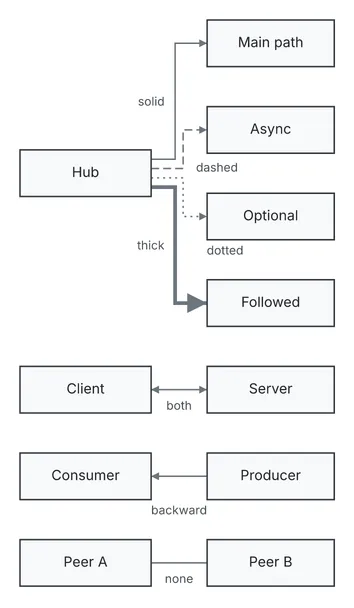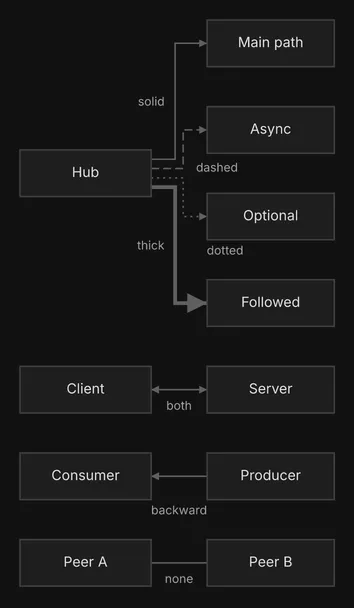
```
solid ┌────────────┐
┌───►│ Main path │
│ └────────────┘
│
│
│ ┌────────────┐
┌──────────┐ │ ┌╌►│ Async │
│ │───┘ ╎ └────────────┘
│ Hub │╌╌╌╌╌┘ dashed
│ │┈┈┈┈┈┐ dotted
│ │━━━┐ ┊ ┌────────────┐
└──────────┘ ┃ └┈►│ Optional │
┃ └────────────┘
┃
┃
┃ ┌────────────┐
└━━━►│ Followed │
thick └────────────┘
┌──────────┐ ┌────────────┐
│ Client │◄──────►│ Server │
└──────────┘ both └────────────┘
┌──────────┐ ┌────────────┐
│ Consumer │◄───────│ Producer │
└──────────┘ └────────────┘
backward
┌──────────┐ ┌────────────┐
│ Peer A │────────│ Peer B │
└──────────┘ none └────────────┘
```
Edge ids matter more than they look. `diago diff` and `render -previous` use them to decide which edge is which across two versions, so an edge you relabel is reported as changed, not as one removed and one added. Without an `id` diago derives `from->to#n`, which breaks when you rename a node.
Label an edge with a verb phrase (`publishes order`, not `data`) and only where its two ends do not already make the meaning obvious: each label is one more thing to place, so fewer labels read cleaner. A label such as `data` or `calls` is reported as [`vague-edge-label`](/docs/reference/advisories/).
## Direction
[Section titled “Direction”](#direction)
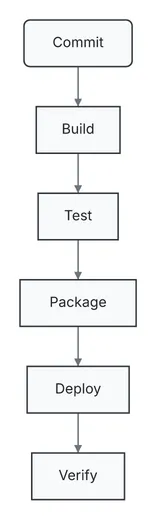
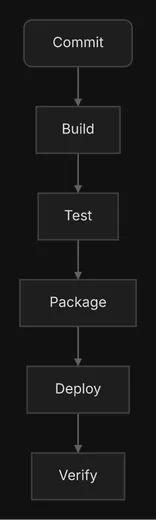
`direction` is the way the diagram flows: `DOWN`, `UP`, `RIGHT`, `LEFT` or `AUTO`. Pick it by the medium’s tight axis, not by habit. A terminal is short of width, so a long chain belongs `DOWN`; a slide or a document is short of height, so the same chain belongs `RIGHT`, as a banner. Here is one six-step chain both ways, as text art:
chain-down.json
```json
{
"type": "flow",
"direction": "DOWN",
"nodes": [
{"id": "commit", "label": "Commit", "shape": "rounded"},
{"id": "build", "label": "Build"},
{"id": "test", "label": "Test"},
{"id": "package", "label": "Package"},
{"id": "deploy", "label": "Deploy"},
{"id": "verify", "label": "Verify"}
],
"edges": [
{"id": "commit-build", "from": "commit", "to": "build"},
{"id": "build-test", "from": "build", "to": "test"},
{"id": "test-package", "from": "test", "to": "package"},
{"id": "package-deploy", "from": "package", "to": "deploy"},
{"id": "deploy-verify", "from": "deploy", "to": "verify"}
]
}
```
```
╭────────╮
│ Commit │
╰────────╯
│
│
▼
┌────────┐
│ Build │
└────────┘
│
│
▼
┌──────┐
│ Test │
└──────┘
│
│
▼
┌──────────┐
│ Package │
└──────────┘
│
│
▼
┌────────┐
│ Deploy │
└────────┘
│
│
▼
┌────────┐
│ Verify │
└────────┘
```
chain-right.json
```json
{
"type": "flow",
"direction": "RIGHT",
"nodes": [
{"id": "commit", "label": "Commit", "shape": "rounded"},
{"id": "build", "label": "Build"},
{"id": "test", "label": "Test"},
{"id": "package", "label": "Package"},
{"id": "deploy", "label": "Deploy"},
{"id": "verify", "label": "Verify"}
],
"edges": [
{"id": "commit-build", "from": "commit", "to": "build"},
{"id": "build-test", "from": "build", "to": "test"},
{"id": "test-package", "from": "test", "to": "package"},
{"id": "package-deploy", "from": "package", "to": "deploy"},
{"id": "deploy-verify", "from": "deploy", "to": "verify"}
]
}
```

```
╭────────╮ ┌────────┐ ┌──────┐ ┌──────────┐ ┌────────┐ ┌────────┐
│ Commit │───►│ Build │───►│ Test │───►│ Package │───►│ Deploy │───►│ Verify │
╰────────╯ └────────┘ └──────┘ └──────────┘ └────────┘ └────────┘
```
In text art the `DOWN` chain is 14 columns wide and 33 lines tall; the `RIGHT` chain is 82 columns wide and 3 lines tall. The reverse holds for a wide fan-out, one node with many children: `RIGHT` keeps it narrow in a terminal, and `DOWN` suits an image. A hierarchy, a decision tree or layers read best `DOWN`.
Set `direction` yourself rather than rely on `AUTO`, which chooses from the shape of the graph and does not know where the diagram will be read. `UP` fits only when the reader expects foundations at the bottom, and `LEFT` almost never. When in doubt, render both and keep the one that fits and reads better.
## Groups
[Section titled “Groups”](#groups)
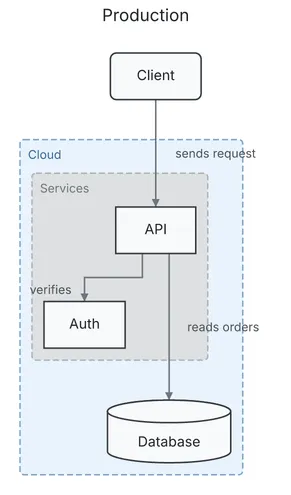
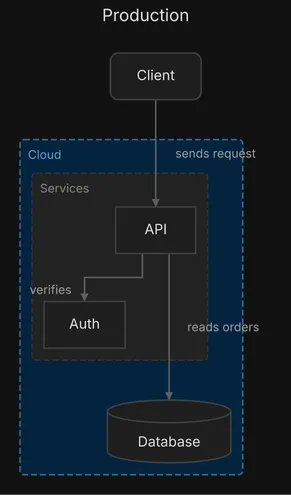
A group draws a frame around the nodes it contains. Use one for a boundary that matters to the reader: a deployment boundary, a package, a team, a trust zone. A group of one member only adds a frame, so give it at least 2. A group id in another group’s `contains` nests it, up to 3 levels; a fourth is a validation error.
groups.json
```json
{
"type": "flow",
"title": "Production",
"direction": "DOWN",
"nodes": [
{"id": "client", "label": "Client", "shape": "rounded"},
{"id": "api", "label": "API"},
{"id": "auth", "label": "Auth"},
{"id": "db", "label": "Database", "shape": "cylinder"}
],
"edges": [
{"id": "client-api", "from": "client", "to": "api", "label": "sends request"},
{"id": "api-auth", "from": "api", "to": "auth", "label": "verifies"},
{"id": "api-db", "from": "api", "to": "db", "label": "reads orders"}
],
"groups": [
{"id": "cloud", "label": "Cloud", "color": "blue", "contains": ["services", "db"]},
{"id": "services", "label": "Services", "contains": ["api", "auth"]}
]
}
```
```
Production
╭────────╮
│ Client │
╰────────╯
│
│ sends request
│
┌─ Cloud ─────────┼────────┐
│ │ │
│ ┌─ Services ───┼─────┐ │
│ │ ▼ │ │
│ │ ┌──────┐ │ │
│ │ │ API │ │ │
│ │ └──────┘ │ │
│ │ verifies │ │ │ │
│ │ │ │ │ │
│ │ ┌─────┘ │ │ │
│ │ ▼ │ │ │
│ │ ┌──────┐ │ │ │
│ │ │ Auth │ │ │ │
│ │ └──────┘ │ │ │
│ └───────────────┼────┘ │
│ │ │
│ reads orders │ │
│ ▼ │
│ ╒══════════╕ │
│ │ Database │ │
│ └──────────┘ │
└──────────────────────────┘
```
Groups are where color pays off best: to tell domains apart, color the groups (here `Cloud`), not their nodes. Deeper groups get progressively different fill shading, so nesting reads at a glance. In text art, keep a group label to one short word: a long one widens the frame, and the art with it. The `title` above the diagram is covered below.
## Decisions
[Section titled “Decisions”](#decisions)
A `diamond` is for a decision, and every exit needs a label. A diamond with two or more exits and one unlabeled raises [`unlabeled-branch`](/docs/reference/advisories/). Branches that rejoin simply point to the same node.
decision.json
```json
{
"type": "flow",
"direction": "DOWN",
"nodes": [
{"id": "start", "label": "Order received", "shape": "rounded"},
{"id": "stock", "label": "In stock?", "shape": "diamond"},
{"id": "ship", "label": "Ship order"},
{"id": "backorder", "label": "Backorder"},
{"id": "notify", "label": "Email customer"}
],
"edges": [
{"id": "start-stock", "from": "start", "to": "stock"},
{"id": "stock-ship", "from": "stock", "to": "ship", "label": "yes"},
{"id": "stock-backorder", "from": "stock", "to": "backorder", "label": "no"},
{"id": "ship-notify", "from": "ship", "to": "notify"},
{"id": "backorder-notify", "from": "backorder", "to": "notify"}
]
}
```
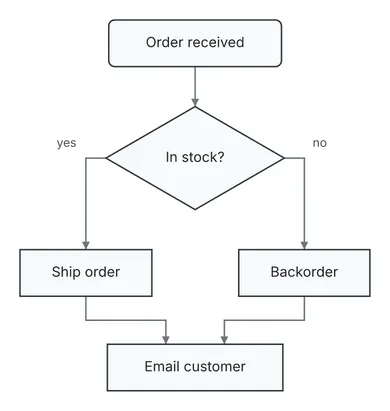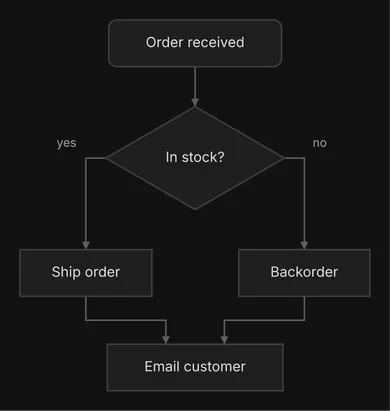
```
╭────────────────╮
│ Order received │
╰────────────────╯
│
│
▼
┌────────────────┐
│ ◇ In stock? ◇ │
└────────────────┘
│ yes │ no
│ │
┌─────┘ └─────┐
▼ ▼
┌────────────┐ ┌────────────┐
│ Ship order │ │ Backorder │
└────────────┘ └────────────┘
│ │
│ │
└─────┐ ┌─────┘
▼ ▼
┌────────────────┐
│ Email customer │
└────────────────┘
```
## Flat edges
[Section titled “Flat edges”](#flat-edges)
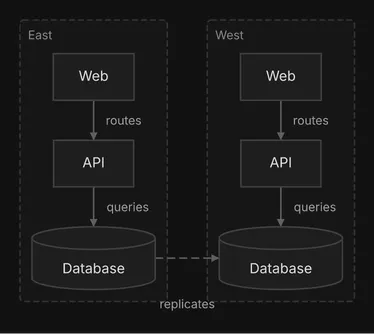
An ordinary edge says “this comes before that”, so diago ranks its ends. A link between peers has no order: replication between two sites that each serve their own traffic, or a sync between two services at one level. Mark it `"flat": true` and diago leaves the ends where the rest of the diagram puts them, side by side when there is room, then routes the edge on the finished layout. Without it the two sites below would stack.
flat.json
```json
{
"type": "flow",
"direction": "DOWN",
"nodes": [
{"id": "east_web", "label": "Web"},
{"id": "east_api", "label": "API"},
{"id": "east_db", "label": "Database", "shape": "cylinder"},
{"id": "west_web", "label": "Web"},
{"id": "west_api", "label": "API"},
{"id": "west_db", "label": "Database", "shape": "cylinder"}
],
"edges": [
{"id": "east-web-api", "from": "east_web", "to": "east_api", "label": "routes"},
{"id": "east-api-db", "from": "east_api", "to": "east_db", "label": "queries"},
{"id": "west-web-api", "from": "west_web", "to": "west_api", "label": "routes"},
{"id": "west-api-db", "from": "west_api", "to": "west_db", "label": "queries"},
{
"id": "east-west",
"from": "east_db",
"to": "west_db",
"label": "replicates",
"style": "dashed",
"flat": true
}
],
"groups": [
{"id": "east", "label": "East", "contains": ["east_web", "east_api", "east_db"]},
{"id": "west", "label": "West", "contains": ["west_web", "west_api", "west_db"]}
]
}
```
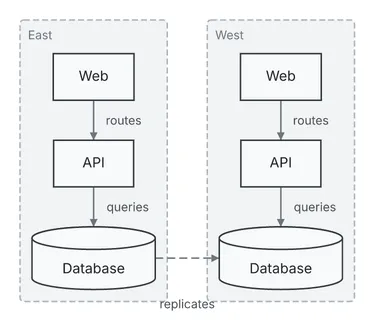
```
┌─ East ─────────┐ ┌─ West ─────────┐
│ │ │ │
│ ┌──────┐ │ │ ┌──────┐ │
│ │ Web │ │ │ │ Web │ │
│ └──────┘ │ │ └──────┘ │
│ │ │ │ │ │
│ routes │ │ │ routes │ │
│ ▼ │ │ ▼ │
│ ┌──────┐ │ │ ┌──────┐ │
│ │ API │ │ │ │ API │ │
│ └──────┘ │ │ └──────┘ │
│ │ │ │ │ │
│ │ queries │ │ queries
│ ▼ replicates ▼ │
│ ╒══════════╕ │ │ ╒══════════╕ │
│ │ Database │╌╌┼╌╌╌╌╌┼╌►│ Database │ │
│ └──────────┘ │ │ └──────────┘ │
└────────────────┘ └────────────────┘
```
Two rules keep a flat edge honest. A node whose only edges are flat is placed as an unconnected node, wherever there is room, not beside its partner, so keep one ordinary link on it: a standby database with nothing else attached keeps its replication edge from the primary ordinary, which puts it under the primary. And do not mark a link flat when it is part of the flow, such as a request, a dependency or a pipeline step; a flat edge cannot be a self-loop. When no clean route exists, the edge is laid out as an ordinary one and the render warns with [`flat-edge-ranked`](/docs/reference/advisories/).
## Color
[Section titled “Color”](#color)
Color is the weakest channel, since text art drops it: never let it carry meaning alone.
* Use 0 to 2 accents per diagram: one for the focus (the entry point, the component under discussion), `orange` for a problem. Leave the rest uncolored.
* Say what a color means in the sentence above the diagram. A flow diagram has no color legend.
* Color groups rather than the nodes inside them to tell domains apart.
* Avoid `green`, `blue` and `red` in a spec you will diff: the diff draws added elements green, changed ones blue and removed ones red.
Values are `red`, `green`, `blue`, `yellow`, `orange`, `purple`, `gray` or `#rrggbb`, on nodes, edges and groups.
## Title
[Section titled “Title”](#title)
Add a top-level `"title"` when the diagram stands alone in a file. It is a band above the diagram in SVG and PNG and a centered first line in text art, as in the `Production` diagram above. It never affects the layout.
## Size
[Section titled “Size”](#size)
Aim for 3 to 12 nodes in a chat reply and 5 to 15 in a document. `check` reports `too-large` above 20 nodes (groups do not count). Past that, split the subject into an overview and one zoom-in per area, and say how they fit together.
For every field and value, see the [flow spec reference](/docs/reference/flow-spec/).
# Output formats
> SVG, PNG, text art, and draw.io and Excalidraw in beta: what each one is, its flags, what text art keeps, and which fits where you will read the diagram.
`diago render -format ` writes one of five formats to stdout. `diago diff` writes the first three. The rest of this page says what each is good for.
## SVG
[Section titled “SVG”](#svg)
The default, and the canonical output: every other image format is made from it. It carries its own fonts, so it looks the same wherever it is opened, and it is deterministic: the same spec and theme give the same bytes, so an unchanged diagram makes no change in version control.
```sh
diago render spec.json > diagram.svg
```
A flow or class SVG also embeds its layout, which is what `-previous` reads back (see [Diffs](/docs/guides/diffs/)).
## PNG
[Section titled “PNG”](#png)
A PNG is the SVG rasterized by [resvg](https://github.com/linebender/resvg), which must be installed. `-scale` multiplies the size (default 2), and `-width` sets the width in pixels and overrides `-scale`.
```sh
diago render -format png spec.json > diagram.png
diago render -format png -scale 3 spec.json > big.png
diago render -format png -width 800 spec.json > fixed.png
```
## Text art
[Section titled “Text art”](#text-art)
`-format text` (or `txt`) draws the diagram in Unicode box-drawing characters, to read in a terminal, a code block or a pull request. It is meant to be read where an image cannot be shown.
```sh
diago render -format text spec.json
```
sample.json
```json
{
"type": "flow",
"direction": "DOWN",
"nodes": [
{"id": "user", "label": "User", "shape": "rounded"},
{"id": "web", "label": "Web"},
{"id": "ok", "label": "Valid?", "shape": "diamond"},
{"id": "db", "label": "Database", "shape": "cylinder"},
{"id": "err", "label": "Error page"}
],
"edges": [
{"id": "user-web", "from": "user", "to": "web", "label": "submits"},
{"id": "web-ok", "from": "web", "to": "ok"},
{"id": "ok-db", "from": "ok", "to": "db", "label": "yes", "style": "thick"},
{"id": "ok-err", "from": "ok", "to": "err", "label": "no", "style": "dashed"}
]
}
```
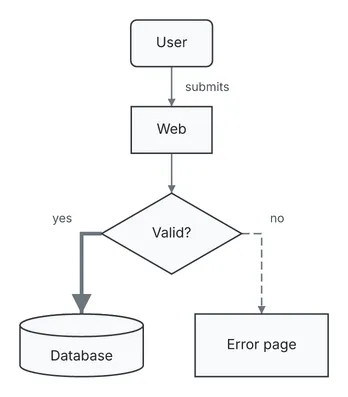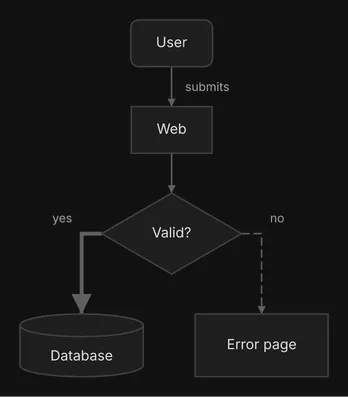
```
╭──────╮
│ User │
╰──────╯
│
│ submits
▼
┌──────┐
│ Web │
└──────┘
│
│
▼
┌────────────┐
│ ◇ Valid? ◇ │
└────────────┘
yes ┃ ╎ no
┃ ╎
┌━━━━━┘ └╌╌╌╌╌╌┐
▼ ▼
╒══════════╕ ┌────────────┐
│ Database │ │ Error page │
└──────────┘ └────────────┘
```
Text art is laid out on its own, in whole character cells, so node positions differ from the SVG of the same spec even though both are orthogonal. What it keeps of the spec:
* **Shapes:** `rect`, `rounded`, `cylinder` and `diamond` are told apart. `hexagon` and `parallelogram` draw as a box, and `circle` like `rounded`, so a role shown only by one of those shapes should also be in its label.
* **Edge styles:** `solid`, `dashed`, `dotted` and `thick` are drawn with different line characters.
* **Color:** dropped. Never let color carry meaning alone.
An edge label sits next to a wire that runs along its row. When a label cannot be placed without overwriting other ink, the text renderer drops it and the render prints the `text-label-dropped` [advisory](/docs/reference/advisories/) on stderr. Rename the label to something shorter, or leave the edge unlabeled. `check` never lays out, so it cannot report this one: only a text render does.
## draw\.io and Excalidraw
[Section titled “draw.io and Excalidraw”](#drawio-and-excalidraw)
Beta
draw\.io and Excalidraw export are in beta: they are not fully tested yet. Open the file and check it before you share it or build on it.
For a diagram someone will edit by hand, `-format drawio` writes diagrams.net XML and `-format excalidraw` writes Excalidraw JSON. Both are made from the laid-out diagram, not from the SVG, and both are for flow diagrams only: a sequence or class spec is an error.
```sh
diago render -format drawio spec.json > diagram.drawio
diago render -format excalidraw spec.json > diagram.excalidraw
```
`diago diff` does not write them.
## Which one fits where
[Section titled “Which one fits where”](#which-one-fits-where)
| The reader sees it in | Use |
| -------------------------------------------------- | -------------------------------------------------------------------------------------------------------------------------------------------------------- |
| A chat reply in a terminal | text art, in a fenced `text` block, at most 100 columns wide |
| A chat reply in a graphical app, or an unknown one | the same text art, then the SVG file’s path so the colored diagram can be opened |
| A Markdown file kept in git | a PNG beside it with alt text, and its spec JSON so it can be regenerated (SVG when resvg is missing) |
| A design note or plan written for review | text art and an image link, with versions and diffs |
| An HTML page | SVG files shown with `![]() `; for a page that follows light and dark mode, a `` with a `prefers-color-scheme: dark` source for the `dark` theme |
| A diagram someone will edit by hand | draw\.io or Excalidraw, flow only beta |
For an HTML page, never paste SVG markup inline: diagrams share element ids, and a diff’s styles would apply to the whole page.
# Mermaid
> Render Mermaid flowcharts, sequence diagrams and class diagrams as they are, or turn them into diago specs, and what is supported, approximated or rejected.
If a diagram already exists as Mermaid, diago draws it as it is:
```sh
diago render diagram.mmd > diagram.svg
diago render -format text diagram.mmd
```
Every verb reads Mermaid: `render`, `check`, both arguments of `diff` and `-previous` recognize a `.mmd` or `.mermaid` file, or a body whose first meaningful line is a Mermaid header, and translate it before anything else. `diago import` writes the translated JSON spec to stdout, for a diagram you want to keep editing in diago’s own terms: it gives you ids to keep and fields to set.
```sh
diago import diagram.mmd > spec.json
diago import < diagram.mmd | diago check
```
The dialect is read from the header. Three are supported: `flowchart` (or `graph`), `sequenceDiagram` and `classDiagram`.
## What is reported and what fails
[Section titled “What is reported and what fails”](#what-is-reported-and-what-fails)
The importer does not guess silently. A construct diago cannot carry is translated to its nearest form and reported on stderr, one line each, as `warning: import line : `, and the import still succeeds. A statement with no meaning in diago fails with `diago : line : ` and exit 1, as does an input that is not Mermaid. The three sources below import with nothing on stderr.
## Flowcharts
[Section titled “Flowcharts”](#flowcharts)
flowchart.mmd
```text
flowchart LR
client(Client) --> gateway[API Gateway]
subgraph backend [Backend]
gateway -->|route| orders[Orders]
orders -->|save| db[(Postgres)]
end
orders -.->|notify| mail{Send mail?}
mail ==>|yes| smtp[SMTP Relay]
```
flowchart.json
```json
{
"type": "flow",
"direction": "RIGHT",
"nodes": [
{"id": "client", "label": "Client", "shape": "rounded"},
{"id": "gateway", "label": "API Gateway"},
{"id": "orders", "label": "Orders"},
{"id": "db", "label": "Postgres", "shape": "cylinder"},
{"id": "mail", "label": "Send mail?", "shape": "diamond"},
{"id": "smtp", "label": "SMTP Relay"}
],
"edges": [
{"from": "client", "to": "gateway"},
{"from": "gateway", "to": "orders", "label": "route"},
{"from": "orders", "to": "db", "label": "save"},
{"from": "orders", "to": "mail", "label": "notify", "style": "dotted"},
{"from": "mail", "to": "smtp", "label": "yes", "style": "thick"}
],
"groups": [{"id": "backend", "label": "Backend", "contains": ["gateway", "orders", "db"]}]
}
```
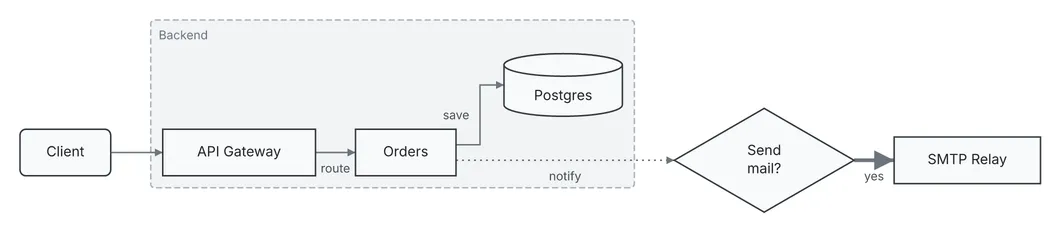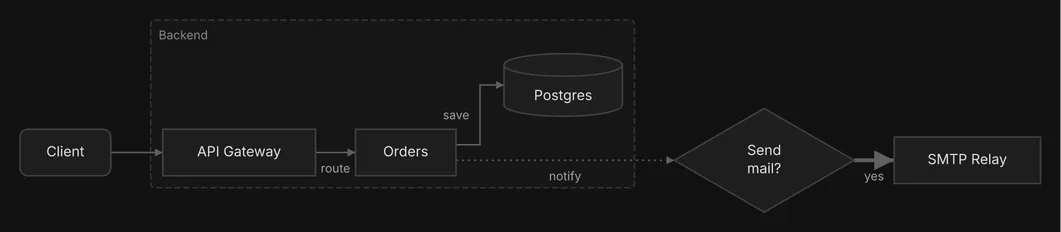
Bracket shapes become shapes, `-.->` a dotted edge and `==>` a thick one, and a `subgraph` a group. An edge keeps the id Mermaid writes before its arrow (`A e1@--> B`), and a diff matches edges by it: give one to every edge before you start diffing versions. Without one, an edge is matched by its two ends, and a labeled edge warns `edge-without-id` in a diff.
| Supported | |
| --------- | -------------------------------------------------------------------------------------------------------------------- |
| Header | `graph` or `flowchart` with `TD`, `TB`, `LR`, `BT` or `RL` |
| Nodes | every bracket form |
| Edges | `-->`, `---`, `-.->`, `-.-`, `==>`, `===` and `<-->`, with `\|label\|` or `-- label -->`; a trailing `;` |
| Edge ids | `e1@` before any arrow; on an `&` fan-out, the edge from the last source to the first target takes it, as in Mermaid |
| Shorthand | `&` fan-out and chains |
| Groups | nested `subgraph … end`; a `title:` frontmatter |
| Approximated, and reported | Becomes |
| -------------------------------------------- | ----------------------------------------------- |
| stadium | `rounded` |
| subroutine | `rect` |
| doublecircle | `circle` |
| trapezoid | `parallelogram` |
| a fourth level of subgraphs | flattened into its third-level ancestor |
| an edge’s properties, `e1@{ animate: true }` | dropped: diago draws no edge animation or curve |
| an edge id already used | kept by its first edge; the later edge has none |
Rejected, with a line number: `classDef`, `class`, `style`, `linkStyle`, `click`, `accTitle`, `accDescr`, `direction`, and an edge whose endpoint is a subgraph.
## Sequence diagrams
[Section titled “Sequence diagrams”](#sequence-diagrams)
sequence.mmd
```text
sequenceDiagram
participant U as User
participant A as App
participant D as Database
U->>A: place order
A->>D: check stock
D-->>A: in stock
alt in stock
A->>D: reserve items
else out of stock
A-->>U: sorry
end
A-->>U: confirmation
```
sequence.json
```json
{
"type": "sequence",
"actors": [
{"id": "U", "label": "User"},
{"id": "A", "label": "App"},
{"id": "D", "label": "Database"}
],
"interactions": [
{"from": "U", "to": "A", "label": "place order"},
{"from": "A", "to": "D", "label": "check stock"},
{"from": "D", "to": "A", "label": "in stock", "style": "dashed"},
{"from": "A", "to": "D", "label": "reserve items"},
{"from": "A", "to": "U", "label": "sorry", "style": "dashed"},
{"from": "A", "to": "U", "label": "confirmation", "style": "dashed"}
],
"fragments": [
{
"type": "alt",
"over": ["U", "A", "D"],
"sections": [
{"label": "in stock", "start": 3, "end": 3},
{"label": "out of stock", "start": 4, "end": 4}
]
}
]
}
```
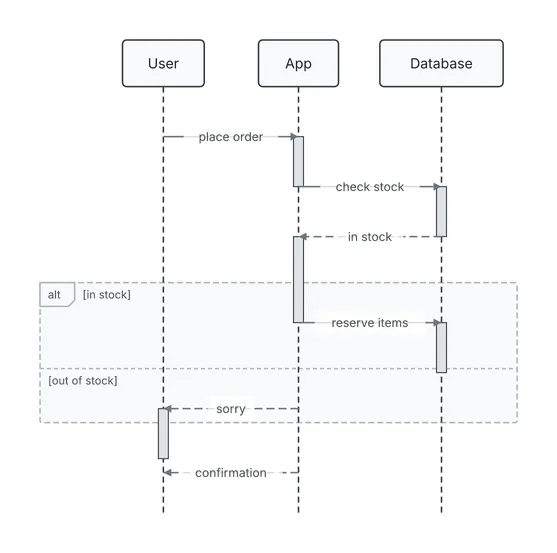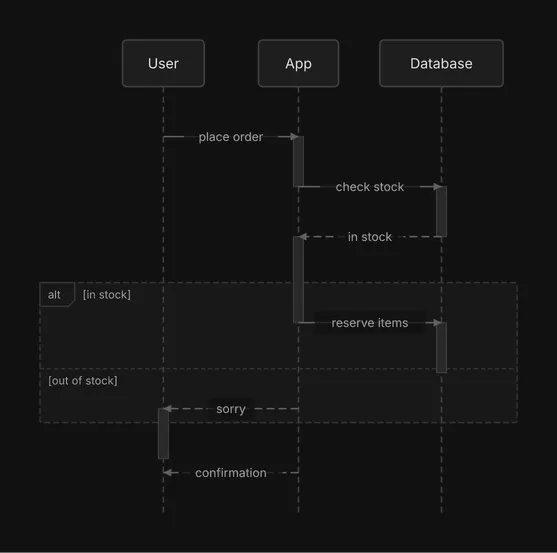
`alt` and `else` become one fragment with a section for each branch, over the range of messages it holds. Declared participants keep their `as` alias as the label.
| Supported | |
| ------------ | ------------------------------------------------------------------------------------------------------------- |
| Participants | `participant` and `actor`, with `as`; implicit declaration on first use |
| Messages | `->>`, `-->>`, `-)` and `--)` |
| Blocks | `loop`, `opt`, `alt` with `else`, `par` with `and`, and `break`, nested, as fragments over ranges of messages |
| Approximated, and reported | Becomes |
| ------------------------------------------- | --------------------------------------------------------------------------------------------------- |
| `actor` | an ordinary participant |
| `+` and `-` marks, `activate`, `deactivate` | ignored: the engine computes the activation bars |
| a `Note` | folded into the label of the nearest message before it in the block, and dropped when there is none |
| an empty branch or block | dropped |
Rejected, with a line number: `critical`, `autonumber`, `create`, `destroy`, `rect`, `box`, `link`, `links`, `properties`, `details`, and lost-message arrows (`-x`).
## Class diagrams
[Section titled “Class diagrams”](#class-diagrams)
class.mmd
```text
classDiagram
direction LR
class Animal {
<>
+String name
+eat() void*
}
class Dog {
+bark() void
}
class Owner {
+String name
}
Animal <|-- Dog
Owner "1" --> "*" Dog : owns
```
class.json
```json
{
"type": "class",
"direction": "RIGHT",
"classes": [
{
"id": "Animal",
"stereotype": "abstract",
"attributes": [{"visibility": "+", "text": "String name"}],
"methods": [{"visibility": "+", "text": "eat() void", "abstract": true}]
},
{"id": "Dog", "methods": [{"visibility": "+", "text": "bark() void"}]},
{"id": "Owner", "attributes": [{"visibility": "+", "text": "String name"}]}
],
"relations": [
{"from": "Dog", "to": "Animal", "kind": "inheritance"},
{
"from": "Owner",
"to": "Dog",
"kind": "association",
"label": "owns",
"from_card": "1",
"to_card": "*",
"directed": true
}
]
}
```
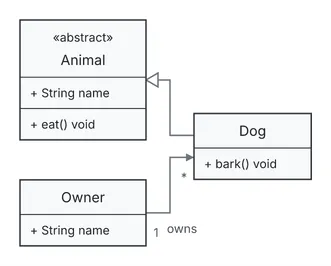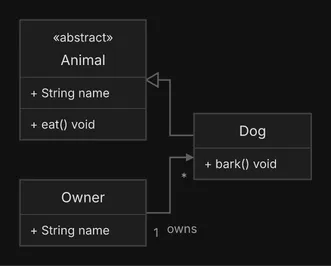
Every relation operator imports with its cardinalities and label. The JSON is written with `from` as the subtype, implementer, owner or dependent, whichever way the Mermaid arrow pointed. A Mermaid relation has no id: import the diagram and add ids to its relations before you start diffing versions, since a diff warns `edge-without-id` for each relation without one.
| Supported | |
| ----------- | ---------------------------------------------------------------------------------- |
| Classes | `class X~T~ { … }` blocks and bare declarations, with generics |
| Stereotypes | `<>` inside a block or on its own line |
| Members | `X : +member` inline, visibility prefixes, a `*` (abstract) or `$` (static) suffix |
| Relations | all twelve operators, with cardinalities and labels |
| Layout | `direction TB`, `LR`, `BT` or `RL` |
Rejected, with a line number: `<-->`, `()--`, `note`, `namespace`, `cssClass` and `click`. Nothing in the class dialect is approximated.
After an import, run `diago check -strict` on the JSON. The importer keeps what Mermaid says, so it can bring a diagram that parses fine but reads badly, and the [advisories](/docs/reference/advisories/) say where.
# Sequence diagrams
> How to draw sequence diagrams that read well: actors, message styles, self-messages, fragments, activations and size.
A sequence diagram shows who calls whom, and in what order: a request path, a protocol, a handshake. Each actor is a column with a lifeline, and time runs down the page. The [sequence spec reference](/docs/reference/sequence-spec/) lists every field and its allowed values.
basic.json
```json
{
"type": "sequence",
"actors": [
{"id": "client", "label": "Client"},
{"id": "gateway", "label": "API Gateway"},
{"id": "auth", "label": "Auth Service"},
{"id": "queue", "label": "Audit Queue"}
],
"interactions": [
{"from": "client", "to": "gateway", "label": "POST /login", "style": "solid"},
{"from": "gateway", "to": "auth", "label": "validate credentials", "style": "solid"},
{"from": "auth", "to": "auth", "label": "hash password", "style": "solid"},
{"from": "auth", "to": "gateway", "label": "token", "style": "dashed"},
{"from": "gateway", "to": "queue", "label": "log sign-in", "style": "async"},
{"from": "gateway", "to": "client", "label": "200 OK", "style": "dashed"}
]
}
```
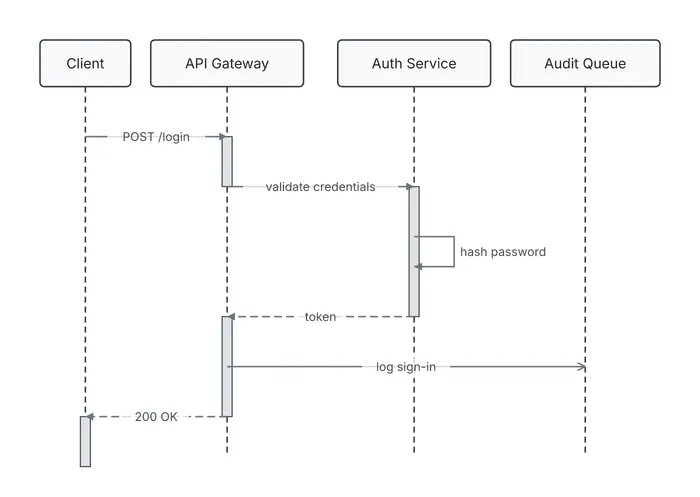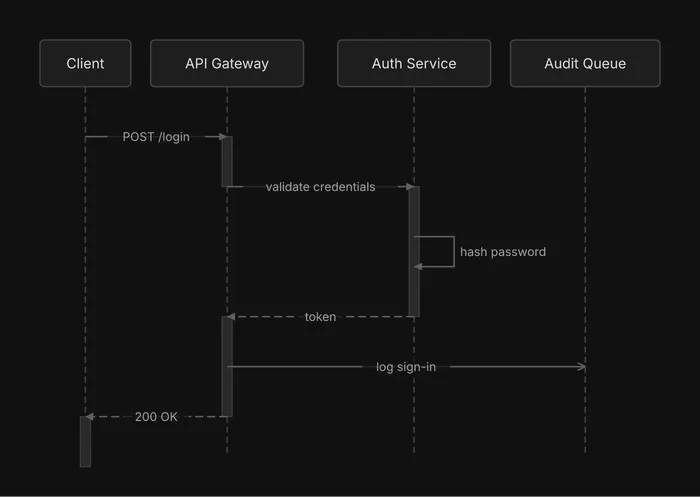
```
┌────────┐ ┌──────────────┐ ┌──────────────┐ ┌──────────────┐
│ Client │ │ API Gateway │ │ Auth Service │ │ Audit Queue │
└────────┘ └──────────────┘ └──────────────┘ └──────────────┘
│ │ │ │
│ │ │ │
├ POST /login ─► │ │
│ ┃ │ │
│ ├ validate credentials ─► │
│ │ ┃ │
│ │ ┃───┐ │
│ │ ┃ │ hash password
│ │ ◄───┘ │
│ │ ┃ │
│ ◄╌╌╌╌╌╌╌╌ token ╌╌╌╌╌╌╌╌┤ │
│ ┃ │ │
│ ┠────────────── log sign-in ──────────────▷
│ ┃ │ │
◄╌╌ 200 OK ╌╌╌╌┤ │ │
┃ │ │ │
┌────────┐ ┌──────────────┐ ┌──────────────┐ ┌──────────────┐
│ Client │ │ API Gateway │ │ Auth Service │ │ Audit Queue │
└────────┘ └──────────────┘ └──────────────┘ └──────────────┘
```
## Actors and their order
[Section titled “Actors and their order”](#actors-and-their-order)
Actors are drawn left to right in the order of the `actors` array. Put the initiator leftmost, then the others in order of first appearance, and name them by role (“Auth Service”), not by technology. A message names its ends by actor `id`, so give each actor a short `id`.
## Interaction styles
[Section titled “Interaction styles”](#interaction-styles)
Each interaction has a `style`:
| Style | Use | Arrow |
| -------- | ----------------------------------------- | ------------------ |
| `solid` | a call (the default) | a filled arrowhead |
| `dashed` | a return | a dashed line |
| `async` | fire-and-forget: the sender does not wait | an open arrowhead |
In the diagram above, `POST /login` and `validate credentials` are `solid` calls, `token` and `200 OK` are `dashed` returns, and `log sign-in` to the queue is `async`. Interactions are drawn in array order, top to bottom. Label messages with what happens, not with `data` or `calls`: those raise `vague-message-label`.
## Self-messages
[Section titled “Self-messages”](#self-messages)
When an actor does something internally, make an interaction with the same `from` and `to`. It is drawn as a short loop on that actor’s lifeline: `hash password` above.
## Fragments
[Section titled “Fragments”](#fragments)
A fragment draws a frame around part of the exchange, with its type in a tab at the top-left corner and each section’s guard in brackets. The types are `alt` (if and else, one section per branch), `opt` (may happen), `loop` (repeats), `par` (happens in parallel) and `break` (leaves the sequence). `over` lists the actors it spans; the frame also widens to every actor its messages reach.
fragments.json
```json
{
"type": "sequence",
"actors": [
{"id": "client", "label": "Client"},
{"id": "api", "label": "API"},
{"id": "db", "label": "Database"}
],
"interactions": [
{"from": "client", "to": "api", "label": "place order", "style": "solid"},
{"from": "api", "to": "db", "label": "check stock", "style": "solid"},
{"from": "db", "to": "api", "label": "in stock", "style": "dashed"},
{"from": "api", "to": "db", "label": "reserve items", "style": "solid"},
{"from": "api", "to": "client", "label": "out of stock", "style": "dashed"},
{"from": "api", "to": "db", "label": "log stock miss", "style": "solid"},
{"from": "api", "to": "client", "label": "send receipt", "style": "dashed"},
{"from": "api", "to": "db", "label": "retry write", "style": "solid"},
{"from": "api", "to": "db", "label": "write audit row", "style": "solid"},
{"from": "api", "to": "client", "label": "payment failed", "style": "dashed"}
],
"fragments": [
{
"type": "alt",
"over": ["client", "api", "db"],
"sections": [
{"label": "in stock", "start": 2, "end": 3},
{"label": "out of stock", "start": 4, "end": 5}
]
},
{
"type": "opt",
"over": ["api", "client"],
"sections": [{"label": "receipt requested", "start": 6, "end": 6}]
},
{
"type": "loop",
"over": ["api", "db"],
"sections": [{"label": "up to 3 times", "start": 7, "end": 7}]
},
{"type": "par", "over": ["api", "db"], "sections": [{"label": "audit", "start": 8, "end": 8}]},
{
"type": "break",
"over": ["api", "client"],
"sections": [{"label": "payment declined", "start": 9, "end": 9}]
}
]
}
```
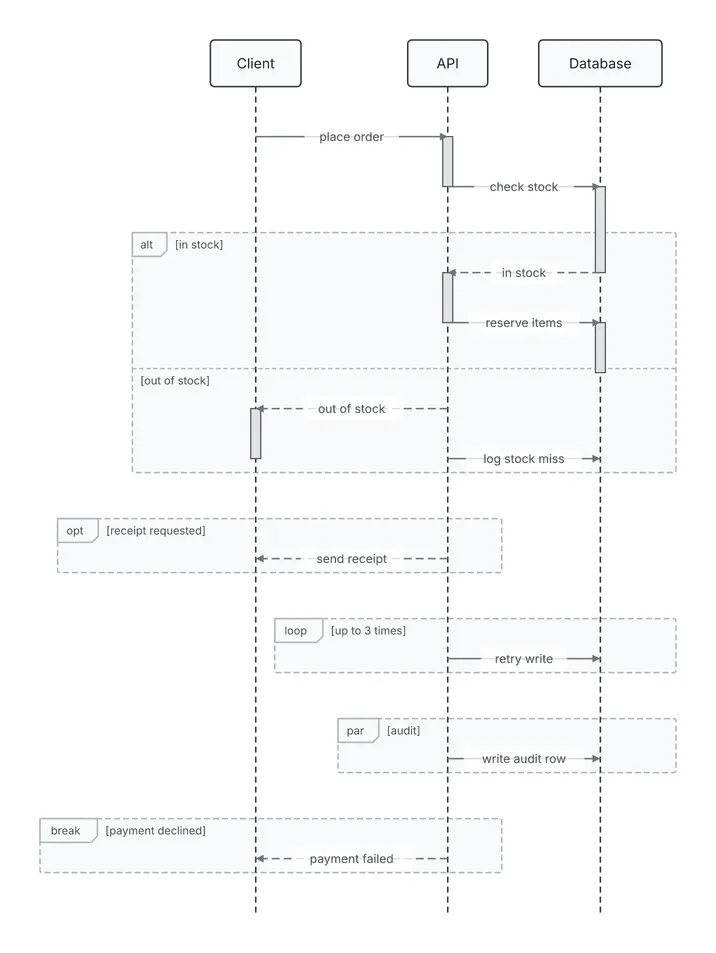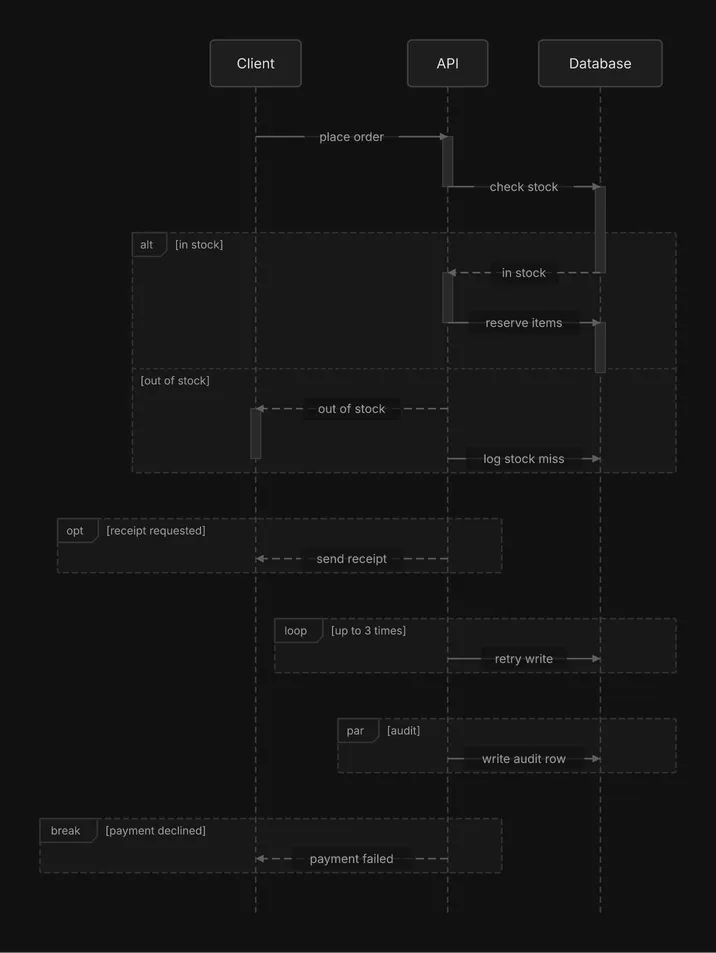
```
┌────────┐ ┌──────┐ ┌──────────┐
│ Client │ │ API │ │ Database │
└────────┘ └──────┘ └──────────┘
│ │ │
│ │ │
├── place order ──► │
│ ┃ │
│ ├── check stock ───►
│ │ ┃
╔══ alt [in stock] ══════╪══════════════════╪═════╗
║ │ ◄╌╌╌ in stock ╌╌╌╌╌┤ ║
║ │ ┃ │ ║
║ │ ├─ reserve items ──► ║
║ │ │ ┃ ║
╟╌╌ [out of stock] ╌╌╌╌╌╌╪╌╌╌╌╌╌╌╌╌╌╌╌╌╌╌╌╌╌╪╌╌╌╌╌╢
║ ◄╌ out of stock ╌╌┤ │ ║
║ ┃ │ │ ║
║ │ ├ log stock miss ──► ║
╚══════╪═════════════════╪══════════════════╪═════╝
│ │ │
╔══ opt [receipt requested] ══╗ │
║ ◄╌ send receipt ╌╌┤ ║ │
╚══════╪═════════════════╪════╝ │
│ │ │
│ ╔══ loop [up to 3 times] ═══════╗
│ ║ ├── retry write ───► ║
│ ╚══════╪══════════════════╪═════╝
│ │ │
│ ╔══ par [audit] ══════════╪═════╗
│ ║ ├ write audit row ─► ║
│ ╚══════╪══════════════════╪═════╝
│ │ │
╔══ break [payment declined] ══╗ │
║ ◄ payment failed ╌┤ ║ │
╚══════╪═════════════════╪═════╝ │
│ │ │
┌────────┐ ┌──────┐ ┌──────────┐
│ Client │ │ API │ │ Database │
└────────┘ └──────┘ └──────────┘
```
Each section covers interactions by index. Indexes are zero-based, and `start` and `end` are both inclusive: in the spec above, the `in stock` section is `"start": 2, "end": 3`, the third and fourth interactions, and `out of stock` is `"start": 4, "end": 5`, the fifth and sixth. The section’s `label` is its guard, drawn in brackets. Give every section a guard: an `alt` section without one raises `unlabeled-alt-section`. A fragment’s sections run in order without overlapping, and two fragments either nest or stay apart: ranges that cross are a validation error. `check` reports `deep-nesting` when a fragment sits more than 3 levels deep.
## Activations
[Section titled “Activations”](#activations)
An activation bar on a lifeline shows when an actor is busy handling a call, and is drawn by default. Set `"activations": false` at the top level for a lighter drawing. Here is the first diagram again without the bars:
plain.json
```json
{
"type": "sequence",
"actors": [
{"id": "client", "label": "Client"},
{"id": "gateway", "label": "API Gateway"},
{"id": "auth", "label": "Auth Service"},
{"id": "queue", "label": "Audit Queue"}
],
"interactions": [
{"from": "client", "to": "gateway", "label": "POST /login", "style": "solid"},
{"from": "gateway", "to": "auth", "label": "validate credentials", "style": "solid"},
{"from": "auth", "to": "auth", "label": "hash password", "style": "solid"},
{"from": "auth", "to": "gateway", "label": "token", "style": "dashed"},
{"from": "gateway", "to": "queue", "label": "log sign-in", "style": "async"},
{"from": "gateway", "to": "client", "label": "200 OK", "style": "dashed"}
],
"activations": false
}
```
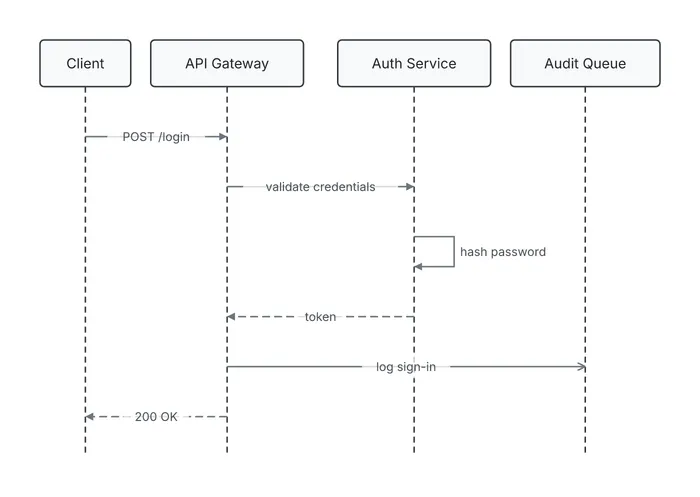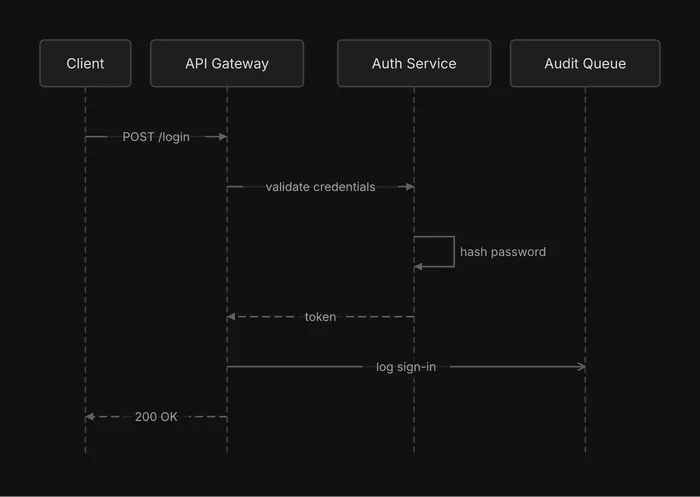
```
┌────────┐ ┌──────────────┐ ┌──────────────┐ ┌──────────────┐
│ Client │ │ API Gateway │ │ Auth Service │ │ Audit Queue │
└────────┘ └──────────────┘ └──────────────┘ └──────────────┘
│ │ │ │
│ │ │ │
├ POST /login ─► │ │
│ │ │ │
│ ├ validate credentials ─► │
│ │ │ │
│ │ ├───┐ │
│ │ │ │ hash password
│ │ ◄───┘ │
│ │ │ │
│ ◄╌╌╌╌╌╌╌╌ token ╌╌╌╌╌╌╌╌┤ │
│ │ │ │
│ ├────────────── log sign-in ──────────────▷
│ │ │ │
◄╌╌ 200 OK ╌╌╌╌┤ │ │
│ │ │ │
┌────────┐ ┌──────────────┐ ┌──────────────┐ ┌──────────────┐
│ Client │ │ API Gateway │ │ Auth Service │ │ Audit Queue │
└────────┘ └──────────────┘ └──────────────┘ └──────────────┘
```
## Size
[Section titled “Size”](#size)
Every actor is a column, so width is the limit. Keep to 8 participants or fewer, which is where `seq-too-many-participants` fires, and about 6 when the art must fit a terminal. Past that, split the exchange into focused diagrams, or collapse minor participants into one.
For every field and value, see the [sequence spec reference](/docs/reference/sequence-spec/).
# Themes
> The four built-in themes, how a spec or a flag picks one, and how to load a theme of your own.
One spec, drawn in every built-in theme. Only the look changes: layout, labels and structure are the same in each.
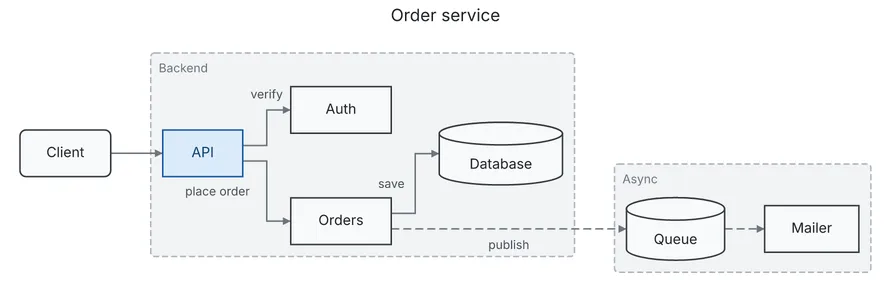
`default`
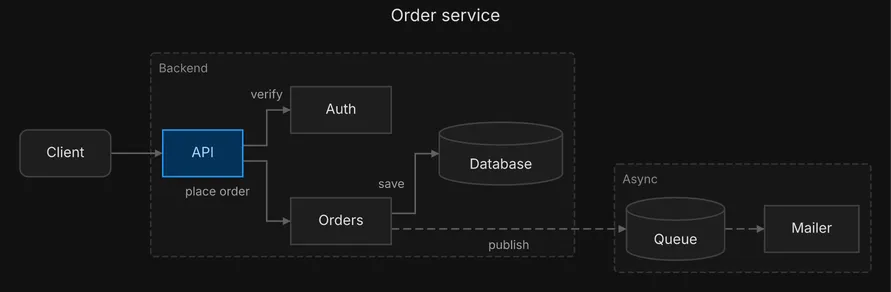
`dark`
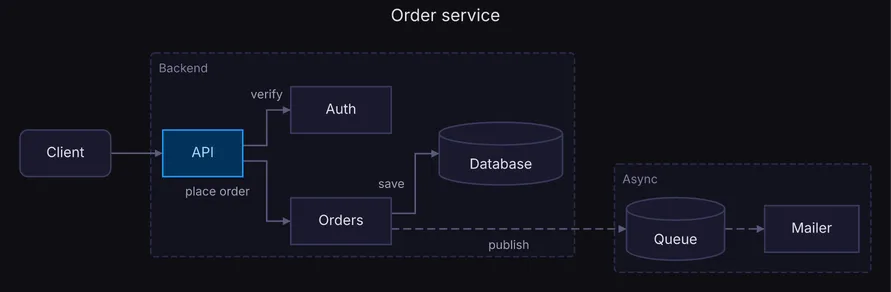
`midnight`
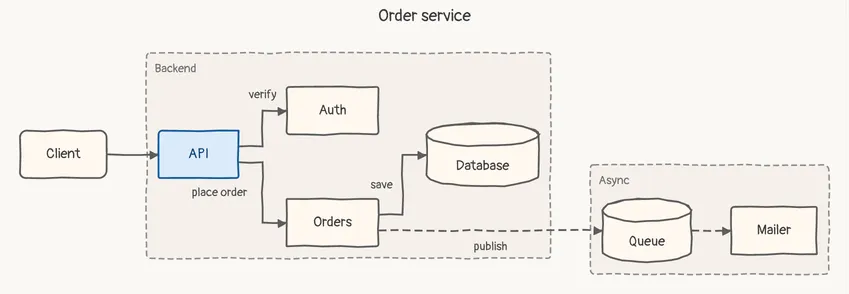
`sketch`
## The built-in themes
[Section titled “The built-in themes”](#the-built-in-themes)
| Theme | For |
| ---------- | ------------------------------------------------------ |
| `default` | light documents and READMEs, an SVG opened from a chat |
| `dark` | dark pages and slides, in a dark neutral palette |
| `midnight` | dark pages and slides, in a dark vibrant palette |
| `sketch` | a draft: the hand-drawn look says “not final” |
Each theme is a complete visual system: colors, fonts, strokes and spacing. diago embeds the fonts (Inter, and Pangolin for `sketch`), so a theme draws the same on every machine.
## Choosing a theme
[Section titled “Choosing a theme”](#choosing-a-theme)
Set the spec’s top-level `theme` field, or pass `-theme` on the command line. The flag wins over the field; without either the theme is `default`.
```sh
diago render -theme midnight spec.json > out.svg
```
```json
{
"type": "flow",
"theme": "midnight",
"nodes": [
{"id": "api", "label": "API"},
{"id": "db", "label": "Database", "shape": "cylinder"}
],
"edges": [{"id": "api-db", "from": "api", "to": "db", "label": "reads"}]
}
```
Text art takes no theme: it is plain characters, but a theme it is given must still load. `diago diff` reads the `theme` field of the new spec, and the old one’s is not read. A `theme` field naming a theme that does not load is a validation error on `theme`, and an unknown `-theme` is a usage error.
To show one diagram on a page that follows light and dark mode, render it twice, in `default` and in `dark`, and let the page choose between the two images. This site does exactly that.
## Your own theme
[Section titled “Your own theme”](#your-own-theme)
A theme is one JSON file. To make one, copy `themes/midnight.json` from the repository, change the colors, and save it as `.json` in a directory of your choosing. Point `DIAGO_THEME_DIR` at that directory and load the theme by its file name:
```sh
DIAGO_THEME_DIR=~/.config/diago-themes diago render -theme ocean spec.json > out.svg
```
Built-in names always win, so a file called `dark.json` there never replaces the built-in `dark`. The structure of the file, and what validation rejects, is in the [theme file reference](/docs/reference/theme-file/).
# Advisories
> Every advisory rule diago reports, what fires it, how to fix it, and how to read, silence and enforce the findings.
An advisory is a finding about a spec that parses fine but reads badly: a vague label, an isolated node, a box too wide to fit. Advisories never stop a render. They are for the author, and for an agent that writes specs and lints them before showing anything.
## Where they appear
[Section titled “Where they appear”](#where-they-appear)
`diago check` prints the findings of a spec and lays nothing out:
```sh
diago check spec.json # one line per finding, exit 0
diago check -strict spec.json # exit 1 when any finding remains
diago check -json spec.json # {"warnings": [...]}
```
Every `render` and `diff` prints the same findings on stderr after the output, each line led by `warning: `. `check` never lays out, so two rules can only appear on `render` and `diff`: `text-label-dropped` (text format) and `flat-edge-ranked` (any format, and only when a flat edge falls back). `edge-without-id` also needs one of them, because it only matters under `render -previous` and `diff`, where ids decide which element is which.
This is `diago check` on a flow spec with a node nothing connects to and a vague label:
```text
isolated-node nodes[3]: node "cache" is connected to nothing; connect it or remove it
vague-edge-label edges[0]: edge web->api label "uses" says little; prefer a specific verb phrase like "validates order" or "publishes event"
```
## Line format
[Section titled “Line format”](#line-format)
` : `, or `: ` for a finding about the whole diagram. `field` is a path into the spec, in the same form as a validation error’s, such as `nodes[3]`. On `render` and `diff` the line starts with `warning: `, and in a diff the field is prefixed `before.` or `after.`. A finding both versions raise alike, with the same rule, field and message, is listed once, under `after.`. Findings are sorted by rule, then by field in natural order (`nodes[9]` before `nodes[10]`), then by message, so the output can be compared between runs.
Node and actor ids are written into messages as they are, so an id with quotes or control characters can make a line awkward to parse. `-json` is the machine-readable form:
```json
{
"warnings": [
{
"rule": "isolated-node",
"message": "node \"cache\" is connected to nothing; connect it or remove it",
"field": "nodes[3]"
},
{
"rule": "vague-edge-label",
"message": "edge web->api label \"uses\" says little; prefer a specific verb phrase like \"validates order\" or \"publishes event\"",
"field": "edges[0]"
}
]
}
```
A finding about the whole diagram has no `field` key. With no findings, `warnings` is an empty array.
## `-strict`
[Section titled “-strict”](#-strict)
`diago check -strict` exits 1 while any finding remains. That is not the exit 1 of `render` and `diff`, which means a validation error: with `-strict` the findings are printed as usual and the exit code is the verdict. It suits a lint step before a diagram is shown or committed.
## Silencing a rule: `ignore`
[Section titled “Silencing a rule: ignore”](#silencing-a-rule-ignore)
A spec silences rules with a top-level `ignore` array:
```json
"ignore": ["vague-edge-label"]
```
The array applies to every finding of that spec, including `text-label-dropped` and `flat-edge-ranked`. A name that is not a rule below is a validation error on `ignore[n]` (`unknown advisory rule "nope"; see diago check`, exit 1). Ignore a rule only when the finding is deliberate; otherwise fix the spec.
## The rules
[Section titled “The rules”](#the-rules)
Each diagram type runs its own rules. A class diagram runs only the class rules, plus `edge-without-id` over its relations, `empty-group` over its packages and `text-label-dropped`; `unknown-field` and `removed-field` run on every type. All 23 rules, by name:
| Rule | Diagrams | Fires when | Usual fix |
| --------------------------- | -------------- | ---------------------------------------------------------------------------------------------------------------------------------------------------------------------- | --------------------------------------------------------------------------------------------------------------------------------------------------------------------------------------------------------------------- |
| `deep-nesting` | sequence | A fragment is nested more than 3 levels deep, by range containment. | Flatten it, or split the diagram. |
| `duplicate-edge` | flow | Two edges have the same `from`, `to` and label. | Drop one, or give them different labels. |
| `edge-without-id` | flow, class | A labeled edge, or any class relation, has no `id`. Only under `render -previous` and `diff`. | Give it a stable `id` that survives edits. |
| `empty-group` | flow, class | A group, or a class package, whose `contains` is empty. | Fill it or remove it. |
| `flat-edge-ranked` | flow | A `flat` edge has no clean side route and is laid out as an ordinary edge, or is kept as one from an earlier anchored layout. `render` and `diff` only. | Accept it (the diagram still renders, the two ends just do not sit side by side), drop `flat` from the edge, or keep one ordinary link on its nodes. Under `-strict`, add the rule to `ignore` for that version only. |
| `god-class` | class | A class has more than 15 attributes and methods together. | Split its responsibilities into smaller classes. |
| `isolated-class` | class | A class no relation touches, in a spec of two or more classes. | Connect it or remove it. |
| `isolated-node` | flow | A node no edge touches, in a spec of two or more nodes. | Connect it or remove it. |
| `long-label` | flow, sequence | A node, group, actor, message or section label is over 60 characters. | Shorten it or move the detail elsewhere. |
| `no-entry` | flow | Every node has an incoming edge. Self-loops and `flat` edges do not count as incoming. | Add a start node, or break a cycle. |
| `overlong-member` | class | A member line (visibility, a space, then the text) is over 40 characters. It widens the box. | Shorten the signature or its types. |
| `oversized-class-diagram` | class | More than 20 classes. | Split into linked sub-diagrams. |
| `removed-field` | flow, class | A spec still carries a removed top-level key: `style`, `hints` or `alignment` on a flow spec, `style` on a class spec. The key is ignored. | Delete it. diago is orthogonal-only. |
| `seq-too-many-participants` | sequence | More than 8 actors. | Split into focused diagrams, or collapse minor participants. |
| `shape-soup` | flow | More than 5 distinct node shapes. | Reserve each shape for one consistent role. |
| `text-label-dropped` | flow, class | The text renderer could not place an edge label or a cardinality without overwriting other ink. `render` and `diff` with `-format text` only; the line has no `field`. | Shorten the label. |
| `too-large` | flow | More than 20 nodes. Groups never count. | Split into linked sub-diagrams. |
| `unbreakable-token` | flow, sequence | A run of over 24 characters without whitespace in a label that `long-label` covers. Wrapping only breaks at whitespace, so it widens its box. | Shorten it or add separators. |
| `unknown-field` | all | A JSON key the schema does not know, at any depth. The key is ignored; the message suggests the nearest known key. | Fix the spelling, or delete the key. A `"$schema"` key is reported too. |
| `unlabeled-alt-section` | sequence | An `alt` section has no guard label. | Label each section with its condition. |
| `unlabeled-branch` | flow | A `diamond` has two or more outgoing edges and one of them has no label. A `flat` edge is not a branch and is not counted. | Label every branch with its condition. |
| `vague-edge-label` | flow | An edge label is one of `uses`, `has`, `is`, `does`, `calls`, `handles`, `data`, `flow`, in any case. | Use a specific verb phrase such as “validates order”. |
| `vague-message-label` | sequence | A message label is one of those same words. | Use a specific verb phrase. |
`flat-edge-ranked` belongs to the format rendered: text art and SVG are laid out differently and can decide a flat edge differently. A message that says the edge was *kept* from the previous or before layout, rather than that no side route exists, comes from `-previous` or `diff` anchoring. The names above are also the only ones `ignore` accepts.
# Class spec
> Every field of a class diagram spec: classes, members, relations, packages, and the values each accepts.
A class diagram is UML: classes drawn as boxes with attribute and method compartments, joined by typed relations. It suits domain models, type hierarchies and interface implementations. A spec is one JSON object with `"type": "class"`.
class.json
```json
{
"type": "class",
"direction": "DOWN",
"theme": "default",
"classes": [
{
"id": "order",
"label": "Order",
"stereotype": "entity",
"type_params": ["T"],
"color": "blue",
"attributes": [{"visibility": "-", "text": "id: string"}],
"methods": [{"visibility": "+", "text": "total(): Money", "static": false, "abstract": false}]
},
{"id": "item", "label": "Item"}
],
"relations": [
{
"id": "r1",
"from": "order",
"to": "item",
"kind": "composition",
"label": "contains",
"from_card": "1",
"to_card": "*",
"color": "red"
}
],
"packages": [{"id": "domain", "label": "Domain", "contains": ["order", "item"], "color": "gray"}],
"legend": true,
"legend_labels": {"inheritance": "is-a"},
"ignore": ["god-class"]
}
```
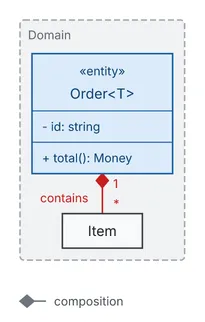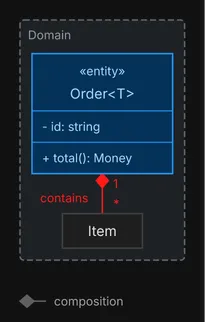
For how to draw well with it, see the [Class diagrams](/docs/guides/class/) guide.
A key diago does not know is ignored and reported by `check` as [`unknown-field`](/docs/reference/advisories/). No id may hold a control character, U+FFFE or U+FFFF. Every text field is drawn on one line: a newline or other control character in it prints as its escape (`\n`). A spec that breaks a rule below is a validation error on the field’s path, such as `relations[0].kind`, and exits 1.
## Top level
[Section titled “Top level”](#top-level)
| Field | Type | Default | Allowed values | Notes |
| --------------- | ----------------- | --------- | ----------------------------------------------------------------------------- | ---------------------------------------------------------------------------------------------------------------------------------------- |
| `type` | string | required | `class` | |
| `title` | string | none | any text | A band above the diagram in SVG and PNG, a centered first line in text art. Never part of the layout. |
| `theme` | string | `default` | `default`, `dark`, `midnight`, `sketch`, or a theme file in `DIAGO_THEME_DIR` | The theme the render uses unless `-theme` overrides it. Text art takes none. A name that does not load is a validation error on `theme`. |
| `direction` | string | `DOWN` | `DOWN`, `UP`, `RIGHT`, `LEFT`, `AUTO` | Upper case only. Unlike a flow spec, an absent `direction` means `DOWN`. |
| `classes` | array of class | required | at least one | |
| `relations` | array of relation | none | | |
| `packages` | array of package | none | | Groups of classes: the flow [group](/docs/reference/flow-spec/#group) rules under another key. |
| `legend` | boolean | `false` | `true`, `false` | `true` adds one row per relation kind present in the diagram. |
| `legend_labels` | object | none | keys are relation kinds | Overrides a legend row’s text. An empty value hides the row. A key that is not a relation kind is a validation error. |
| `ignore` | array of string | none | an advisory rule name each | Silences those rules for this spec. An unknown name is a validation error. See [Advisories](/docs/reference/advisories/). |
`legend_labels` on its own, without `legend`, draws nothing: it is checked, but only `legend: true` adds the legend. A top-level `style` key was removed and is reported as `removed-field`.
## Class
[Section titled “Class”](#class)
| Field | Type | Default | Allowed values | Notes |
| ------------- | --------------- | ----------- | -------------------------------------------------------------------------- | --------------------------------------------------------------------------------------------------------------------------------------------------------------------------------- |
| `id` | string | required | | Unique, not empty. Relations and packages refer to it. It must not contain `->` or end in `@` and digits (such as `db@2`): derived edge ids and layout anchoring use those forms. |
| `label` | string | the `id` | | The class name. |
| `stereotype` | string | none | any text | Drawn as «stereotype» above the name. |
| `type_params` | array of string | none | non-empty strings | Generic parameters, drawn after the name inside angle brackets. |
| `color` | string | the theme’s | `red`, `green`, `blue`, `yellow`, `orange`, `purple`, `gray`, or `#rrggbb` | |
| `attributes` | array of member | none | | The attributes compartment. |
| `methods` | array of member | none | | The methods compartment. |
## Member
[Section titled “Member”](#member)
An attribute or a method line.
| Field | Type | Default | Allowed values | Notes |
| ------------ | ------- | -------- | ------------------ | --------------------------------------------------------------------------- |
| `text` | string | required | | The member as written, such as `id: string` or `total(): Money`. Not empty. |
| `visibility` | string | none | `+`, `-`, `#`, `~` | Drawn before the text. |
| `static` | boolean | `false` | `true`, `false` | Underlines the member. In text art, a `$` suffix. |
| `abstract` | boolean | `false` | `true`, `false` | Italicises the member. In text art, a `*` suffix. |
## Relation
[Section titled “Relation”](#relation)
| Field | Type | Default | Allowed values | Notes |
| ----------- | ------- | ------------------------------------- | --------------------------------------------------------------------------------------- | --------------------------------------------------------------------------------------------------------------------------------------------------------------------------------------------------------------------------- |
| `id` | string | `from->to#n` | | As for flow edges: stable across edits, and derived from `from` and `to` as written. When present it must not be empty or repeat another relation’s id. |
| `from` | string | required | a class `id` | |
| `to` | string | required | a class `id` | |
| `kind` | string | `association` | `association`, `inheritance`, `realization`, `dependency`, `aggregation`, `composition` | For `inheritance` and `realization`, `from` is the subtype and `to` the supertype or interface; the supertype is laid out first and the hollow triangle is drawn at its end. A class cannot inherit from or realize itself. |
| `label` | string | none | | Drawn beside the relation. |
| `from_card` | string | none | any text, such as `1` or `0..*` | Cardinality beside the `from` end. |
| `to_card` | string | none | any text | Cardinality beside the `to` end. |
| `directed` | boolean | `true` for `dependency`, else `false` | `true`, `false` | An arrowhead at `to`. Not allowed on the four adorned kinds, `inheritance`, `realization`, `aggregation` and `composition`, whose own end marker replaces it: giving `directed` on one is a validation error. |
| `color` | string | the theme’s | `red`, `green`, `blue`, `yellow`, `orange`, `purple`, `gray`, or `#rrggbb` | |
Give every relation an explicit `id`: one without it is reported as `edge-without-id` under `render -previous` and `diff`.
## Package
[Section titled “Package”](#package)
A package is a group under another key: the same fields as a flow group.
| Field | Type | Default | Allowed values | Notes |
| ---------- | --------------- | ----------- | -------------------------------------------------------------------------- | ---------------------------------------------------------------------------------------------------------------------------------------------------------------------------- |
| `id` | string | required | | Unique among packages, and not the id of a class. It must not contain `->` or end in `@` and digits (such as `db@2`): derived edge ids and layout anchoring use those forms. |
| `label` | string | required | | Drawn on the frame. |
| `contains` | array of string | none | class ids and package ids | A package id makes a child package. A class or package belongs to at most one. Up to 3 levels. A package with nothing in it is reported as `empty-group`. |
| `color` | string | the theme’s | `red`, `green`, `blue`, `yellow`, `orange`, `purple`, `gray`, or `#rrggbb` | |
## Output notes
[Section titled “Output notes”](#output-notes)
SVG draws each relation kind with its own end marker, and the wire stops at the marker. Text art uses the glyphs `△`, `▽`, `◁`, `▷`, `◆` and `◇`. draw\.io and Excalidraw export cover flow diagrams only.
## Using the schema in an editor
[Section titled “Using the schema in an editor”](#using-the-schema-in-an-editor)
The JSON schema for class specs is served at [/schemas/class.json](/schemas/class.json). Map it to your spec files in your editor’s JSON settings to get completion and the allowed values of every enum. Do not put a `"$schema"` key in the spec itself: diago reports it as `unknown-field` (`unknown key "$schema" is ignored`), so the editor’s own schema mapping is the way.
# CLI reference
> The diago verbs, flags, formats, exit codes, stderr formats and environment variables.
diago is one binary with four verbs. Every verb reads a spec and writes its result to stdout; warnings and errors go to stderr. [Getting started](/docs/) shows them in use.
## Verbs
[Section titled “Verbs”](#verbs)
| Verb | Does |
| -------------------------------------- | -------------------------------------------------------------------------------------------------------------------------------------------- |
| `diago render [flags] [SPEC]` | Draws one spec in the chosen format. |
| `diago diff [flags] PATH` | Draws the latest change of a file kept in git. |
| `diago diff [flags] OLD NEW` | Draws one picture of what changed between two specs. |
| `diago check [-strict] [-json] [SPEC]` | Prints advisories without laying anything out. |
| `diago import [SPEC]` | Translates a Mermaid source into a diago JSON spec. |
| `diago help [verb]` | Prints the usage, or a verb’s usage and flags. |
| `diago --version` | Prints the installed version: a release tag such as `v0.5.0`, the commit it was built from, or `(devel)` when the binary carries no version. |
Every call names its verb. `diago spec.json` and `diago -format text spec.json` are errors that print the usage (exit 2), with a `did you mean: diago render …` hint when the word looks like a spec. Help you ask for goes to stdout with exit 0: `diago -h`, `--help` or `help` print the usage, and `diago help ` or `-h`/`--help` on a verb print that verb’s usage and flags. A bad flag prints its error and the verb’s usage on stderr, exit 2. `diago --version` (or `diago version`) prints `diago `.
## Input
[Section titled “Input”](#input)
A SPEC is a path, `-` or nothing (stdin, for `render`, `check` and `import`; `diff` reads files only), or `REV:PATH`: the file as it was at a git revision, such as `HEAD~1:arch.json`, `v1.2:arch.json` or a commit hash. PATH is relative to the current directory, and the repository is the one that contains it; a name that exists on disk is always read as a file. Reading a revision needs `git` on `PATH`, and a symbolic link at that revision is refused: git keeps the link’s text, not the spec it points to. With one PATH, `diff` draws that file’s latest change: the newest version committed along first parents from HEAD, following renames, whose content differs from the file on disk, against the file on disk.
A Mermaid file renders as it is: `diago render diagram.mmd`. Mermaid sources are accepted wherever a spec is. A path ending in `.mmd` or `.mermaid`, or a body whose first meaningful line is `flowchart`, `graph`, `sequenceDiagram` or `classDiagram`, is translated before parsing. This holds for `render`, `check`, both arguments of `diff` and the `-previous` argument. Constructs diago cannot carry are translated to their nearest form and reported on stderr; statements with no meaning in diago fail with a line number. The mapping is under [`diago import`](#diago-import).
Flags may come before, between or after the paths, on every verb: `diago render spec.json -format text` and `diago render -format text spec.json` are the same call. A `--` ends the flags.
## Flags
[Section titled “Flags”](#flags)
### `diago render`
[Section titled “diago render”](#diago-render)
| Flag | Default | Notes |
| ----------- | ---------------------------------- | ----------------------------------------------------------------------------------------------------------------------------------------------------------------------------------------------------- |
| `-format` | `svg` | `svg`, `png`, `text` (alias `txt`), `drawio`, `excalidraw` (the last two in beta). An unknown value is an error, never a silent fallback. |
| `-theme` | the spec’s `theme`, else `default` | `default`, `dark`, `midnight`, `sketch`, or a theme file in `DIAGO_THEME_DIR`. Overrides the spec’s field. Text art takes no theme, but the name must still load. An unknown name is an error. |
| `-scale` | `2.0` | PNG only. Ignored when `-width` is set. |
| `-width` | none | PNG width in pixels. Overrides `-scale`. |
| `-previous` | none | Anchors the layout on an earlier render, so the nodes that survive an edit stay close to where they were. Flow and class only. See [Anchoring on a previous render](#anchoring-on-a-previous-render). |
| `-debug` | off | Writes one JSON line per layout decision to stderr. See [Debug logging](/docs/reference/debug-logging/). |
### `diago diff`
[Section titled “diago diff”](#diago-diff)
| Flag | Default | Notes |
| --------- | -------------------------------------- | ------------------------------------------------------------------------------------------- |
| `-format` | `svg` | `svg`, `png`, `text` (alias `txt`). `drawio` and `excalidraw` are not available for a diff. |
| `-theme` | the new spec’s `theme`, else `default` | The old spec’s `theme` field is not read. |
| `-scale` | `2.0` | PNG only. Ignored when `-width` is set. |
| `-width` | none | PNG width in pixels. Overrides `-scale`. |
| `-debug` | off | JSON Lines layout decisions on stderr. |
`diff` has no `-previous`: for a flow or class diagram it always anchors the union of the two specs on the old layout. A sequence diff is not anchored.
### `diago check`
[Section titled “diago check”](#diago-check)
| Flag | Default | Notes |
| --------- | ------- | --------------------------------------------------------------- |
| `-strict` | off | Exit 1 when any finding remains after the spec’s `ignore` list. |
| `-json` | off | Print `{"warnings": [...]}` instead of one line per finding. |
`check` validates the spec as `render` does, the theme it names included, and exits 1 on an error. It never lays a diagram out, so three findings appear only on `render` and `diff`: `text-label-dropped` and `flat-edge-ranked`, which come from the layout, and `edge-without-id`, which only `render -previous` and `diff` report, since only they match elements by id. The [advisories](/docs/reference/advisories/) page lists every rule.
### `diago import`
[Section titled “diago import”](#diago-import)
`import` takes no flags, only an optional path. It writes the JSON spec to stdout and report lines to stderr.
## Formats
[Section titled “Formats”](#formats)
| Format | `render` | `diff` | Types |
| ----------------- | ------------- | ------------- | --------------------- |
| `svg` | yes (default) | yes (default) | flow, sequence, class |
| `png` | yes | yes | flow, sequence, class |
| `text` or `txt` | yes | yes | flow, sequence, class |
| `drawio` beta | yes | no | flow only |
| `excalidraw` beta | yes | no | flow only |
PNG is the SVG rasterized by [resvg](https://github.com/linebender/resvg), which must be installed (see [Environment variables](#environment-variables)). Without it `-format png` fails with an install hint and the other formats still work. A PNG is `2.0` times the SVG’s size unless `-scale` or `-width` says otherwise.
draw\.io and Excalidraw output is in beta, not fully tested yet: check the file before relying on it. It is derived from the laid-out flow model, never from the SVG. Asking for either on a sequence or class spec is an error: `error: render: drawio format is not supported for sequence diagrams`, exit 2.
Text art lays the diagram out under its own profile: every position snaps to a character cell, so node positions differ from the SVG’s even though both are orthogonal. An edge label sits on the row next to a wire that runs along its row, and may be written over a group frame’s left or right side when nothing nearer is free. A label that cannot be placed without overwriting other ink is dropped and reported as the `text-label-dropped` advisory.
## Anchoring on a previous render
[Section titled “Anchoring on a previous render”](#anchoring-on-a-previous-render)
`-previous` keeps the nodes that survive an edit close to where they were, instead of laying the whole diagram out from scratch. It takes any of:
* an SVG that diago rendered: it carries its layout in a `` element, which is the exact anchor;
* that layout carrier as a JSON file on its own;
* the previous spec, which is laid out fresh the way the new render is (under the text profile for `-format text`, else under the theme’s screen profile), so anchoring on an unchanged spec draws what a fresh render draws.
An SVG from an older diago anchors as a best effort. The carrier lists ids only, never labels. `-previous` anchors flow and class specs, and a previous spec’s type must match the spec being rendered. A sequence diagram has no layout to anchor: its render checks that the file is an SVG, a carrier or a sequence spec, ignores it and warns `-previous ignored`.
Each version anchored on the render before it:
```sh
diago render hello.v1.json > v1.svg
diago render -previous v1.svg hello.v2.json > v2.svg
```
When a `flat` edge falls back to an ordinary edge, the carrier records it, and every render anchored on that carrier keeps the edge ordinary: its `flat-edge-ranked` warning then says it was kept, not that no side route exists. A render without `-previous` tries the side route again and decides fresh.
## The 10-second timeout
[Section titled “The 10-second timeout”](#the-10-second-timeout)
A `render` or `diff` that has not finished its layout and drawing after 10 seconds is cancelled and fails. The limit applies to every invocation, and `check` and `import` do not lay anything out. Each git call made to read a `REV:PATH` has its own 10 seconds. It prints `error: the render took longer than 10s and was stopped: split the diagram or simplify it` and exits 2.
## Exit codes
[Section titled “Exit codes”](#exit-codes)
| Code | Meaning |
| ---- | ----------------------------------------------------------------------------------------------------------------------------------------------------------------------------------------------------------------------- |
| `0` | Success. Advisories and import reports do not change it. |
| `1` | The spec is invalid: not JSON, a missing or unknown `type`, a field of the wrong JSON type, a validation error, a rejected Mermaid line, or, for `check -strict`, a finding that survived the `ignore` list. |
| `2` | A usage or internal error: an unknown verb or format, a missing file, a git failure reading `REV:PATH`, a render that fails or runs past [10 seconds](#the-10-second-timeout), output that cannot be written to stdout. |
A validation error is structured JSON on stderr with a `field` that names the path into the spec. This is `diago render` on a spec whose node has the shape `oval`:
```json
{
"error": {
"type": "validation_error",
"errors": [
{
"field": "nodes[1].shape",
"message": "unknown shape \"oval\""
}
]
}
}
```
A spec that is not JSON at all has the field `""` (in a diff, `before` or `after`). Several errors are collected and returned together. For `diff`, a field is prefixed `before.` or `after.`. For `check -strict`, exit 1 means findings survived the `ignore` list; the output is the findings, not a JSON error.
## stderr formats
[Section titled “stderr formats”](#stderr-formats)
* Advisories, on `render` and `diff`: `warning: : `, or `warning: : ` for a finding about the whole diagram. `check` prints the same lines without the `warning: `prefix, on stdout.
* Import reports: `warning: import line : `. With two inputs the line names the side: `warning: import (before) line : `, `(after)` or `(previous)`.
* A rejected Mermaid line: `diago : line : `, exit 1.
* Anything else that fails: `error: `, exit 2.
* With `-debug`, JSON Lines on stderr as well.
Without `-debug`, stderr stays empty on a clean render.
## `diago import`
[Section titled “diago import”](#diago-import-1)
```sh
diago import diagram.mmd > spec.json # JSON on stdout, report lines on stderr
diago import < diagram.mmd | diago check
```
The dialect is sniffed from the header. The output is the JSON an agent would have written: two-space indent, edge ids left out for diago to derive, `rect` left out. Exit 1 on a rejected line (plain text, with the line number) or on a non-Mermaid input; exit 0 otherwise, even with report lines.
**Flowchart** (`graph` or `flowchart`, with `TD`, `TB`, `LR`, `BT` or `RL`):
* Every node bracket form; the links `-->`, `---`, `-.->`, `-.-`, `==>`, `===` and `<-->`, with `|label|` or `-- label -->`; a trailing `;`; `&` fan-out; chains; nested `subgraph … end` (a fourth level is flattened into its depth-3 ancestor and reported); a `title:` frontmatter.
* Translated and reported: stadium and subroutine shapes become `rounded` and `rect`, doublecircle and trapezoid become `circle` and `parallelogram`.
* Rejected: `classDef`, `class`, `style`, `linkStyle`, `click`, `accTitle`, `accDescr`, `direction`, and an edge whose endpoint is a subgraph.
**Sequence** (`sequenceDiagram`):
* `participant` and `actor` with `as`, implicit declaration on first use; the arrows `->>`, `-->>`, `-)` and `--)`; `loop`, `opt`, `alt`/`else`, `par`/`and` and `break` blocks, nested, become fragments over interaction ranges.
* Translated and reported: `actor` renders as a participant; `+` and `-` marks and `activate`/`deactivate` lines are ignored, because diago computes the activation bars; a `Note` is folded into the label of the nearest preceding message in its block, and dropped when there is none; an empty branch or block is dropped.
* Rejected: `critical`, `autonumber`, `create`, `destroy`, `rect`, `box`, `link`, `links`, `properties`, `details`, and lost-message arrows (`-x`).
**Class** (`classDiagram`):
* `class X~T~ { … }` blocks and bare declarations, `<>` inside a block or on its own, `X : +member` inline members, visibility prefixes, `*` abstract and `$` static suffixes, `~T~` generics, all twelve relation operators with cardinalities and labels (the JSON is written with `from` as the subtype, implementer, owner or dependent), and `direction TB|LR|BT|RL`.
* Rejected: `<-->`, `()--`, `note`, `namespace`, `cssClass` and `click`.
## Environment variables
[Section titled “Environment variables”](#environment-variables)
| Variable | Description |
| ------------------ | ------------------------------------------------------------------------------------------------------------------------------------------------------------------------------------------ |
| `DIAGO_RESVG_PATH` | Path to the resvg binary, overriding the `PATH` lookup. PNG only. |
| `DIAGO_THEME_DIR` | Directory searched for theme files whose name is not built in. A theme name is a plain file name, never a path. Built-in themes always win. See [Theme file](/docs/reference/theme-file/). |
These are the only two.
# Debug logging
> The -debug trace of every layout and routing decision: its record schema, the phases, jq queries and a workflow for investigating a misplaced node or edge.
When a diagram comes out wrong, such as a node in an odd place, a wire that detours or a label beside the wrong edge, `-debug` shows how the layout got there. It writes one JSON Lines record per layout and routing decision on stderr, so a run separates cleanly into the artifact on stdout and the trace on stderr:
```sh
diago render -debug spec.json > out.svg 2> debug.ndjson
```
Without `-debug`, stderr stays empty on a clean render. `diago diff` takes `-debug` too. A sequence diagram emits no records. This page is for someone reporting or investigating a layout bug: attaching the trace to a report tells the maintainers which decision went wrong.
## The record
[Section titled “The record”](#the-record)
One JSON object per line. Always present: `time`, `level` (`DEBUG`), `msg` (always `layout decision`), `phase`, `decision` (snake_case) and `module` (`diago`). A record may carry `spec_ref`, the identifier of the layout rule the decision followed: a letter and a number that name an internal rule. Quote it in a report; it is not meant to be looked up by a user. The remaining keys vary per decision. This is a real record, from rendering the flow spec on the [flow spec page](/docs/reference/flow-spec/) with its `spec_ref` left out:
```json
{"time":"2026-10-07T21:51:13.755443+02:00","level":"DEBUG","msg":"layout decision","decision":"layers_assigned","phase":"rank","module":"diago","layers":3,"span_longest_path":2,"span":2}
```
## Phases
[Section titled “Phases”](#phases)
The `phase` says which stage emitted the record. In pipeline order:
| Phase | Stage |
| ------------ | ------------------------------------------------------------------------------------------------------------------------------------------------------------------------------------------------------------------------------------------------------------------------------------------------------------------------------------ |
| `size` | Sizing each node and class box from its label and members. |
| `cycle` | Breaking cycles, so every edge can point the same way; reversed edges are recorded. |
| `anchoring` | Reusing a previous layout. Runs per level, before `rank` and again before `order`, and only when a previous layout is given through `render -previous` or `diago diff`. It emits `previous_read` once, when the previous carrier is read, and `previous_ranked` once too, but only when the carrier lists flat edges that fell back. |
| `rank` | Assigning nodes to layers. |
| `equalize` | Evening out sibling groups. |
| `lgraph` | Building the layered graph the next stages work on. |
| `order` | Ordering the nodes within each layer. |
| `place` | Giving every node its coordinates. |
| `route` | Routing every edge. |
| `nest` | Laying groups out level by level. |
| `congruence` | Copying a layout between groups that have the same shape. |
| `flat` | Routing the `flat` edges on the finished layout: `flat_edge_routed`, `flat_edge_unrouted`, and `flat_edge_ranked` when one falls back to an ordinary edge and the layout is redone, whose stages then emit their records again. |
| `labels` | Placing edge labels and cardinalities. |
| `frame` | Framing groups and fitting the title. |
| `contract` | Checking the final layout against the output rules, in the profile rendered, screen or text. Each `contract_violation` record has `spec_ref` the violated rule, `subject` the edge, node or group id it applies to, and `detail` the checker’s message. Emitted only with `-debug`. |
## Useful queries
[Section titled “Useful queries”](#useful-queries)
```sh
# Only one stage's decisions
jq 'select(.phase == "route")' debug.ndjson
# Everything mentioning one node, across the differing key conventions
jq 'select(.node == "db" or .source == "db" or .subject == "db")' debug.ndjson
# Every output-rule violation -debug found in this render
jq 'select(.decision == "contract_violation")' debug.ndjson
# Every decision that cites one layout rule: copy the value from a record
jq --arg ref "" 'select(.spec_ref == $ref)' debug.ndjson
# What ran, and how much
jq -r '.phase' debug.ndjson | sort | uniq -c | sort -rn
jq -r '(.module // "-") + " | " + .phase + " | " + .decision' debug.ndjson | sort -u
```
## Workflow
[Section titled “Workflow”](#workflow)
1. Save the failing spec to a file.
2. Render it with `-debug`, sending stderr to a file.
3. Find the misplaced node or edge in the output.
4. Search the trace for its id.
5. Walk the decision chain backward to the phase that made the wrong call.
If no record explains what you see, the gap is the bug report: tell the maintainers which decision has no record. If you work on diago itself, the fix for that gap is to extend the `internal/layoutdbg.Decision` call sites at that spot, with the same gating as the rest, and never to add ad-hoc `fmt.Printf` instrumentation.
## Cost
[Section titled “Cost”](#cost)
When debug is off, each call site costs one `slog.Logger.Enabled(LevelDebug)` comparison and allocates nothing. When it is on, expect thousands of lines for a large diagram, so always redirect stderr to a file. The `contract` records come from running the output-rule checker on the final layout, which `-debug` arms; without it that check does not run.
# Flow spec
> Every field of a flow diagram spec: nodes, edges, groups, and the values each accepts.
A flow diagram is a directed graph: nodes, the edges between them, and optional groups. It suits architecture diagrams, flowcharts, data pipelines and decision trees. A spec is one JSON object with `"type": "flow"`.
flow\.json
```json
{
"type": "flow",
"title": "Request Path",
"direction": "DOWN",
"nodes": [
{"id": "client", "label": "Client App", "shape": "rounded"},
{"id": "api", "label": "API Gateway", "shape": "rect"},
{"id": "db", "label": "PostgreSQL", "shape": "cylinder"}
],
"edges": [
{"id": "client-api", "from": "client", "to": "api", "label": "HTTPS"},
{"id": "api-db", "from": "api", "to": "db", "label": "query", "style": "dashed"}
],
"groups": [{"id": "backend", "label": "Backend", "contains": ["api", "db"]}]
}
```
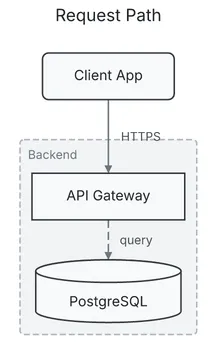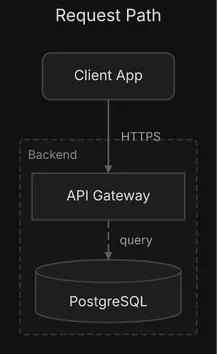
For how to draw well with it, see the [Flow diagrams](/docs/guides/flow/) guide.
Field names match in any case (`Nodes` reads as `nodes`), and a key diago does not know is ignored and reported by `check` as [`unknown-field`](/docs/reference/advisories/), with the nearest known key as a suggestion. No id may hold a control character, U+FFFE or U+FFFF. A spec that breaks a rule below is a validation error on the field’s path, such as `nodes[1].shape`, and exits 1.
## Top level
[Section titled “Top level”](#top-level)
| Field | Type | Default | Allowed values | Notes |
| ----------- | --------------- | --------- | ----------------------------------------------------------------------------- | -------------------------------------------------------------------------------------------------------------------------------------------------------------------------------------------------------------- |
| `type` | string | required | `flow` | |
| `title` | string | none | any text | A band above the diagram in SVG and PNG, a centered first line in text art. Never part of the layout. A newline or other control character prints as its escape (`\n`); only a node’s label breaks into lines. |
| `theme` | string | `default` | `default`, `dark`, `midnight`, `sketch`, or a theme file in `DIAGO_THEME_DIR` | The theme the render uses unless `-theme` overrides it. Text art takes none. A name that does not load is a validation error on `theme`. |
| `direction` | string | `AUTO` | `DOWN`, `UP`, `RIGHT`, `LEFT`, `AUTO` | The way the diagram flows. `AUTO` lets the engine choose from the shape of the graph. Upper case only. |
| `nodes` | array of node | required | at least one | |
| `edges` | array of edge | none | | A flow may have nodes only. |
| `groups` | array of group | none | | |
| `ignore` | array of string | none | an advisory rule name each | Silences those rules for this spec. An unknown name is a validation error. See [Advisories](/docs/reference/advisories/). |
Every edge is routed orthogonally, in right-angle segments. There is no diagram-level style to choose. A top-level `style`, `hints` or `alignment` key was removed and is reported as `removed-field`.
## Node
[Section titled “Node”](#node)
| Field | Type | Default | Allowed values | Notes |
| ------- | ------ | ----------- | ------------------------------------------------------------------------------ | --------------------------------------------------------------------------------------------------------------------------------------------------------------------------- |
| `id` | string | required | | Unique, not empty. Edges and groups refer to it. It must not contain `->` or end in `@` and digits (such as `db@2`): derived edge ids and layout anchoring use those forms. |
| `label` | string | required | | The text in the box. Not empty. A `\n` starts a new line. |
| `shape` | string | `rect` | `rect`, `rounded`, `circle`, `diamond`, `cylinder`, `hexagon`, `parallelogram` | |
| `color` | string | the theme’s | `red`, `green`, `blue`, `yellow`, `orange`, `purple`, `gray`, or `#rrggbb` | Fill, stroke and text are derived from it, so they stay consistent. |
## Edge
[Section titled “Edge”](#edge)
| Field | Type | Default | Allowed values | Notes |
| ----------- | ------- | ------------ | -------------------------------------------------------------------------- | ----------------------------------------------------------------------------------------------------------------------------------------------------------------------------------------- |
| `id` | string | `from->to#n` | | Stable across edits: diffs and `-previous` anchoring key on it. `n` counts every edge between the same pair in spec order. When present it must not be empty or repeat another edge’s id. |
| `from` | string | required | a node `id` | |
| `to` | string | required | a node `id` | May equal `from`, a self-loop. |
| `label` | string | none | | Drawn beside the edge. A newline or other control character prints as its escape (`\n`); only a node’s label breaks into lines. |
| `style` | string | `solid` | `solid`, `dashed`, `dotted`, `thick` | |
| `direction` | string | `forward` | `forward`, `backward`, `both`, `none` | Where the arrowheads go: `forward` at the target, `backward` at the source, `both` at both ends, `none` at neither. |
| `color` | string | the theme’s | `red`, `green`, `blue`, `yellow`, `orange`, `purple`, `gray`, or `#rrggbb` | |
| `flat` | boolean | `false` | `true`, `false` | A link that implies no order. See below. Not allowed on a self-loop. |
Give every edge an explicit `id`. A labeled edge without one is reported as `edge-without-id` under `render -previous` and `diff`, where ids decide which edge is which.
### Flat edges
[Section titled “Flat edges”](#flat-edges)
A `flat` edge does not take part in ranking: its ends stay wherever the rest of the diagram puts them, side by side when it allows, and the edge is routed on the finished layout. Use it for links between peers that would otherwise be forced into a hierarchy they do not have, such as replication between two sites that each serve their own traffic.
```json
{"id": "east-west", "from": "east_db", "to": "west_db", "label": "async", "style": "dashed", "flat": true}
```
Two peer sites, each with its own web, API and database, joined by one flat edge between their databases sit side by side; without it they stack.
A flat edge helps between nodes that other edges already place. A node whose only edges are flat is laid out as an unconnected node, wherever there is room and not beside its partner, so keep one of its links ordinary: a standby database with nothing else attached keeps its replication edge from the primary ordinary, which puts it under the primary. When no clean route exists between the ends, the edge is laid out as an ordinary edge and the render warns with `flat-edge-ranked`. The warning belongs to the format rendered: text art and SVG are laid out differently and can decide a flat edge differently.
## Group
[Section titled “Group”](#group)
A group draws a frame around the nodes and groups it contains.
| Field | Type | Default | Allowed values | Notes |
| ---------- | --------------- | ----------- | -------------------------------------------------------------------------- | ------------------------------------------------------------------------------------------------------------------------------------------------------------------------- |
| `id` | string | required | | Unique among groups, and not the id of a node. It must not contain `->` or end in `@` and digits (such as `db@2`): derived edge ids and layout anchoring use those forms. |
| `label` | string | required | | Drawn on the frame. A newline or other control character prints as its escape (`\n`); only a node’s label breaks into lines. |
| `contains` | array of string | none | node ids and group ids | A group id makes a child group, drawn inside its parent. A node or group belongs to at most one group. A group with nothing in it is reported as `empty-group`. |
| `color` | string | the theme’s | `red`, `green`, `blue`, `yellow`, `orange`, `purple`, `gray`, or `#rrggbb` | |
Groups nest up to 3 levels. A fourth level, or a group that contains itself, is a validation error on `groups`. Deeper groups are drawn with progressively different fill shading, so nesting reads at a glance:
```json
"groups": [
{"id": "cloud", "label": "Cloud", "contains": ["services", "db"]},
{"id": "services", "label": "Services", "contains": ["api", "auth"]}
]
```
## Using the schema in an editor
[Section titled “Using the schema in an editor”](#using-the-schema-in-an-editor)
The JSON schema for flow specs is served at [/schemas/flow.json](/schemas/flow.json). Map it to your spec files in your editor’s JSON settings to get completion and the allowed values of every enum. Do not put a `"$schema"` key in the spec itself: diago reports it as `unknown-field` (`unknown key "$schema" is ignored`), so the editor’s own schema mapping is the way.
# Sequence spec
> Every field of a sequence diagram spec: actors, interactions, fragments, and the values each accepts.
A sequence diagram is a timeline of messages between actors. It suits API flows, protocol handshakes and any interaction where the order of the messages matters. A spec is one JSON object with `"type": "sequence"`. Messages are drawn top to bottom in the order of `interactions`.
sequence.json
```json
{
"type": "sequence",
"activations": true,
"actors": [
{"id": "client", "label": "Client"},
{"id": "server", "label": "Server"}
],
"interactions": [
{"from": "client", "to": "server", "label": "GET /api", "style": "solid"},
{"from": "server", "to": "client", "label": "200 OK", "style": "dashed"}
]
}
```
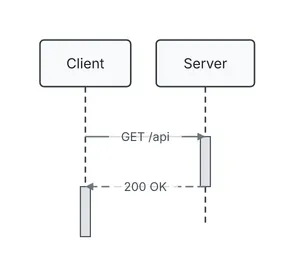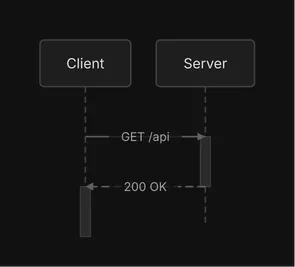
For how to draw well with it, see the [Sequence diagrams](/docs/guides/sequence/) guide.
A key diago does not know is ignored and reported by `check` as [`unknown-field`](/docs/reference/advisories/). No id may hold a control character, U+FFFE or U+FFFF. Every text field is drawn on one line: a newline or other control character in it prints as its escape (`\n`). A spec that breaks a rule below is a validation error on the field’s path, such as `interactions[2].from`, and exits 1.
## Top level
[Section titled “Top level”](#top-level)
| Field | Type | Default | Allowed values | Notes |
| -------------- | -------------------- | --------- | ----------------------------------------------------------------------------- | ---------------------------------------------------------------------------------------------------------------------------------------- |
| `type` | string | required | `sequence` | |
| `title` | string | none | any text | A band above the diagram in SVG and PNG, a centered first line in text art. Never part of the layout. |
| `theme` | string | `default` | `default`, `dark`, `midnight`, `sketch`, or a theme file in `DIAGO_THEME_DIR` | The theme the render uses unless `-theme` overrides it. Text art takes none. A name that does not load is a validation error on `theme`. |
| `actors` | array of actor | required | at least one | Drawn left to right in this order. |
| `interactions` | array of interaction | none | | A sequence may have no messages. |
| `fragments` | array of fragment | none | | |
| `activations` | boolean | `true` | `true`, `false` | `false` hides the activation bars on the lifelines. |
| `ignore` | array of string | none | an advisory rule name each | Silences those rules for this spec. An unknown name is a validation error. See [Advisories](/docs/reference/advisories/). |
A sequence spec has no `direction`, and no `flat`, `groups` or edge ids: those belong to flow and class diagrams.
## Actor
[Section titled “Actor”](#actor)
| Field | Type | Default | Allowed values | Notes |
| ------- | ------ | ----------- | -------------------------------------------------------------------------- | ---------------------------------------------------------- |
| `id` | string | required | | Unique, not empty. Interactions and fragments refer to it. |
| `label` | string | required | | The text in the header box. Not empty. |
| `color` | string | the theme’s | `red`, `green`, `blue`, `yellow`, `orange`, `purple`, `gray`, or `#rrggbb` | |
## Interaction
[Section titled “Interaction”](#interaction)
One message from an actor to an actor. Its position in `interactions`, counting from 0, is the index that fragment sections refer to.
| Field | Type | Default | Allowed values | Notes |
| ------- | ------ | ----------- | -------------------------------------------------------------------------- | ----------------------------------------------------------------------------------- |
| `from` | string | required | an actor `id` | |
| `to` | string | required | an actor `id` | |
| `label` | string | none | | The message text, drawn on the arrow. |
| `style` | string | `solid` | `solid`, `dashed`, `async` | `solid` is a call, `dashed` a return, and `async` a message with an open arrowhead. |
| `color` | string | the theme’s | `red`, `green`, `blue`, `yellow`, `orange`, `purple`, `gray`, or `#rrggbb` | |
## Fragment
[Section titled “Fragment”](#fragment)
A fragment draws a labeled box around a range of messages, split into sections, with its type in a tab at the top-left corner.
| Field | Type | Default | Allowed values | Notes |
| ---------- | ---------------- | -------- | ------------------------------------ | ------------------------------------------------------------------------------------------------------------------ |
| `type` | string | required | `alt`, `opt`, `loop`, `par`, `break` | |
| `over` | array of string | required | actor ids | The actors the box spans, at least one. The box also widens to every actor that a message in its sections reaches. |
| `sections` | array of section | required | | At least one. |
### Section
[Section titled “Section”](#section)
| Field | Type | Default | Allowed values | Notes |
| ------- | ------- | -------- | ---------------------------------------- | ------------------------------------------------------------------------------------------------------------------------------------------------- |
| `label` | string | none | | The guard or caption, such as `valid token`. May be left out or empty, but an `alt` section with no label is reported as `unlabeled-alt-section`. |
| `start` | integer | required | `0` up to the last interaction index | The first interaction in the section, after the previous section’s `end`. |
| `end` | integer | required | `start` up to the last interaction index | The last interaction in the section, inclusive. |
A fragment’s sections run in order without overlapping. Two fragments nest (one’s range inside the other’s) or stay apart; ranges that cross are an error. A fragment whose range lies inside another’s is drawn nested inside it; more than three levels is reported as `deep-nesting`. This fragment splits the last two messages into two branches:
```json
{
"type": "alt",
"over": ["auth", "db"],
"sections": [
{"label": "user found", "start": 1, "end": 2},
{"label": "no such user", "start": 3, "end": 3}
]
}
```
## Using the schema in an editor
[Section titled “Using the schema in an editor”](#using-the-schema-in-an-editor)
The JSON schema for sequence specs is served at [/schemas/sequence.json](/schemas/sequence.json). Map it to your spec files in your editor’s JSON settings to get completion and the allowed values of every enum. Do not put a `"$schema"` key in the spec itself: diago reports it as `unknown-field` (`unknown key "$schema" is ignored`), so the editor’s own schema mapping is the way.
# Theme file
> The structure of a diago theme file, what validation rejects, and how to load a custom theme by name.
A theme is one JSON file that holds the complete visual system for diagrams: colors, fonts, strokes and sizes. diago embeds four: `default` (light), `dark` (dark neutral), `midnight` (dark vibrant) and `sketch` (hand-drawn). A spec picks one with its top-level `theme` field, and `-theme` on the command line overrides it; without either, the theme is `default`. Text art takes no theme.
A theme is self-contained: no inheritance, no imports, no overrides between themes. To make a custom one, copy a real file such as `midnight.json` below and edit it.
## Loading a custom theme
[Section titled “Loading a custom theme”](#loading-a-custom-theme)
A theme name that is not built in is looked up as `.json` in the directory named by the `DIAGO_THEME_DIR` environment variable. Built-in names always win, so a file called `dark.json` there never replaces the built-in `dark`.
```sh
mkdir -p ~/.config/diago-themes
sed 's/"midnight"/"ocean"/; s/"#0f0f14"/"#0b1d2a"/' midnight.json > ~/.config/diago-themes/ocean.json
DIAGO_THEME_DIR=~/.config/diago-themes diago render -theme ocean spec.json > out.svg
```
The file name is what chooses the theme: `ocean.json` is `ocean`, whatever its `name` field says. A theme name is a plain file name: a name with a path, such as `../ocean` or `a/b`, is an error. The same name works in a spec’s `"theme": "ocean"`, with `DIAGO_THEME_DIR` set. Without the directory, `-theme ocean` fails with `error: render flow: theme "ocean" not found` (exit 2), and a `theme` field that does not load is a validation error on `theme` (exit 1). The editor schemas list only the four built-in names for `theme`, so an editor may flag a custom one even though diago accepts it.
## What validation rejects
[Section titled “What validation rejects”](#what-validation-rejects)
A theme that fails validation is an error that names the field, such as `theme "bad2": field "node.font.family": font family "Arial" is not supported; must be one of: Inter, Pangolin`. The rules:
* `style` must be `clean` or `sketch`. The field is required: it selects the renderer, so `sketch` is what gives the hand-drawn look.
* A font `family` must be `Inter` or `Pangolin`, the two faces embedded in diago. Text is measured from the embedded font files, so sizing is the same on every machine.
* Every color must be `#rrggbb` or `#rrggbbaa`: no names, no empty values.
* Every size and stroke width marked below as positive must be greater than 0.
* `colors` must define all seven named colors.
**Unknown keys are ignored without a word.** A typo in a key name degrades the theme instead of failing, so check a new file by rendering with it.
## Fields
[Section titled “Fields”](#fields)
Every section below is required. Sizes and widths are in pixels.
### Top level
[Section titled “Top level”](#top-level)
| Field | Type | Notes |
| ------------- | ------ | -------------------------------------------------------------------------------------------------------------------------------------- |
| `name` | string | A label for the theme. Not used to find it. |
| `description` | string | Free text. |
| `style` | string | `clean` or `sketch`. Required. |
| `background` | color | The diagram background. Also decides whether colors derived from a `color` field are made for a light or a dark ground. |
| `colors` | object | The palette behind a spec’s named `color` values. Needs `red`, `green`, `blue`, `yellow`, `orange`, `purple` and `gray`, each a color. |
| `diff` | object | Optional. The diff palette, below. |
### `node`
[Section titled “node”](#node)
| Field | Type | Notes |
| --------------- | ------------ | ------------------------------------------------------------------------------------------------------------------------------------------------- |
| `fill` | color | The box fill. |
| `stroke` | color | The box outline. |
| `stroke_width` | number | Positive. |
| `corner_radius` | number | The corner radius of rounded boxes. |
| `font` | font | The label font. |
| `padding` | `{"x", "y"}` | The blank between a node’s label and its box, each side. At least 0. Screen output only: text art ignores it. Class boxes keep their own padding. |
### `edge`
[Section titled “edge”](#edge)
| Field | Type | Notes |
| -------------- | ------ | ----------------------------- |
| `stroke` | color | The wire color. |
| `stroke_width` | number | Positive. |
| `arrow_size` | number | The arrowhead size. Positive. |
| `label_font` | font | The edge label font. |
### `group`
[Section titled “group”](#group)
| Field | Type | Notes |
| -------------- | ------ | ------------------------------------------------------------------------------------------------------------------------------------------------------------------------ |
| `fill` | color | The frame fill. |
| `stroke` | color | The frame outline. |
| `stroke_width` | number | Positive. |
| `stroke_dash` | string | The dash pattern of the outline, such as `6,3`. Not validated. |
| `label_font` | font | The frame label font. |
| `padding` | number | The blank between a group’s content and its frame, on every side. At least 12, so a group’s own wires keep clear of its border. Screen output only: text art ignores it. |
### `actor`
[Section titled “actor”](#actor)
The sequence diagram’s header boxes and lifelines.
| Field | Type | Notes |
| -------------- | ------ | ----------------------- |
| `fill` | color | The header box fill. |
| `stroke` | color | The header box outline. |
| `stroke_width` | number | Positive. |
| `font` | font | The header label font. |
### `fragment`
[Section titled “fragment”](#fragment)
The sequence diagram’s `alt`, `opt`, `loop`, `par` and `break` boxes.
| Field | Type | Notes |
| -------------- | ------ | -------------------------------------------------------------------------------------------- |
| `fill` | color | The box background. A translucent value such as `#rrggbbaa` lets the lifelines show through. |
| `stroke` | color | The box outline. |
| `stroke_width` | number | Positive. |
| `stroke_dash` | string | The dash pattern of the outline. Not validated. |
| `label_font` | font | The font of the type tag and the section guards. |
### `activation`
[Section titled “activation”](#activation)
The activation bars on sequence lifelines.
| Field | Type | Notes |
| -------------- | ------ | ------------------------------------------------------------------------------ |
| `fill` | color | The bar fill. |
| `stroke` | color | The bar outline. |
| `stroke_width` | number | Positive. |
| `width` | number | The bar width in px. Positive. Screen output only: text art draws its own bar. |
### `class`
[Section titled “class”](#class)
| Field | Type | Notes |
| ----------------- | ------ | ------------------------------------------------------------------------------------------------------- |
| `member_font` | font | The font of the attribute and method lines. |
| `separator_width` | number | The width of the lines between a class box’s compartments. Positive. Their color is the box’s `stroke`. |
### A font
[Section titled “A font”](#a-font)
Wherever a table says `font`, the value is an object:
| Field | Type | Notes |
| -------- | ------- | ---------------------------------------- |
| `family` | string | `Inter` or `Pangolin`. |
| `size` | number | Positive. |
| `weight` | integer | The font weight, such as `400` or `600`. |
| `color` | color | The text color. |
### `diff`
[Section titled “diff”](#diff)
An optional block that sets the palette of `diago diff`: the stroke and text color of added, changed and removed elements. A key it leaves out falls back to the palette, per key:
| Field | Falls back to |
| --------- | -------------- |
| `added` | `colors.green` |
| `changed` | `colors.blue` |
| `removed` | `colors.red` |
A theme without a `diff` block therefore still renders diffs: delete the block from a theme and its diffs use its green, blue and red. Each of the three must be a color.
## A complete theme: `midnight`
[Section titled “A complete theme: midnight”](#a-complete-theme-midnight)
themes/midnight.json
```json
{
"name": "midnight",
"description": "Dark theme",
"style": "clean",
"background": "#0f0f14",
"colors": {
"red": "#ff6b6b",
"green": "#51cf66",
"blue": "#74c0fc",
"yellow": "#ffd43b",
"orange": "#ff922b",
"purple": "#cc5de8",
"gray": "#9090b0"
},
"diff": { "added": "#51cf66", "changed": "#74c0fc", "removed": "#ff6b6b" },
"node": {
"fill": "#1a1a2e",
"stroke": "#3a3a5c",
"stroke_width": 1.5,
"corner_radius": 8,
"font": { "family": "Inter", "size": 14, "weight": 500, "color": "#e0e0e8" },
"padding": { "x": 20, "y": 12 }
},
"edge": {
"stroke": "#5a5a7c",
"stroke_width": 1.5,
"arrow_size": 8,
"label_font": { "family": "Inter", "size": 12, "weight": 400, "color": "#a0a0b8" }
},
"group": {
"fill": "#12121e",
"stroke": "#2a2a4c",
"stroke_width": 1.5,
"stroke_dash": "6,3",
"label_font": { "family": "Inter", "size": 12, "weight": 600, "color": "#8080a0" },
"padding": 12
},
"actor": {
"fill": "#1a1a2e",
"stroke": "#3a3a5c",
"stroke_width": 1.5,
"font": { "family": "Inter", "size": 14, "weight": 600, "color": "#e0e0e8" }
},
"fragment": {
"fill": "#14141f",
"stroke": "#2a2a4c",
"stroke_width": 1.5,
"stroke_dash": "6,3",
"label_font": { "family": "Inter", "size": 11, "weight": 700, "color": "#a0a0b8" }
},
"activation": {
"fill": "#22223a",
"stroke": "#3a3a5c",
"stroke_width": 1.0,
"width": 10
},
"class": {
"member_font": { "family": "Inter", "size": 12, "weight": 400, "color": "#e0e0e8" },
"separator_width": 1.0
}
}
```
`; for a page that follows light and dark mode, a `` with a `prefers-color-scheme: dark` source for the `dark` theme |
| A diagram someone will edit by hand | draw\.io or Excalidraw, flow only beta |
For an HTML page, never paste SVG markup inline: diagrams share element ids, and a diff’s styles would apply to the whole page.
# Mermaid
> Render Mermaid flowcharts, sequence diagrams and class diagrams as they are, or turn them into diago specs, and what is supported, approximated or rejected.
If a diagram already exists as Mermaid, diago draws it as it is:
```sh
diago render diagram.mmd > diagram.svg
diago render -format text diagram.mmd
```
Every verb reads Mermaid: `render`, `check`, both arguments of `diff` and `-previous` recognize a `.mmd` or `.mermaid` file, or a body whose first meaningful line is a Mermaid header, and translate it before anything else. `diago import` writes the translated JSON spec to stdout, for a diagram you want to keep editing in diago’s own terms: it gives you ids to keep and fields to set.
```sh
diago import diagram.mmd > spec.json
diago import < diagram.mmd | diago check
```
The dialect is read from the header. Three are supported: `flowchart` (or `graph`), `sequenceDiagram` and `classDiagram`.
## What is reported and what fails
[Section titled “What is reported and what fails”](#what-is-reported-and-what-fails)
The importer does not guess silently. A construct diago cannot carry is translated to its nearest form and reported on stderr, one line each, as `warning: import line : `, and the import still succeeds. A statement with no meaning in diago fails with `diago : line : ` and exit 1, as does an input that is not Mermaid. The three sources below import with nothing on stderr.
## Flowcharts
[Section titled “Flowcharts”](#flowcharts)
flowchart.mmd
```text
flowchart LR
client(Client) --> gateway[API Gateway]
subgraph backend [Backend]
gateway -->|route| orders[Orders]
orders -->|save| db[(Postgres)]
end
orders -.->|notify| mail{Send mail?}
mail ==>|yes| smtp[SMTP Relay]
```
flowchart.json
```json
{
"type": "flow",
"direction": "RIGHT",
"nodes": [
{"id": "client", "label": "Client", "shape": "rounded"},
{"id": "gateway", "label": "API Gateway"},
{"id": "orders", "label": "Orders"},
{"id": "db", "label": "Postgres", "shape": "cylinder"},
{"id": "mail", "label": "Send mail?", "shape": "diamond"},
{"id": "smtp", "label": "SMTP Relay"}
],
"edges": [
{"from": "client", "to": "gateway"},
{"from": "gateway", "to": "orders", "label": "route"},
{"from": "orders", "to": "db", "label": "save"},
{"from": "orders", "to": "mail", "label": "notify", "style": "dotted"},
{"from": "mail", "to": "smtp", "label": "yes", "style": "thick"}
],
"groups": [{"id": "backend", "label": "Backend", "contains": ["gateway", "orders", "db"]}]
}
```

Bracket shapes become shapes, `-.->` a dotted edge and `==>` a thick one, and a `subgraph` a group. An edge keeps the id Mermaid writes before its arrow (`A e1@--> B`), and a diff matches edges by it: give one to every edge before you start diffing versions. Without one, an edge is matched by its two ends, and a labeled edge warns `edge-without-id` in a diff.
| Supported | |
| --------- | -------------------------------------------------------------------------------------------------------------------- |
| Header | `graph` or `flowchart` with `TD`, `TB`, `LR`, `BT` or `RL` |
| Nodes | every bracket form |
| Edges | `-->`, `---`, `-.->`, `-.-`, `==>`, `===` and `<-->`, with `\|label\|` or `-- label -->`; a trailing `;` |
| Edge ids | `e1@` before any arrow; on an `&` fan-out, the edge from the last source to the first target takes it, as in Mermaid |
| Shorthand | `&` fan-out and chains |
| Groups | nested `subgraph … end`; a `title:` frontmatter |
| Approximated, and reported | Becomes |
| -------------------------------------------- | ----------------------------------------------- |
| stadium | `rounded` |
| subroutine | `rect` |
| doublecircle | `circle` |
| trapezoid | `parallelogram` |
| a fourth level of subgraphs | flattened into its third-level ancestor |
| an edge’s properties, `e1@{ animate: true }` | dropped: diago draws no edge animation or curve |
| an edge id already used | kept by its first edge; the later edge has none |
Rejected, with a line number: `classDef`, `class`, `style`, `linkStyle`, `click`, `accTitle`, `accDescr`, `direction`, and an edge whose endpoint is a subgraph.
## Sequence diagrams
[Section titled “Sequence diagrams”](#sequence-diagrams)
sequence.mmd
```text
sequenceDiagram
participant U as User
participant A as App
participant D as Database
U->>A: place order
A->>D: check stock
D-->>A: in stock
alt in stock
A->>D: reserve items
else out of stock
A-->>U: sorry
end
A-->>U: confirmation
```
sequence.json
```json
{
"type": "sequence",
"actors": [
{"id": "U", "label": "User"},
{"id": "A", "label": "App"},
{"id": "D", "label": "Database"}
],
"interactions": [
{"from": "U", "to": "A", "label": "place order"},
{"from": "A", "to": "D", "label": "check stock"},
{"from": "D", "to": "A", "label": "in stock", "style": "dashed"},
{"from": "A", "to": "D", "label": "reserve items"},
{"from": "A", "to": "U", "label": "sorry", "style": "dashed"},
{"from": "A", "to": "U", "label": "confirmation", "style": "dashed"}
],
"fragments": [
{
"type": "alt",
"over": ["U", "A", "D"],
"sections": [
{"label": "in stock", "start": 3, "end": 3},
{"label": "out of stock", "start": 4, "end": 4}
]
}
]
}
```

`alt` and `else` become one fragment with a section for each branch, over the range of messages it holds. Declared participants keep their `as` alias as the label.
| Supported | |
| ------------ | ------------------------------------------------------------------------------------------------------------- |
| Participants | `participant` and `actor`, with `as`; implicit declaration on first use |
| Messages | `->>`, `-->>`, `-)` and `--)` |
| Blocks | `loop`, `opt`, `alt` with `else`, `par` with `and`, and `break`, nested, as fragments over ranges of messages |
| Approximated, and reported | Becomes |
| ------------------------------------------- | --------------------------------------------------------------------------------------------------- |
| `actor` | an ordinary participant |
| `+` and `-` marks, `activate`, `deactivate` | ignored: the engine computes the activation bars |
| a `Note` | folded into the label of the nearest message before it in the block, and dropped when there is none |
| an empty branch or block | dropped |
Rejected, with a line number: `critical`, `autonumber`, `create`, `destroy`, `rect`, `box`, `link`, `links`, `properties`, `details`, and lost-message arrows (`-x`).
## Class diagrams
[Section titled “Class diagrams”](#class-diagrams)
class.mmd
```text
classDiagram
direction LR
class Animal {
<>
+String name
+eat() void*
}
class Dog {
+bark() void
}
class Owner {
+String name
}
Animal <|-- Dog
Owner "1" --> "*" Dog : owns
```
class.json
```json
{
"type": "class",
"direction": "RIGHT",
"classes": [
{
"id": "Animal",
"stereotype": "abstract",
"attributes": [{"visibility": "+", "text": "String name"}],
"methods": [{"visibility": "+", "text": "eat() void", "abstract": true}]
},
{"id": "Dog", "methods": [{"visibility": "+", "text": "bark() void"}]},
{"id": "Owner", "attributes": [{"visibility": "+", "text": "String name"}]}
],
"relations": [
{"from": "Dog", "to": "Animal", "kind": "inheritance"},
{
"from": "Owner",
"to": "Dog",
"kind": "association",
"label": "owns",
"from_card": "1",
"to_card": "*",
"directed": true
}
]
}
```

Every relation operator imports with its cardinalities and label. The JSON is written with `from` as the subtype, implementer, owner or dependent, whichever way the Mermaid arrow pointed. A Mermaid relation has no id: import the diagram and add ids to its relations before you start diffing versions, since a diff warns `edge-without-id` for each relation without one.
| Supported | |
| ----------- | ---------------------------------------------------------------------------------- |
| Classes | `class X~T~ { … }` blocks and bare declarations, with generics |
| Stereotypes | `<>` inside a block or on its own line |
| Members | `X : +member` inline, visibility prefixes, a `*` (abstract) or `$` (static) suffix |
| Relations | all twelve operators, with cardinalities and labels |
| Layout | `direction TB`, `LR`, `BT` or `RL` |
Rejected, with a line number: `<-->`, `()--`, `note`, `namespace`, `cssClass` and `click`. Nothing in the class dialect is approximated.
After an import, run `diago check -strict` on the JSON. The importer keeps what Mermaid says, so it can bring a diagram that parses fine but reads badly, and the [advisories](/docs/reference/advisories/) say where.
# Sequence diagrams
> How to draw sequence diagrams that read well: actors, message styles, self-messages, fragments, activations and size.
A sequence diagram shows who calls whom, and in what order: a request path, a protocol, a handshake. Each actor is a column with a lifeline, and time runs down the page. The [sequence spec reference](/docs/reference/sequence-spec/) lists every field and its allowed values.
basic.json
```json
{
"type": "sequence",
"actors": [
{"id": "client", "label": "Client"},
{"id": "gateway", "label": "API Gateway"},
{"id": "auth", "label": "Auth Service"},
{"id": "queue", "label": "Audit Queue"}
],
"interactions": [
{"from": "client", "to": "gateway", "label": "POST /login", "style": "solid"},
{"from": "gateway", "to": "auth", "label": "validate credentials", "style": "solid"},
{"from": "auth", "to": "auth", "label": "hash password", "style": "solid"},
{"from": "auth", "to": "gateway", "label": "token", "style": "dashed"},
{"from": "gateway", "to": "queue", "label": "log sign-in", "style": "async"},
{"from": "gateway", "to": "client", "label": "200 OK", "style": "dashed"}
]
}
```

```
┌────────┐ ┌──────────────┐ ┌──────────────┐ ┌──────────────┐
│ Client │ │ API Gateway │ │ Auth Service │ │ Audit Queue │
└────────┘ └──────────────┘ └──────────────┘ └──────────────┘
│ │ │ │
│ │ │ │
├ POST /login ─► │ │
│ ┃ │ │
│ ├ validate credentials ─► │
│ │ ┃ │
│ │ ┃───┐ │
│ │ ┃ │ hash password
│ │ ◄───┘ │
│ │ ┃ │
│ ◄╌╌╌╌╌╌╌╌ token ╌╌╌╌╌╌╌╌┤ │
│ ┃ │ │
│ ┠────────────── log sign-in ──────────────▷
│ ┃ │ │
◄╌╌ 200 OK ╌╌╌╌┤ │ │
┃ │ │ │
┌────────┐ ┌──────────────┐ ┌──────────────┐ ┌──────────────┐
│ Client │ │ API Gateway │ │ Auth Service │ │ Audit Queue │
└────────┘ └──────────────┘ └──────────────┘ └──────────────┘
```
## Actors and their order
[Section titled “Actors and their order”](#actors-and-their-order)
Actors are drawn left to right in the order of the `actors` array. Put the initiator leftmost, then the others in order of first appearance, and name them by role (“Auth Service”), not by technology. A message names its ends by actor `id`, so give each actor a short `id`.
## Interaction styles
[Section titled “Interaction styles”](#interaction-styles)
Each interaction has a `style`:
| Style | Use | Arrow |
| -------- | ----------------------------------------- | ------------------ |
| `solid` | a call (the default) | a filled arrowhead |
| `dashed` | a return | a dashed line |
| `async` | fire-and-forget: the sender does not wait | an open arrowhead |
In the diagram above, `POST /login` and `validate credentials` are `solid` calls, `token` and `200 OK` are `dashed` returns, and `log sign-in` to the queue is `async`. Interactions are drawn in array order, top to bottom. Label messages with what happens, not with `data` or `calls`: those raise `vague-message-label`.
## Self-messages
[Section titled “Self-messages”](#self-messages)
When an actor does something internally, make an interaction with the same `from` and `to`. It is drawn as a short loop on that actor’s lifeline: `hash password` above.
## Fragments
[Section titled “Fragments”](#fragments)
A fragment draws a frame around part of the exchange, with its type in a tab at the top-left corner and each section’s guard in brackets. The types are `alt` (if and else, one section per branch), `opt` (may happen), `loop` (repeats), `par` (happens in parallel) and `break` (leaves the sequence). `over` lists the actors it spans; the frame also widens to every actor its messages reach.
fragments.json
```json
{
"type": "sequence",
"actors": [
{"id": "client", "label": "Client"},
{"id": "api", "label": "API"},
{"id": "db", "label": "Database"}
],
"interactions": [
{"from": "client", "to": "api", "label": "place order", "style": "solid"},
{"from": "api", "to": "db", "label": "check stock", "style": "solid"},
{"from": "db", "to": "api", "label": "in stock", "style": "dashed"},
{"from": "api", "to": "db", "label": "reserve items", "style": "solid"},
{"from": "api", "to": "client", "label": "out of stock", "style": "dashed"},
{"from": "api", "to": "db", "label": "log stock miss", "style": "solid"},
{"from": "api", "to": "client", "label": "send receipt", "style": "dashed"},
{"from": "api", "to": "db", "label": "retry write", "style": "solid"},
{"from": "api", "to": "db", "label": "write audit row", "style": "solid"},
{"from": "api", "to": "client", "label": "payment failed", "style": "dashed"}
],
"fragments": [
{
"type": "alt",
"over": ["client", "api", "db"],
"sections": [
{"label": "in stock", "start": 2, "end": 3},
{"label": "out of stock", "start": 4, "end": 5}
]
},
{
"type": "opt",
"over": ["api", "client"],
"sections": [{"label": "receipt requested", "start": 6, "end": 6}]
},
{
"type": "loop",
"over": ["api", "db"],
"sections": [{"label": "up to 3 times", "start": 7, "end": 7}]
},
{"type": "par", "over": ["api", "db"], "sections": [{"label": "audit", "start": 8, "end": 8}]},
{
"type": "break",
"over": ["api", "client"],
"sections": [{"label": "payment declined", "start": 9, "end": 9}]
}
]
}
```

```
┌────────┐ ┌──────┐ ┌──────────┐
│ Client │ │ API │ │ Database │
└────────┘ └──────┘ └──────────┘
│ │ │
│ │ │
├── place order ──► │
│ ┃ │
│ ├── check stock ───►
│ │ ┃
╔══ alt [in stock] ══════╪══════════════════╪═════╗
║ │ ◄╌╌╌ in stock ╌╌╌╌╌┤ ║
║ │ ┃ │ ║
║ │ ├─ reserve items ──► ║
║ │ │ ┃ ║
╟╌╌ [out of stock] ╌╌╌╌╌╌╪╌╌╌╌╌╌╌╌╌╌╌╌╌╌╌╌╌╌╪╌╌╌╌╌╢
║ ◄╌ out of stock ╌╌┤ │ ║
║ ┃ │ │ ║
║ │ ├ log stock miss ──► ║
╚══════╪═════════════════╪══════════════════╪═════╝
│ │ │
╔══ opt [receipt requested] ══╗ │
║ ◄╌ send receipt ╌╌┤ ║ │
╚══════╪═════════════════╪════╝ │
│ │ │
│ ╔══ loop [up to 3 times] ═══════╗
│ ║ ├── retry write ───► ║
│ ╚══════╪══════════════════╪═════╝
│ │ │
│ ╔══ par [audit] ══════════╪═════╗
│ ║ ├ write audit row ─► ║
│ ╚══════╪══════════════════╪═════╝
│ │ │
╔══ break [payment declined] ══╗ │
║ ◄ payment failed ╌┤ ║ │
╚══════╪═════════════════╪═════╝ │
│ │ │
┌────────┐ ┌──────┐ ┌──────────┐
│ Client │ │ API │ │ Database │
└────────┘ └──────┘ └──────────┘
```
Each section covers interactions by index. Indexes are zero-based, and `start` and `end` are both inclusive: in the spec above, the `in stock` section is `"start": 2, "end": 3`, the third and fourth interactions, and `out of stock` is `"start": 4, "end": 5`, the fifth and sixth. The section’s `label` is its guard, drawn in brackets. Give every section a guard: an `alt` section without one raises `unlabeled-alt-section`. A fragment’s sections run in order without overlapping, and two fragments either nest or stay apart: ranges that cross are a validation error. `check` reports `deep-nesting` when a fragment sits more than 3 levels deep.
## Activations
[Section titled “Activations”](#activations)
An activation bar on a lifeline shows when an actor is busy handling a call, and is drawn by default. Set `"activations": false` at the top level for a lighter drawing. Here is the first diagram again without the bars:
plain.json
```json
{
"type": "sequence",
"actors": [
{"id": "client", "label": "Client"},
{"id": "gateway", "label": "API Gateway"},
{"id": "auth", "label": "Auth Service"},
{"id": "queue", "label": "Audit Queue"}
],
"interactions": [
{"from": "client", "to": "gateway", "label": "POST /login", "style": "solid"},
{"from": "gateway", "to": "auth", "label": "validate credentials", "style": "solid"},
{"from": "auth", "to": "auth", "label": "hash password", "style": "solid"},
{"from": "auth", "to": "gateway", "label": "token", "style": "dashed"},
{"from": "gateway", "to": "queue", "label": "log sign-in", "style": "async"},
{"from": "gateway", "to": "client", "label": "200 OK", "style": "dashed"}
],
"activations": false
}
```

```
┌────────┐ ┌──────────────┐ ┌──────────────┐ ┌──────────────┐
│ Client │ │ API Gateway │ │ Auth Service │ │ Audit Queue │
└────────┘ └──────────────┘ └──────────────┘ └──────────────┘
│ │ │ │
│ │ │ │
├ POST /login ─► │ │
│ │ │ │
│ ├ validate credentials ─► │
│ │ │ │
│ │ ├───┐ │
│ │ │ │ hash password
│ │ ◄───┘ │
│ │ │ │
│ ◄╌╌╌╌╌╌╌╌ token ╌╌╌╌╌╌╌╌┤ │
│ │ │ │
│ ├────────────── log sign-in ──────────────▷
│ │ │ │
◄╌╌ 200 OK ╌╌╌╌┤ │ │
│ │ │ │
┌────────┐ ┌──────────────┐ ┌──────────────┐ ┌──────────────┐
│ Client │ │ API Gateway │ │ Auth Service │ │ Audit Queue │
└────────┘ └──────────────┘ └──────────────┘ └──────────────┘
```
## Size
[Section titled “Size”](#size)
Every actor is a column, so width is the limit. Keep to 8 participants or fewer, which is where `seq-too-many-participants` fires, and about 6 when the art must fit a terminal. Past that, split the exchange into focused diagrams, or collapse minor participants into one.
For every field and value, see the [sequence spec reference](/docs/reference/sequence-spec/).
# Themes
> The four built-in themes, how a spec or a flag picks one, and how to load a theme of your own.
One spec, drawn in every built-in theme. Only the look changes: layout, labels and structure are the same in each.

`default`

`dark`

`midnight`

`sketch`
## The built-in themes
[Section titled “The built-in themes”](#the-built-in-themes)
| Theme | For |
| ---------- | ------------------------------------------------------ |
| `default` | light documents and READMEs, an SVG opened from a chat |
| `dark` | dark pages and slides, in a dark neutral palette |
| `midnight` | dark pages and slides, in a dark vibrant palette |
| `sketch` | a draft: the hand-drawn look says “not final” |
Each theme is a complete visual system: colors, fonts, strokes and spacing. diago embeds the fonts (Inter, and Pangolin for `sketch`), so a theme draws the same on every machine.
## Choosing a theme
[Section titled “Choosing a theme”](#choosing-a-theme)
Set the spec’s top-level `theme` field, or pass `-theme` on the command line. The flag wins over the field; without either the theme is `default`.
```sh
diago render -theme midnight spec.json > out.svg
```
```json
{
"type": "flow",
"theme": "midnight",
"nodes": [
{"id": "api", "label": "API"},
{"id": "db", "label": "Database", "shape": "cylinder"}
],
"edges": [{"id": "api-db", "from": "api", "to": "db", "label": "reads"}]
}
```
Text art takes no theme: it is plain characters, but a theme it is given must still load. `diago diff` reads the `theme` field of the new spec, and the old one’s is not read. A `theme` field naming a theme that does not load is a validation error on `theme`, and an unknown `-theme` is a usage error.
To show one diagram on a page that follows light and dark mode, render it twice, in `default` and in `dark`, and let the page choose between the two images. This site does exactly that.
## Your own theme
[Section titled “Your own theme”](#your-own-theme)
A theme is one JSON file. To make one, copy `themes/midnight.json` from the repository, change the colors, and save it as `.json` in a directory of your choosing. Point `DIAGO_THEME_DIR` at that directory and load the theme by its file name:
```sh
DIAGO_THEME_DIR=~/.config/diago-themes diago render -theme ocean spec.json > out.svg
```
Built-in names always win, so a file called `dark.json` there never replaces the built-in `dark`. The structure of the file, and what validation rejects, is in the [theme file reference](/docs/reference/theme-file/).
# Advisories
> Every advisory rule diago reports, what fires it, how to fix it, and how to read, silence and enforce the findings.
An advisory is a finding about a spec that parses fine but reads badly: a vague label, an isolated node, a box too wide to fit. Advisories never stop a render. They are for the author, and for an agent that writes specs and lints them before showing anything.
## Where they appear
[Section titled “Where they appear”](#where-they-appear)
`diago check` prints the findings of a spec and lays nothing out:
```sh
diago check spec.json # one line per finding, exit 0
diago check -strict spec.json # exit 1 when any finding remains
diago check -json spec.json # {"warnings": [...]}
```
Every `render` and `diff` prints the same findings on stderr after the output, each line led by `warning: `. `check` never lays out, so two rules can only appear on `render` and `diff`: `text-label-dropped` (text format) and `flat-edge-ranked` (any format, and only when a flat edge falls back). `edge-without-id` also needs one of them, because it only matters under `render -previous` and `diff`, where ids decide which element is which.
This is `diago check` on a flow spec with a node nothing connects to and a vague label:
```text
isolated-node nodes[3]: node "cache" is connected to nothing; connect it or remove it
vague-edge-label edges[0]: edge web->api label "uses" says little; prefer a specific verb phrase like "validates order" or "publishes event"
```
## Line format
[Section titled “Line format”](#line-format)
` : `, or `: ` for a finding about the whole diagram. `field` is a path into the spec, in the same form as a validation error’s, such as `nodes[3]`. On `render` and `diff` the line starts with `warning: `, and in a diff the field is prefixed `before.` or `after.`. A finding both versions raise alike, with the same rule, field and message, is listed once, under `after.`. Findings are sorted by rule, then by field in natural order (`nodes[9]` before `nodes[10]`), then by message, so the output can be compared between runs.
Node and actor ids are written into messages as they are, so an id with quotes or control characters can make a line awkward to parse. `-json` is the machine-readable form:
```json
{
"warnings": [
{
"rule": "isolated-node",
"message": "node \"cache\" is connected to nothing; connect it or remove it",
"field": "nodes[3]"
},
{
"rule": "vague-edge-label",
"message": "edge web->api label \"uses\" says little; prefer a specific verb phrase like \"validates order\" or \"publishes event\"",
"field": "edges[0]"
}
]
}
```
A finding about the whole diagram has no `field` key. With no findings, `warnings` is an empty array.
## `-strict`
[Section titled “-strict”](#-strict)
`diago check -strict` exits 1 while any finding remains. That is not the exit 1 of `render` and `diff`, which means a validation error: with `-strict` the findings are printed as usual and the exit code is the verdict. It suits a lint step before a diagram is shown or committed.
## Silencing a rule: `ignore`
[Section titled “Silencing a rule: ignore”](#silencing-a-rule-ignore)
A spec silences rules with a top-level `ignore` array:
```json
"ignore": ["vague-edge-label"]
```
The array applies to every finding of that spec, including `text-label-dropped` and `flat-edge-ranked`. A name that is not a rule below is a validation error on `ignore[n]` (`unknown advisory rule "nope"; see diago check`, exit 1). Ignore a rule only when the finding is deliberate; otherwise fix the spec.
## The rules
[Section titled “The rules”](#the-rules)
Each diagram type runs its own rules. A class diagram runs only the class rules, plus `edge-without-id` over its relations, `empty-group` over its packages and `text-label-dropped`; `unknown-field` and `removed-field` run on every type. All 23 rules, by name:
| Rule | Diagrams | Fires when | Usual fix |
| --------------------------- | -------------- | ---------------------------------------------------------------------------------------------------------------------------------------------------------------------- | --------------------------------------------------------------------------------------------------------------------------------------------------------------------------------------------------------------------- |
| `deep-nesting` | sequence | A fragment is nested more than 3 levels deep, by range containment. | Flatten it, or split the diagram. |
| `duplicate-edge` | flow | Two edges have the same `from`, `to` and label. | Drop one, or give them different labels. |
| `edge-without-id` | flow, class | A labeled edge, or any class relation, has no `id`. Only under `render -previous` and `diff`. | Give it a stable `id` that survives edits. |
| `empty-group` | flow, class | A group, or a class package, whose `contains` is empty. | Fill it or remove it. |
| `flat-edge-ranked` | flow | A `flat` edge has no clean side route and is laid out as an ordinary edge, or is kept as one from an earlier anchored layout. `render` and `diff` only. | Accept it (the diagram still renders, the two ends just do not sit side by side), drop `flat` from the edge, or keep one ordinary link on its nodes. Under `-strict`, add the rule to `ignore` for that version only. |
| `god-class` | class | A class has more than 15 attributes and methods together. | Split its responsibilities into smaller classes. |
| `isolated-class` | class | A class no relation touches, in a spec of two or more classes. | Connect it or remove it. |
| `isolated-node` | flow | A node no edge touches, in a spec of two or more nodes. | Connect it or remove it. |
| `long-label` | flow, sequence | A node, group, actor, message or section label is over 60 characters. | Shorten it or move the detail elsewhere. |
| `no-entry` | flow | Every node has an incoming edge. Self-loops and `flat` edges do not count as incoming. | Add a start node, or break a cycle. |
| `overlong-member` | class | A member line (visibility, a space, then the text) is over 40 characters. It widens the box. | Shorten the signature or its types. |
| `oversized-class-diagram` | class | More than 20 classes. | Split into linked sub-diagrams. |
| `removed-field` | flow, class | A spec still carries a removed top-level key: `style`, `hints` or `alignment` on a flow spec, `style` on a class spec. The key is ignored. | Delete it. diago is orthogonal-only. |
| `seq-too-many-participants` | sequence | More than 8 actors. | Split into focused diagrams, or collapse minor participants. |
| `shape-soup` | flow | More than 5 distinct node shapes. | Reserve each shape for one consistent role. |
| `text-label-dropped` | flow, class | The text renderer could not place an edge label or a cardinality without overwriting other ink. `render` and `diff` with `-format text` only; the line has no `field`. | Shorten the label. |
| `too-large` | flow | More than 20 nodes. Groups never count. | Split into linked sub-diagrams. |
| `unbreakable-token` | flow, sequence | A run of over 24 characters without whitespace in a label that `long-label` covers. Wrapping only breaks at whitespace, so it widens its box. | Shorten it or add separators. |
| `unknown-field` | all | A JSON key the schema does not know, at any depth. The key is ignored; the message suggests the nearest known key. | Fix the spelling, or delete the key. A `"$schema"` key is reported too. |
| `unlabeled-alt-section` | sequence | An `alt` section has no guard label. | Label each section with its condition. |
| `unlabeled-branch` | flow | A `diamond` has two or more outgoing edges and one of them has no label. A `flat` edge is not a branch and is not counted. | Label every branch with its condition. |
| `vague-edge-label` | flow | An edge label is one of `uses`, `has`, `is`, `does`, `calls`, `handles`, `data`, `flow`, in any case. | Use a specific verb phrase such as “validates order”. |
| `vague-message-label` | sequence | A message label is one of those same words. | Use a specific verb phrase. |
`flat-edge-ranked` belongs to the format rendered: text art and SVG are laid out differently and can decide a flat edge differently. A message that says the edge was *kept* from the previous or before layout, rather than that no side route exists, comes from `-previous` or `diff` anchoring. The names above are also the only ones `ignore` accepts.
# Class spec
> Every field of a class diagram spec: classes, members, relations, packages, and the values each accepts.
A class diagram is UML: classes drawn as boxes with attribute and method compartments, joined by typed relations. It suits domain models, type hierarchies and interface implementations. A spec is one JSON object with `"type": "class"`.
class.json
```json
{
"type": "class",
"direction": "DOWN",
"theme": "default",
"classes": [
{
"id": "order",
"label": "Order",
"stereotype": "entity",
"type_params": ["T"],
"color": "blue",
"attributes": [{"visibility": "-", "text": "id: string"}],
"methods": [{"visibility": "+", "text": "total(): Money", "static": false, "abstract": false}]
},
{"id": "item", "label": "Item"}
],
"relations": [
{
"id": "r1",
"from": "order",
"to": "item",
"kind": "composition",
"label": "contains",
"from_card": "1",
"to_card": "*",
"color": "red"
}
],
"packages": [{"id": "domain", "label": "Domain", "contains": ["order", "item"], "color": "gray"}],
"legend": true,
"legend_labels": {"inheritance": "is-a"},
"ignore": ["god-class"]
}
```

For how to draw well with it, see the [Class diagrams](/docs/guides/class/) guide.
A key diago does not know is ignored and reported by `check` as [`unknown-field`](/docs/reference/advisories/). No id may hold a control character, U+FFFE or U+FFFF. Every text field is drawn on one line: a newline or other control character in it prints as its escape (`\n`). A spec that breaks a rule below is a validation error on the field’s path, such as `relations[0].kind`, and exits 1.
## Top level
[Section titled “Top level”](#top-level)
| Field | Type | Default | Allowed values | Notes |
| --------------- | ----------------- | --------- | ----------------------------------------------------------------------------- | ---------------------------------------------------------------------------------------------------------------------------------------- |
| `type` | string | required | `class` | |
| `title` | string | none | any text | A band above the diagram in SVG and PNG, a centered first line in text art. Never part of the layout. |
| `theme` | string | `default` | `default`, `dark`, `midnight`, `sketch`, or a theme file in `DIAGO_THEME_DIR` | The theme the render uses unless `-theme` overrides it. Text art takes none. A name that does not load is a validation error on `theme`. |
| `direction` | string | `DOWN` | `DOWN`, `UP`, `RIGHT`, `LEFT`, `AUTO` | Upper case only. Unlike a flow spec, an absent `direction` means `DOWN`. |
| `classes` | array of class | required | at least one | |
| `relations` | array of relation | none | | |
| `packages` | array of package | none | | Groups of classes: the flow [group](/docs/reference/flow-spec/#group) rules under another key. |
| `legend` | boolean | `false` | `true`, `false` | `true` adds one row per relation kind present in the diagram. |
| `legend_labels` | object | none | keys are relation kinds | Overrides a legend row’s text. An empty value hides the row. A key that is not a relation kind is a validation error. |
| `ignore` | array of string | none | an advisory rule name each | Silences those rules for this spec. An unknown name is a validation error. See [Advisories](/docs/reference/advisories/). |
`legend_labels` on its own, without `legend`, draws nothing: it is checked, but only `legend: true` adds the legend. A top-level `style` key was removed and is reported as `removed-field`.
## Class
[Section titled “Class”](#class)
| Field | Type | Default | Allowed values | Notes |
| ------------- | --------------- | ----------- | -------------------------------------------------------------------------- | --------------------------------------------------------------------------------------------------------------------------------------------------------------------------------- |
| `id` | string | required | | Unique, not empty. Relations and packages refer to it. It must not contain `->` or end in `@` and digits (such as `db@2`): derived edge ids and layout anchoring use those forms. |
| `label` | string | the `id` | | The class name. |
| `stereotype` | string | none | any text | Drawn as «stereotype» above the name. |
| `type_params` | array of string | none | non-empty strings | Generic parameters, drawn after the name inside angle brackets. |
| `color` | string | the theme’s | `red`, `green`, `blue`, `yellow`, `orange`, `purple`, `gray`, or `#rrggbb` | |
| `attributes` | array of member | none | | The attributes compartment. |
| `methods` | array of member | none | | The methods compartment. |
## Member
[Section titled “Member”](#member)
An attribute or a method line.
| Field | Type | Default | Allowed values | Notes |
| ------------ | ------- | -------- | ------------------ | --------------------------------------------------------------------------- |
| `text` | string | required | | The member as written, such as `id: string` or `total(): Money`. Not empty. |
| `visibility` | string | none | `+`, `-`, `#`, `~` | Drawn before the text. |
| `static` | boolean | `false` | `true`, `false` | Underlines the member. In text art, a `$` suffix. |
| `abstract` | boolean | `false` | `true`, `false` | Italicises the member. In text art, a `*` suffix. |
## Relation
[Section titled “Relation”](#relation)
| Field | Type | Default | Allowed values | Notes |
| ----------- | ------- | ------------------------------------- | --------------------------------------------------------------------------------------- | --------------------------------------------------------------------------------------------------------------------------------------------------------------------------------------------------------------------------- |
| `id` | string | `from->to#n` | | As for flow edges: stable across edits, and derived from `from` and `to` as written. When present it must not be empty or repeat another relation’s id. |
| `from` | string | required | a class `id` | |
| `to` | string | required | a class `id` | |
| `kind` | string | `association` | `association`, `inheritance`, `realization`, `dependency`, `aggregation`, `composition` | For `inheritance` and `realization`, `from` is the subtype and `to` the supertype or interface; the supertype is laid out first and the hollow triangle is drawn at its end. A class cannot inherit from or realize itself. |
| `label` | string | none | | Drawn beside the relation. |
| `from_card` | string | none | any text, such as `1` or `0..*` | Cardinality beside the `from` end. |
| `to_card` | string | none | any text | Cardinality beside the `to` end. |
| `directed` | boolean | `true` for `dependency`, else `false` | `true`, `false` | An arrowhead at `to`. Not allowed on the four adorned kinds, `inheritance`, `realization`, `aggregation` and `composition`, whose own end marker replaces it: giving `directed` on one is a validation error. |
| `color` | string | the theme’s | `red`, `green`, `blue`, `yellow`, `orange`, `purple`, `gray`, or `#rrggbb` | |
Give every relation an explicit `id`: one without it is reported as `edge-without-id` under `render -previous` and `diff`.
## Package
[Section titled “Package”](#package)
A package is a group under another key: the same fields as a flow group.
| Field | Type | Default | Allowed values | Notes |
| ---------- | --------------- | ----------- | -------------------------------------------------------------------------- | ---------------------------------------------------------------------------------------------------------------------------------------------------------------------------- |
| `id` | string | required | | Unique among packages, and not the id of a class. It must not contain `->` or end in `@` and digits (such as `db@2`): derived edge ids and layout anchoring use those forms. |
| `label` | string | required | | Drawn on the frame. |
| `contains` | array of string | none | class ids and package ids | A package id makes a child package. A class or package belongs to at most one. Up to 3 levels. A package with nothing in it is reported as `empty-group`. |
| `color` | string | the theme’s | `red`, `green`, `blue`, `yellow`, `orange`, `purple`, `gray`, or `#rrggbb` | |
## Output notes
[Section titled “Output notes”](#output-notes)
SVG draws each relation kind with its own end marker, and the wire stops at the marker. Text art uses the glyphs `△`, `▽`, `◁`, `▷`, `◆` and `◇`. draw\.io and Excalidraw export cover flow diagrams only.
## Using the schema in an editor
[Section titled “Using the schema in an editor”](#using-the-schema-in-an-editor)
The JSON schema for class specs is served at [/schemas/class.json](/schemas/class.json). Map it to your spec files in your editor’s JSON settings to get completion and the allowed values of every enum. Do not put a `"$schema"` key in the spec itself: diago reports it as `unknown-field` (`unknown key "$schema" is ignored`), so the editor’s own schema mapping is the way.
# CLI reference
> The diago verbs, flags, formats, exit codes, stderr formats and environment variables.
diago is one binary with four verbs. Every verb reads a spec and writes its result to stdout; warnings and errors go to stderr. [Getting started](/docs/) shows them in use.
## Verbs
[Section titled “Verbs”](#verbs)
| Verb | Does |
| -------------------------------------- | -------------------------------------------------------------------------------------------------------------------------------------------- |
| `diago render [flags] [SPEC]` | Draws one spec in the chosen format. |
| `diago diff [flags] PATH` | Draws the latest change of a file kept in git. |
| `diago diff [flags] OLD NEW` | Draws one picture of what changed between two specs. |
| `diago check [-strict] [-json] [SPEC]` | Prints advisories without laying anything out. |
| `diago import [SPEC]` | Translates a Mermaid source into a diago JSON spec. |
| `diago help [verb]` | Prints the usage, or a verb’s usage and flags. |
| `diago --version` | Prints the installed version: a release tag such as `v0.5.0`, the commit it was built from, or `(devel)` when the binary carries no version. |
Every call names its verb. `diago spec.json` and `diago -format text spec.json` are errors that print the usage (exit 2), with a `did you mean: diago render …` hint when the word looks like a spec. Help you ask for goes to stdout with exit 0: `diago -h`, `--help` or `help` print the usage, and `diago help ` or `-h`/`--help` on a verb print that verb’s usage and flags. A bad flag prints its error and the verb’s usage on stderr, exit 2. `diago --version` (or `diago version`) prints `diago `.
## Input
[Section titled “Input”](#input)
A SPEC is a path, `-` or nothing (stdin, for `render`, `check` and `import`; `diff` reads files only), or `REV:PATH`: the file as it was at a git revision, such as `HEAD~1:arch.json`, `v1.2:arch.json` or a commit hash. PATH is relative to the current directory, and the repository is the one that contains it; a name that exists on disk is always read as a file. Reading a revision needs `git` on `PATH`, and a symbolic link at that revision is refused: git keeps the link’s text, not the spec it points to. With one PATH, `diff` draws that file’s latest change: the newest version committed along first parents from HEAD, following renames, whose content differs from the file on disk, against the file on disk.
A Mermaid file renders as it is: `diago render diagram.mmd`. Mermaid sources are accepted wherever a spec is. A path ending in `.mmd` or `.mermaid`, or a body whose first meaningful line is `flowchart`, `graph`, `sequenceDiagram` or `classDiagram`, is translated before parsing. This holds for `render`, `check`, both arguments of `diff` and the `-previous` argument. Constructs diago cannot carry are translated to their nearest form and reported on stderr; statements with no meaning in diago fail with a line number. The mapping is under [`diago import`](#diago-import).
Flags may come before, between or after the paths, on every verb: `diago render spec.json -format text` and `diago render -format text spec.json` are the same call. A `--` ends the flags.
## Flags
[Section titled “Flags”](#flags)
### `diago render`
[Section titled “diago render”](#diago-render)
| Flag | Default | Notes |
| ----------- | ---------------------------------- | ----------------------------------------------------------------------------------------------------------------------------------------------------------------------------------------------------- |
| `-format` | `svg` | `svg`, `png`, `text` (alias `txt`), `drawio`, `excalidraw` (the last two in beta). An unknown value is an error, never a silent fallback. |
| `-theme` | the spec’s `theme`, else `default` | `default`, `dark`, `midnight`, `sketch`, or a theme file in `DIAGO_THEME_DIR`. Overrides the spec’s field. Text art takes no theme, but the name must still load. An unknown name is an error. |
| `-scale` | `2.0` | PNG only. Ignored when `-width` is set. |
| `-width` | none | PNG width in pixels. Overrides `-scale`. |
| `-previous` | none | Anchors the layout on an earlier render, so the nodes that survive an edit stay close to where they were. Flow and class only. See [Anchoring on a previous render](#anchoring-on-a-previous-render). |
| `-debug` | off | Writes one JSON line per layout decision to stderr. See [Debug logging](/docs/reference/debug-logging/). |
### `diago diff`
[Section titled “diago diff”](#diago-diff)
| Flag | Default | Notes |
| --------- | -------------------------------------- | ------------------------------------------------------------------------------------------- |
| `-format` | `svg` | `svg`, `png`, `text` (alias `txt`). `drawio` and `excalidraw` are not available for a diff. |
| `-theme` | the new spec’s `theme`, else `default` | The old spec’s `theme` field is not read. |
| `-scale` | `2.0` | PNG only. Ignored when `-width` is set. |
| `-width` | none | PNG width in pixels. Overrides `-scale`. |
| `-debug` | off | JSON Lines layout decisions on stderr. |
`diff` has no `-previous`: for a flow or class diagram it always anchors the union of the two specs on the old layout. A sequence diff is not anchored.
### `diago check`
[Section titled “diago check”](#diago-check)
| Flag | Default | Notes |
| --------- | ------- | --------------------------------------------------------------- |
| `-strict` | off | Exit 1 when any finding remains after the spec’s `ignore` list. |
| `-json` | off | Print `{"warnings": [...]}` instead of one line per finding. |
`check` validates the spec as `render` does, the theme it names included, and exits 1 on an error. It never lays a diagram out, so three findings appear only on `render` and `diff`: `text-label-dropped` and `flat-edge-ranked`, which come from the layout, and `edge-without-id`, which only `render -previous` and `diff` report, since only they match elements by id. The [advisories](/docs/reference/advisories/) page lists every rule.
### `diago import`
[Section titled “diago import”](#diago-import)
`import` takes no flags, only an optional path. It writes the JSON spec to stdout and report lines to stderr.
## Formats
[Section titled “Formats”](#formats)
| Format | `render` | `diff` | Types |
| ----------------- | ------------- | ------------- | --------------------- |
| `svg` | yes (default) | yes (default) | flow, sequence, class |
| `png` | yes | yes | flow, sequence, class |
| `text` or `txt` | yes | yes | flow, sequence, class |
| `drawio` beta | yes | no | flow only |
| `excalidraw` beta | yes | no | flow only |
PNG is the SVG rasterized by [resvg](https://github.com/linebender/resvg), which must be installed (see [Environment variables](#environment-variables)). Without it `-format png` fails with an install hint and the other formats still work. A PNG is `2.0` times the SVG’s size unless `-scale` or `-width` says otherwise.
draw\.io and Excalidraw output is in beta, not fully tested yet: check the file before relying on it. It is derived from the laid-out flow model, never from the SVG. Asking for either on a sequence or class spec is an error: `error: render: drawio format is not supported for sequence diagrams`, exit 2.
Text art lays the diagram out under its own profile: every position snaps to a character cell, so node positions differ from the SVG’s even though both are orthogonal. An edge label sits on the row next to a wire that runs along its row, and may be written over a group frame’s left or right side when nothing nearer is free. A label that cannot be placed without overwriting other ink is dropped and reported as the `text-label-dropped` advisory.
## Anchoring on a previous render
[Section titled “Anchoring on a previous render”](#anchoring-on-a-previous-render)
`-previous` keeps the nodes that survive an edit close to where they were, instead of laying the whole diagram out from scratch. It takes any of:
* an SVG that diago rendered: it carries its layout in a `` element, which is the exact anchor;
* that layout carrier as a JSON file on its own;
* the previous spec, which is laid out fresh the way the new render is (under the text profile for `-format text`, else under the theme’s screen profile), so anchoring on an unchanged spec draws what a fresh render draws.
An SVG from an older diago anchors as a best effort. The carrier lists ids only, never labels. `-previous` anchors flow and class specs, and a previous spec’s type must match the spec being rendered. A sequence diagram has no layout to anchor: its render checks that the file is an SVG, a carrier or a sequence spec, ignores it and warns `-previous ignored`.
Each version anchored on the render before it:
```sh
diago render hello.v1.json > v1.svg
diago render -previous v1.svg hello.v2.json > v2.svg
```
When a `flat` edge falls back to an ordinary edge, the carrier records it, and every render anchored on that carrier keeps the edge ordinary: its `flat-edge-ranked` warning then says it was kept, not that no side route exists. A render without `-previous` tries the side route again and decides fresh.
## The 10-second timeout
[Section titled “The 10-second timeout”](#the-10-second-timeout)
A `render` or `diff` that has not finished its layout and drawing after 10 seconds is cancelled and fails. The limit applies to every invocation, and `check` and `import` do not lay anything out. Each git call made to read a `REV:PATH` has its own 10 seconds. It prints `error: the render took longer than 10s and was stopped: split the diagram or simplify it` and exits 2.
## Exit codes
[Section titled “Exit codes”](#exit-codes)
| Code | Meaning |
| ---- | ----------------------------------------------------------------------------------------------------------------------------------------------------------------------------------------------------------------------- |
| `0` | Success. Advisories and import reports do not change it. |
| `1` | The spec is invalid: not JSON, a missing or unknown `type`, a field of the wrong JSON type, a validation error, a rejected Mermaid line, or, for `check -strict`, a finding that survived the `ignore` list. |
| `2` | A usage or internal error: an unknown verb or format, a missing file, a git failure reading `REV:PATH`, a render that fails or runs past [10 seconds](#the-10-second-timeout), output that cannot be written to stdout. |
A validation error is structured JSON on stderr with a `field` that names the path into the spec. This is `diago render` on a spec whose node has the shape `oval`:
```json
{
"error": {
"type": "validation_error",
"errors": [
{
"field": "nodes[1].shape",
"message": "unknown shape \"oval\""
}
]
}
}
```
A spec that is not JSON at all has the field `""` (in a diff, `before` or `after`). Several errors are collected and returned together. For `diff`, a field is prefixed `before.` or `after.`. For `check -strict`, exit 1 means findings survived the `ignore` list; the output is the findings, not a JSON error.
## stderr formats
[Section titled “stderr formats”](#stderr-formats)
* Advisories, on `render` and `diff`: `warning: : `, or `warning: : ` for a finding about the whole diagram. `check` prints the same lines without the `warning: `prefix, on stdout.
* Import reports: `warning: import line : `. With two inputs the line names the side: `warning: import (before) line : `, `(after)` or `(previous)`.
* A rejected Mermaid line: `diago : line : `, exit 1.
* Anything else that fails: `error: `, exit 2.
* With `-debug`, JSON Lines on stderr as well.
Without `-debug`, stderr stays empty on a clean render.
## `diago import`
[Section titled “diago import”](#diago-import-1)
```sh
diago import diagram.mmd > spec.json # JSON on stdout, report lines on stderr
diago import < diagram.mmd | diago check
```
The dialect is sniffed from the header. The output is the JSON an agent would have written: two-space indent, edge ids left out for diago to derive, `rect` left out. Exit 1 on a rejected line (plain text, with the line number) or on a non-Mermaid input; exit 0 otherwise, even with report lines.
**Flowchart** (`graph` or `flowchart`, with `TD`, `TB`, `LR`, `BT` or `RL`):
* Every node bracket form; the links `-->`, `---`, `-.->`, `-.-`, `==>`, `===` and `<-->`, with `|label|` or `-- label -->`; a trailing `;`; `&` fan-out; chains; nested `subgraph … end` (a fourth level is flattened into its depth-3 ancestor and reported); a `title:` frontmatter.
* Translated and reported: stadium and subroutine shapes become `rounded` and `rect`, doublecircle and trapezoid become `circle` and `parallelogram`.
* Rejected: `classDef`, `class`, `style`, `linkStyle`, `click`, `accTitle`, `accDescr`, `direction`, and an edge whose endpoint is a subgraph.
**Sequence** (`sequenceDiagram`):
* `participant` and `actor` with `as`, implicit declaration on first use; the arrows `->>`, `-->>`, `-)` and `--)`; `loop`, `opt`, `alt`/`else`, `par`/`and` and `break` blocks, nested, become fragments over interaction ranges.
* Translated and reported: `actor` renders as a participant; `+` and `-` marks and `activate`/`deactivate` lines are ignored, because diago computes the activation bars; a `Note` is folded into the label of the nearest preceding message in its block, and dropped when there is none; an empty branch or block is dropped.
* Rejected: `critical`, `autonumber`, `create`, `destroy`, `rect`, `box`, `link`, `links`, `properties`, `details`, and lost-message arrows (`-x`).
**Class** (`classDiagram`):
* `class X~T~ { … }` blocks and bare declarations, `<>` inside a block or on its own, `X : +member` inline members, visibility prefixes, `*` abstract and `$` static suffixes, `~T~` generics, all twelve relation operators with cardinalities and labels (the JSON is written with `from` as the subtype, implementer, owner or dependent), and `direction TB|LR|BT|RL`.
* Rejected: `<-->`, `()--`, `note`, `namespace`, `cssClass` and `click`.
## Environment variables
[Section titled “Environment variables”](#environment-variables)
| Variable | Description |
| ------------------ | ------------------------------------------------------------------------------------------------------------------------------------------------------------------------------------------ |
| `DIAGO_RESVG_PATH` | Path to the resvg binary, overriding the `PATH` lookup. PNG only. |
| `DIAGO_THEME_DIR` | Directory searched for theme files whose name is not built in. A theme name is a plain file name, never a path. Built-in themes always win. See [Theme file](/docs/reference/theme-file/). |
These are the only two.
# Debug logging
> The -debug trace of every layout and routing decision: its record schema, the phases, jq queries and a workflow for investigating a misplaced node or edge.
When a diagram comes out wrong, such as a node in an odd place, a wire that detours or a label beside the wrong edge, `-debug` shows how the layout got there. It writes one JSON Lines record per layout and routing decision on stderr, so a run separates cleanly into the artifact on stdout and the trace on stderr:
```sh
diago render -debug spec.json > out.svg 2> debug.ndjson
```
Without `-debug`, stderr stays empty on a clean render. `diago diff` takes `-debug` too. A sequence diagram emits no records. This page is for someone reporting or investigating a layout bug: attaching the trace to a report tells the maintainers which decision went wrong.
## The record
[Section titled “The record”](#the-record)
One JSON object per line. Always present: `time`, `level` (`DEBUG`), `msg` (always `layout decision`), `phase`, `decision` (snake_case) and `module` (`diago`). A record may carry `spec_ref`, the identifier of the layout rule the decision followed: a letter and a number that name an internal rule. Quote it in a report; it is not meant to be looked up by a user. The remaining keys vary per decision. This is a real record, from rendering the flow spec on the [flow spec page](/docs/reference/flow-spec/) with its `spec_ref` left out:
```json
{"time":"2026-10-07T21:51:13.755443+02:00","level":"DEBUG","msg":"layout decision","decision":"layers_assigned","phase":"rank","module":"diago","layers":3,"span_longest_path":2,"span":2}
```
## Phases
[Section titled “Phases”](#phases)
The `phase` says which stage emitted the record. In pipeline order:
| Phase | Stage |
| ------------ | ------------------------------------------------------------------------------------------------------------------------------------------------------------------------------------------------------------------------------------------------------------------------------------------------------------------------------------ |
| `size` | Sizing each node and class box from its label and members. |
| `cycle` | Breaking cycles, so every edge can point the same way; reversed edges are recorded. |
| `anchoring` | Reusing a previous layout. Runs per level, before `rank` and again before `order`, and only when a previous layout is given through `render -previous` or `diago diff`. It emits `previous_read` once, when the previous carrier is read, and `previous_ranked` once too, but only when the carrier lists flat edges that fell back. |
| `rank` | Assigning nodes to layers. |
| `equalize` | Evening out sibling groups. |
| `lgraph` | Building the layered graph the next stages work on. |
| `order` | Ordering the nodes within each layer. |
| `place` | Giving every node its coordinates. |
| `route` | Routing every edge. |
| `nest` | Laying groups out level by level. |
| `congruence` | Copying a layout between groups that have the same shape. |
| `flat` | Routing the `flat` edges on the finished layout: `flat_edge_routed`, `flat_edge_unrouted`, and `flat_edge_ranked` when one falls back to an ordinary edge and the layout is redone, whose stages then emit their records again. |
| `labels` | Placing edge labels and cardinalities. |
| `frame` | Framing groups and fitting the title. |
| `contract` | Checking the final layout against the output rules, in the profile rendered, screen or text. Each `contract_violation` record has `spec_ref` the violated rule, `subject` the edge, node or group id it applies to, and `detail` the checker’s message. Emitted only with `-debug`. |
## Useful queries
[Section titled “Useful queries”](#useful-queries)
```sh
# Only one stage's decisions
jq 'select(.phase == "route")' debug.ndjson
# Everything mentioning one node, across the differing key conventions
jq 'select(.node == "db" or .source == "db" or .subject == "db")' debug.ndjson
# Every output-rule violation -debug found in this render
jq 'select(.decision == "contract_violation")' debug.ndjson
# Every decision that cites one layout rule: copy the value from a record
jq --arg ref "" 'select(.spec_ref == $ref)' debug.ndjson
# What ran, and how much
jq -r '.phase' debug.ndjson | sort | uniq -c | sort -rn
jq -r '(.module // "-") + " | " + .phase + " | " + .decision' debug.ndjson | sort -u
```
## Workflow
[Section titled “Workflow”](#workflow)
1. Save the failing spec to a file.
2. Render it with `-debug`, sending stderr to a file.
3. Find the misplaced node or edge in the output.
4. Search the trace for its id.
5. Walk the decision chain backward to the phase that made the wrong call.
If no record explains what you see, the gap is the bug report: tell the maintainers which decision has no record. If you work on diago itself, the fix for that gap is to extend the `internal/layoutdbg.Decision` call sites at that spot, with the same gating as the rest, and never to add ad-hoc `fmt.Printf` instrumentation.
## Cost
[Section titled “Cost”](#cost)
When debug is off, each call site costs one `slog.Logger.Enabled(LevelDebug)` comparison and allocates nothing. When it is on, expect thousands of lines for a large diagram, so always redirect stderr to a file. The `contract` records come from running the output-rule checker on the final layout, which `-debug` arms; without it that check does not run.
# Flow spec
> Every field of a flow diagram spec: nodes, edges, groups, and the values each accepts.
A flow diagram is a directed graph: nodes, the edges between them, and optional groups. It suits architecture diagrams, flowcharts, data pipelines and decision trees. A spec is one JSON object with `"type": "flow"`.
flow\.json
```json
{
"type": "flow",
"title": "Request Path",
"direction": "DOWN",
"nodes": [
{"id": "client", "label": "Client App", "shape": "rounded"},
{"id": "api", "label": "API Gateway", "shape": "rect"},
{"id": "db", "label": "PostgreSQL", "shape": "cylinder"}
],
"edges": [
{"id": "client-api", "from": "client", "to": "api", "label": "HTTPS"},
{"id": "api-db", "from": "api", "to": "db", "label": "query", "style": "dashed"}
],
"groups": [{"id": "backend", "label": "Backend", "contains": ["api", "db"]}]
}
```

For how to draw well with it, see the [Flow diagrams](/docs/guides/flow/) guide.
Field names match in any case (`Nodes` reads as `nodes`), and a key diago does not know is ignored and reported by `check` as [`unknown-field`](/docs/reference/advisories/), with the nearest known key as a suggestion. No id may hold a control character, U+FFFE or U+FFFF. A spec that breaks a rule below is a validation error on the field’s path, such as `nodes[1].shape`, and exits 1.
## Top level
[Section titled “Top level”](#top-level)
| Field | Type | Default | Allowed values | Notes |
| ----------- | --------------- | --------- | ----------------------------------------------------------------------------- | -------------------------------------------------------------------------------------------------------------------------------------------------------------------------------------------------------------- |
| `type` | string | required | `flow` | |
| `title` | string | none | any text | A band above the diagram in SVG and PNG, a centered first line in text art. Never part of the layout. A newline or other control character prints as its escape (`\n`); only a node’s label breaks into lines. |
| `theme` | string | `default` | `default`, `dark`, `midnight`, `sketch`, or a theme file in `DIAGO_THEME_DIR` | The theme the render uses unless `-theme` overrides it. Text art takes none. A name that does not load is a validation error on `theme`. |
| `direction` | string | `AUTO` | `DOWN`, `UP`, `RIGHT`, `LEFT`, `AUTO` | The way the diagram flows. `AUTO` lets the engine choose from the shape of the graph. Upper case only. |
| `nodes` | array of node | required | at least one | |
| `edges` | array of edge | none | | A flow may have nodes only. |
| `groups` | array of group | none | | |
| `ignore` | array of string | none | an advisory rule name each | Silences those rules for this spec. An unknown name is a validation error. See [Advisories](/docs/reference/advisories/). |
Every edge is routed orthogonally, in right-angle segments. There is no diagram-level style to choose. A top-level `style`, `hints` or `alignment` key was removed and is reported as `removed-field`.
## Node
[Section titled “Node”](#node)
| Field | Type | Default | Allowed values | Notes |
| ------- | ------ | ----------- | ------------------------------------------------------------------------------ | --------------------------------------------------------------------------------------------------------------------------------------------------------------------------- |
| `id` | string | required | | Unique, not empty. Edges and groups refer to it. It must not contain `->` or end in `@` and digits (such as `db@2`): derived edge ids and layout anchoring use those forms. |
| `label` | string | required | | The text in the box. Not empty. A `\n` starts a new line. |
| `shape` | string | `rect` | `rect`, `rounded`, `circle`, `diamond`, `cylinder`, `hexagon`, `parallelogram` | |
| `color` | string | the theme’s | `red`, `green`, `blue`, `yellow`, `orange`, `purple`, `gray`, or `#rrggbb` | Fill, stroke and text are derived from it, so they stay consistent. |
## Edge
[Section titled “Edge”](#edge)
| Field | Type | Default | Allowed values | Notes |
| ----------- | ------- | ------------ | -------------------------------------------------------------------------- | ----------------------------------------------------------------------------------------------------------------------------------------------------------------------------------------- |
| `id` | string | `from->to#n` | | Stable across edits: diffs and `-previous` anchoring key on it. `n` counts every edge between the same pair in spec order. When present it must not be empty or repeat another edge’s id. |
| `from` | string | required | a node `id` | |
| `to` | string | required | a node `id` | May equal `from`, a self-loop. |
| `label` | string | none | | Drawn beside the edge. A newline or other control character prints as its escape (`\n`); only a node’s label breaks into lines. |
| `style` | string | `solid` | `solid`, `dashed`, `dotted`, `thick` | |
| `direction` | string | `forward` | `forward`, `backward`, `both`, `none` | Where the arrowheads go: `forward` at the target, `backward` at the source, `both` at both ends, `none` at neither. |
| `color` | string | the theme’s | `red`, `green`, `blue`, `yellow`, `orange`, `purple`, `gray`, or `#rrggbb` | |
| `flat` | boolean | `false` | `true`, `false` | A link that implies no order. See below. Not allowed on a self-loop. |
Give every edge an explicit `id`. A labeled edge without one is reported as `edge-without-id` under `render -previous` and `diff`, where ids decide which edge is which.
### Flat edges
[Section titled “Flat edges”](#flat-edges)
A `flat` edge does not take part in ranking: its ends stay wherever the rest of the diagram puts them, side by side when it allows, and the edge is routed on the finished layout. Use it for links between peers that would otherwise be forced into a hierarchy they do not have, such as replication between two sites that each serve their own traffic.
```json
{"id": "east-west", "from": "east_db", "to": "west_db", "label": "async", "style": "dashed", "flat": true}
```
Two peer sites, each with its own web, API and database, joined by one flat edge between their databases sit side by side; without it they stack.
A flat edge helps between nodes that other edges already place. A node whose only edges are flat is laid out as an unconnected node, wherever there is room and not beside its partner, so keep one of its links ordinary: a standby database with nothing else attached keeps its replication edge from the primary ordinary, which puts it under the primary. When no clean route exists between the ends, the edge is laid out as an ordinary edge and the render warns with `flat-edge-ranked`. The warning belongs to the format rendered: text art and SVG are laid out differently and can decide a flat edge differently.
## Group
[Section titled “Group”](#group)
A group draws a frame around the nodes and groups it contains.
| Field | Type | Default | Allowed values | Notes |
| ---------- | --------------- | ----------- | -------------------------------------------------------------------------- | ------------------------------------------------------------------------------------------------------------------------------------------------------------------------- |
| `id` | string | required | | Unique among groups, and not the id of a node. It must not contain `->` or end in `@` and digits (such as `db@2`): derived edge ids and layout anchoring use those forms. |
| `label` | string | required | | Drawn on the frame. A newline or other control character prints as its escape (`\n`); only a node’s label breaks into lines. |
| `contains` | array of string | none | node ids and group ids | A group id makes a child group, drawn inside its parent. A node or group belongs to at most one group. A group with nothing in it is reported as `empty-group`. |
| `color` | string | the theme’s | `red`, `green`, `blue`, `yellow`, `orange`, `purple`, `gray`, or `#rrggbb` | |
Groups nest up to 3 levels. A fourth level, or a group that contains itself, is a validation error on `groups`. Deeper groups are drawn with progressively different fill shading, so nesting reads at a glance:
```json
"groups": [
{"id": "cloud", "label": "Cloud", "contains": ["services", "db"]},
{"id": "services", "label": "Services", "contains": ["api", "auth"]}
]
```
## Using the schema in an editor
[Section titled “Using the schema in an editor”](#using-the-schema-in-an-editor)
The JSON schema for flow specs is served at [/schemas/flow.json](/schemas/flow.json). Map it to your spec files in your editor’s JSON settings to get completion and the allowed values of every enum. Do not put a `"$schema"` key in the spec itself: diago reports it as `unknown-field` (`unknown key "$schema" is ignored`), so the editor’s own schema mapping is the way.
# Sequence spec
> Every field of a sequence diagram spec: actors, interactions, fragments, and the values each accepts.
A sequence diagram is a timeline of messages between actors. It suits API flows, protocol handshakes and any interaction where the order of the messages matters. A spec is one JSON object with `"type": "sequence"`. Messages are drawn top to bottom in the order of `interactions`.
sequence.json
```json
{
"type": "sequence",
"activations": true,
"actors": [
{"id": "client", "label": "Client"},
{"id": "server", "label": "Server"}
],
"interactions": [
{"from": "client", "to": "server", "label": "GET /api", "style": "solid"},
{"from": "server", "to": "client", "label": "200 OK", "style": "dashed"}
]
}
```

For how to draw well with it, see the [Sequence diagrams](/docs/guides/sequence/) guide.
A key diago does not know is ignored and reported by `check` as [`unknown-field`](/docs/reference/advisories/). No id may hold a control character, U+FFFE or U+FFFF. Every text field is drawn on one line: a newline or other control character in it prints as its escape (`\n`). A spec that breaks a rule below is a validation error on the field’s path, such as `interactions[2].from`, and exits 1.
## Top level
[Section titled “Top level”](#top-level)
| Field | Type | Default | Allowed values | Notes |
| -------------- | -------------------- | --------- | ----------------------------------------------------------------------------- | ---------------------------------------------------------------------------------------------------------------------------------------- |
| `type` | string | required | `sequence` | |
| `title` | string | none | any text | A band above the diagram in SVG and PNG, a centered first line in text art. Never part of the layout. |
| `theme` | string | `default` | `default`, `dark`, `midnight`, `sketch`, or a theme file in `DIAGO_THEME_DIR` | The theme the render uses unless `-theme` overrides it. Text art takes none. A name that does not load is a validation error on `theme`. |
| `actors` | array of actor | required | at least one | Drawn left to right in this order. |
| `interactions` | array of interaction | none | | A sequence may have no messages. |
| `fragments` | array of fragment | none | | |
| `activations` | boolean | `true` | `true`, `false` | `false` hides the activation bars on the lifelines. |
| `ignore` | array of string | none | an advisory rule name each | Silences those rules for this spec. An unknown name is a validation error. See [Advisories](/docs/reference/advisories/). |
A sequence spec has no `direction`, and no `flat`, `groups` or edge ids: those belong to flow and class diagrams.
## Actor
[Section titled “Actor”](#actor)
| Field | Type | Default | Allowed values | Notes |
| ------- | ------ | ----------- | -------------------------------------------------------------------------- | ---------------------------------------------------------- |
| `id` | string | required | | Unique, not empty. Interactions and fragments refer to it. |
| `label` | string | required | | The text in the header box. Not empty. |
| `color` | string | the theme’s | `red`, `green`, `blue`, `yellow`, `orange`, `purple`, `gray`, or `#rrggbb` | |
## Interaction
[Section titled “Interaction”](#interaction)
One message from an actor to an actor. Its position in `interactions`, counting from 0, is the index that fragment sections refer to.
| Field | Type | Default | Allowed values | Notes |
| ------- | ------ | ----------- | -------------------------------------------------------------------------- | ----------------------------------------------------------------------------------- |
| `from` | string | required | an actor `id` | |
| `to` | string | required | an actor `id` | |
| `label` | string | none | | The message text, drawn on the arrow. |
| `style` | string | `solid` | `solid`, `dashed`, `async` | `solid` is a call, `dashed` a return, and `async` a message with an open arrowhead. |
| `color` | string | the theme’s | `red`, `green`, `blue`, `yellow`, `orange`, `purple`, `gray`, or `#rrggbb` | |
## Fragment
[Section titled “Fragment”](#fragment)
A fragment draws a labeled box around a range of messages, split into sections, with its type in a tab at the top-left corner.
| Field | Type | Default | Allowed values | Notes |
| ---------- | ---------------- | -------- | ------------------------------------ | ------------------------------------------------------------------------------------------------------------------ |
| `type` | string | required | `alt`, `opt`, `loop`, `par`, `break` | |
| `over` | array of string | required | actor ids | The actors the box spans, at least one. The box also widens to every actor that a message in its sections reaches. |
| `sections` | array of section | required | | At least one. |
### Section
[Section titled “Section”](#section)
| Field | Type | Default | Allowed values | Notes |
| ------- | ------- | -------- | ---------------------------------------- | ------------------------------------------------------------------------------------------------------------------------------------------------- |
| `label` | string | none | | The guard or caption, such as `valid token`. May be left out or empty, but an `alt` section with no label is reported as `unlabeled-alt-section`. |
| `start` | integer | required | `0` up to the last interaction index | The first interaction in the section, after the previous section’s `end`. |
| `end` | integer | required | `start` up to the last interaction index | The last interaction in the section, inclusive. |
A fragment’s sections run in order without overlapping. Two fragments nest (one’s range inside the other’s) or stay apart; ranges that cross are an error. A fragment whose range lies inside another’s is drawn nested inside it; more than three levels is reported as `deep-nesting`. This fragment splits the last two messages into two branches:
```json
{
"type": "alt",
"over": ["auth", "db"],
"sections": [
{"label": "user found", "start": 1, "end": 2},
{"label": "no such user", "start": 3, "end": 3}
]
}
```
## Using the schema in an editor
[Section titled “Using the schema in an editor”](#using-the-schema-in-an-editor)
The JSON schema for sequence specs is served at [/schemas/sequence.json](/schemas/sequence.json). Map it to your spec files in your editor’s JSON settings to get completion and the allowed values of every enum. Do not put a `"$schema"` key in the spec itself: diago reports it as `unknown-field` (`unknown key "$schema" is ignored`), so the editor’s own schema mapping is the way.
# Theme file
> The structure of a diago theme file, what validation rejects, and how to load a custom theme by name.
A theme is one JSON file that holds the complete visual system for diagrams: colors, fonts, strokes and sizes. diago embeds four: `default` (light), `dark` (dark neutral), `midnight` (dark vibrant) and `sketch` (hand-drawn). A spec picks one with its top-level `theme` field, and `-theme` on the command line overrides it; without either, the theme is `default`. Text art takes no theme.
A theme is self-contained: no inheritance, no imports, no overrides between themes. To make a custom one, copy a real file such as `midnight.json` below and edit it.
## Loading a custom theme
[Section titled “Loading a custom theme”](#loading-a-custom-theme)
A theme name that is not built in is looked up as `.json` in the directory named by the `DIAGO_THEME_DIR` environment variable. Built-in names always win, so a file called `dark.json` there never replaces the built-in `dark`.
```sh
mkdir -p ~/.config/diago-themes
sed 's/"midnight"/"ocean"/; s/"#0f0f14"/"#0b1d2a"/' midnight.json > ~/.config/diago-themes/ocean.json
DIAGO_THEME_DIR=~/.config/diago-themes diago render -theme ocean spec.json > out.svg
```
The file name is what chooses the theme: `ocean.json` is `ocean`, whatever its `name` field says. A theme name is a plain file name: a name with a path, such as `../ocean` or `a/b`, is an error. The same name works in a spec’s `"theme": "ocean"`, with `DIAGO_THEME_DIR` set. Without the directory, `-theme ocean` fails with `error: render flow: theme "ocean" not found` (exit 2), and a `theme` field that does not load is a validation error on `theme` (exit 1). The editor schemas list only the four built-in names for `theme`, so an editor may flag a custom one even though diago accepts it.
## What validation rejects
[Section titled “What validation rejects”](#what-validation-rejects)
A theme that fails validation is an error that names the field, such as `theme "bad2": field "node.font.family": font family "Arial" is not supported; must be one of: Inter, Pangolin`. The rules:
* `style` must be `clean` or `sketch`. The field is required: it selects the renderer, so `sketch` is what gives the hand-drawn look.
* A font `family` must be `Inter` or `Pangolin`, the two faces embedded in diago. Text is measured from the embedded font files, so sizing is the same on every machine.
* Every color must be `#rrggbb` or `#rrggbbaa`: no names, no empty values.
* Every size and stroke width marked below as positive must be greater than 0.
* `colors` must define all seven named colors.
**Unknown keys are ignored without a word.** A typo in a key name degrades the theme instead of failing, so check a new file by rendering with it.
## Fields
[Section titled “Fields”](#fields)
Every section below is required. Sizes and widths are in pixels.
### Top level
[Section titled “Top level”](#top-level)
| Field | Type | Notes |
| ------------- | ------ | -------------------------------------------------------------------------------------------------------------------------------------- |
| `name` | string | A label for the theme. Not used to find it. |
| `description` | string | Free text. |
| `style` | string | `clean` or `sketch`. Required. |
| `background` | color | The diagram background. Also decides whether colors derived from a `color` field are made for a light or a dark ground. |
| `colors` | object | The palette behind a spec’s named `color` values. Needs `red`, `green`, `blue`, `yellow`, `orange`, `purple` and `gray`, each a color. |
| `diff` | object | Optional. The diff palette, below. |
### `node`
[Section titled “node”](#node)
| Field | Type | Notes |
| --------------- | ------------ | ------------------------------------------------------------------------------------------------------------------------------------------------- |
| `fill` | color | The box fill. |
| `stroke` | color | The box outline. |
| `stroke_width` | number | Positive. |
| `corner_radius` | number | The corner radius of rounded boxes. |
| `font` | font | The label font. |
| `padding` | `{"x", "y"}` | The blank between a node’s label and its box, each side. At least 0. Screen output only: text art ignores it. Class boxes keep their own padding. |
### `edge`
[Section titled “edge”](#edge)
| Field | Type | Notes |
| -------------- | ------ | ----------------------------- |
| `stroke` | color | The wire color. |
| `stroke_width` | number | Positive. |
| `arrow_size` | number | The arrowhead size. Positive. |
| `label_font` | font | The edge label font. |
### `group`
[Section titled “group”](#group)
| Field | Type | Notes |
| -------------- | ------ | ------------------------------------------------------------------------------------------------------------------------------------------------------------------------ |
| `fill` | color | The frame fill. |
| `stroke` | color | The frame outline. |
| `stroke_width` | number | Positive. |
| `stroke_dash` | string | The dash pattern of the outline, such as `6,3`. Not validated. |
| `label_font` | font | The frame label font. |
| `padding` | number | The blank between a group’s content and its frame, on every side. At least 12, so a group’s own wires keep clear of its border. Screen output only: text art ignores it. |
### `actor`
[Section titled “actor”](#actor)
The sequence diagram’s header boxes and lifelines.
| Field | Type | Notes |
| -------------- | ------ | ----------------------- |
| `fill` | color | The header box fill. |
| `stroke` | color | The header box outline. |
| `stroke_width` | number | Positive. |
| `font` | font | The header label font. |
### `fragment`
[Section titled “fragment”](#fragment)
The sequence diagram’s `alt`, `opt`, `loop`, `par` and `break` boxes.
| Field | Type | Notes |
| -------------- | ------ | -------------------------------------------------------------------------------------------- |
| `fill` | color | The box background. A translucent value such as `#rrggbbaa` lets the lifelines show through. |
| `stroke` | color | The box outline. |
| `stroke_width` | number | Positive. |
| `stroke_dash` | string | The dash pattern of the outline. Not validated. |
| `label_font` | font | The font of the type tag and the section guards. |
### `activation`
[Section titled “activation”](#activation)
The activation bars on sequence lifelines.
| Field | Type | Notes |
| -------------- | ------ | ------------------------------------------------------------------------------ |
| `fill` | color | The bar fill. |
| `stroke` | color | The bar outline. |
| `stroke_width` | number | Positive. |
| `width` | number | The bar width in px. Positive. Screen output only: text art draws its own bar. |
### `class`
[Section titled “class”](#class)
| Field | Type | Notes |
| ----------------- | ------ | ------------------------------------------------------------------------------------------------------- |
| `member_font` | font | The font of the attribute and method lines. |
| `separator_width` | number | The width of the lines between a class box’s compartments. Positive. Their color is the box’s `stroke`. |
### A font
[Section titled “A font”](#a-font)
Wherever a table says `font`, the value is an object:
| Field | Type | Notes |
| -------- | ------- | ---------------------------------------- |
| `family` | string | `Inter` or `Pangolin`. |
| `size` | number | Positive. |
| `weight` | integer | The font weight, such as `400` or `600`. |
| `color` | color | The text color. |
### `diff`
[Section titled “diff”](#diff)
An optional block that sets the palette of `diago diff`: the stroke and text color of added, changed and removed elements. A key it leaves out falls back to the palette, per key:
| Field | Falls back to |
| --------- | -------------- |
| `added` | `colors.green` |
| `changed` | `colors.blue` |
| `removed` | `colors.red` |
A theme without a `diff` block therefore still renders diffs: delete the block from a theme and its diffs use its green, blue and red. Each of the three must be a color.
## A complete theme: `midnight`
[Section titled “A complete theme: midnight”](#a-complete-theme-midnight)
themes/midnight.json
```json
{
"name": "midnight",
"description": "Dark theme",
"style": "clean",
"background": "#0f0f14",
"colors": {
"red": "#ff6b6b",
"green": "#51cf66",
"blue": "#74c0fc",
"yellow": "#ffd43b",
"orange": "#ff922b",
"purple": "#cc5de8",
"gray": "#9090b0"
},
"diff": { "added": "#51cf66", "changed": "#74c0fc", "removed": "#ff6b6b" },
"node": {
"fill": "#1a1a2e",
"stroke": "#3a3a5c",
"stroke_width": 1.5,
"corner_radius": 8,
"font": { "family": "Inter", "size": 14, "weight": 500, "color": "#e0e0e8" },
"padding": { "x": 20, "y": 12 }
},
"edge": {
"stroke": "#5a5a7c",
"stroke_width": 1.5,
"arrow_size": 8,
"label_font": { "family": "Inter", "size": 12, "weight": 400, "color": "#a0a0b8" }
},
"group": {
"fill": "#12121e",
"stroke": "#2a2a4c",
"stroke_width": 1.5,
"stroke_dash": "6,3",
"label_font": { "family": "Inter", "size": 12, "weight": 600, "color": "#8080a0" },
"padding": 12
},
"actor": {
"fill": "#1a1a2e",
"stroke": "#3a3a5c",
"stroke_width": 1.5,
"font": { "family": "Inter", "size": 14, "weight": 600, "color": "#e0e0e8" }
},
"fragment": {
"fill": "#14141f",
"stroke": "#2a2a4c",
"stroke_width": 1.5,
"stroke_dash": "6,3",
"label_font": { "family": "Inter", "size": 11, "weight": 700, "color": "#a0a0b8" }
},
"activation": {
"fill": "#22223a",
"stroke": "#3a3a5c",
"stroke_width": 1.0,
"width": 10
},
"class": {
"member_font": { "family": "Inter", "size": 12, "weight": 400, "color": "#e0e0e8" },
"separator_width": 1.0
}
}
```