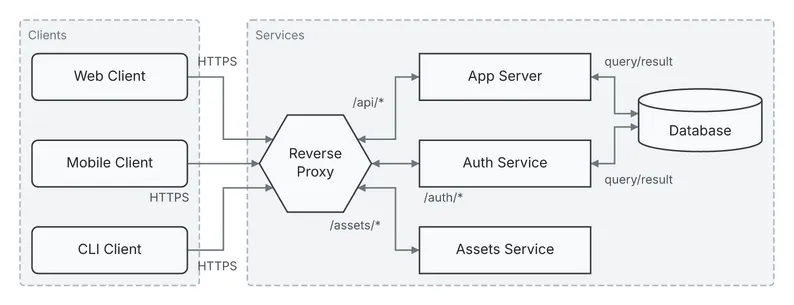
Reverse proxy, left to right
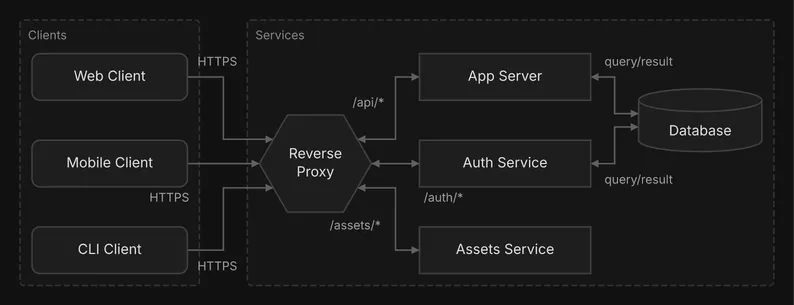
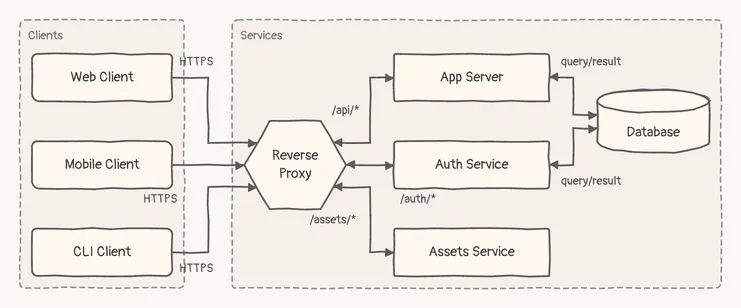
A flow diagram. The clients, proxy and services of Reverse proxy, laid out left to right.
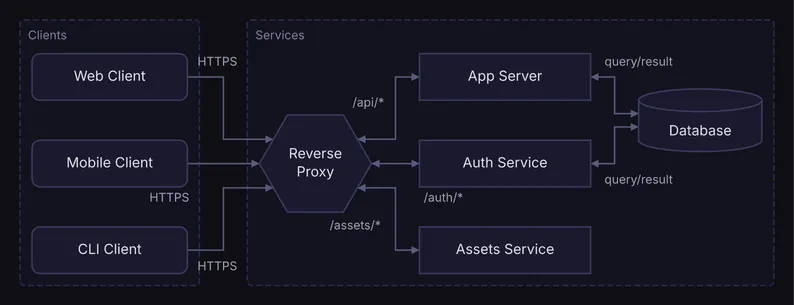
  ┌─ Clients ────────────┐      ┌─ Services ─────────────────────────────────────────────────────┐
  │                      │      │                                                                │
  │  ╭────────────────╮ HTTPS   │                   /api/* ┌────────────────┐ query/result       │
  │  │   Web Client   │──┼───┐  │                       ┌─►│   App Server   │◄──┐                │
  │  ╰────────────────╯  │   │  │                       │  └────────────────┘   │  ╒══════════╕  │
  │                      │   │  │                       │                       └─►│ Database │  │
  │                      │   │  │  ┌────────────────┐   │                       ┌─►│          │  │
  │  ╭────────────────╮  │   └──┼─►│                │◄──┘  ┌────────────────┐   │  └──────────┘  │
  │  │ Mobile Client  │──┼──────┼─►│ Reverse Proxy  │◄────►│  Auth Service  │◄──┘                │
  │  ╰────────────────╯  │   ┌──┼─►│                │◄──┐  └────────────────┘ query/result       │
  │                HTTPS │   │  │  └────────────────┘   │ /auth/*                                │
  │                      │   │  │                       │                                        │
  │  ╭────────────────╮  │   │  │                       │  ┌────────────────┐                    │
  │  │   CLI Client   │──┼───┘  │                       └─►│ Assets Service │                    │
  │  ╰────────────────╯ HTTPS   │                /assets/* └────────────────┘                    │
  └──────────────────────┘      └────────────────────────────────────────────────────────────────┘
Spec
{ "type": "flow", "direction": "RIGHT", "nodes": [ {"id": "web", "label": "Web Client", "shape": "rounded"}, {"id": "mobile", "label": "Mobile Client", "shape": "rounded"}, {"id": "cli", "label": "CLI Client", "shape": "rounded"}, {"id": "proxy", "label": "Reverse Proxy", "shape": "hexagon"}, {"id": "server", "label": "App Server", "shape": "rect"}, {"id": "auth", "label": "Auth Service", "shape": "rect"}, {"id": "assets", "label": "Assets Service", "shape": "rect"}, {"id": "db", "label": "Database", "shape": "cylinder"} ], "edges": [ {"id": "e-web-proxy", "from": "web", "to": "proxy", "label": "HTTPS", "style": "solid"}, {"id": "e-mobile-proxy", "from": "mobile", "to": "proxy", "label": "HTTPS", "style": "solid"}, {"id": "e-cli-proxy", "from": "cli", "to": "proxy", "label": "HTTPS", "style": "solid"}, { "id": "e-proxy-server", "from": "proxy", "to": "server", "label": "/api/*", "direction": "both" }, {"id": "e-proxy-auth", "from": "proxy", "to": "auth", "label": "/auth/*", "direction": "both"}, { "id": "e-proxy-assets", "from": "proxy", "to": "assets", "label": "/assets/*", "direction": "both" }, { "id": "e-server-db", "from": "server", "to": "db", "label": "query/result", "direction": "both" }, {"id": "e-auth-db", "from": "auth", "to": "db", "label": "query/result", "direction": "both"} ], "groups": [ {"id": "clients", "label": "Clients", "contains": ["web", "mobile", "cli"]}, {"id": "services", "label": "Services", "contains": ["proxy", "server", "auth", "assets", "db"]} ]}Draw it yourself
diago render reverse-proxy-across.json > reverse-proxy-across.svgOpen it in the playground to edit it in your browser.