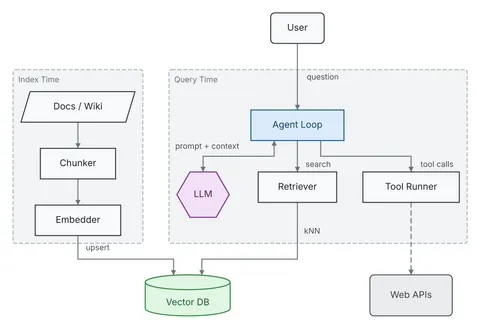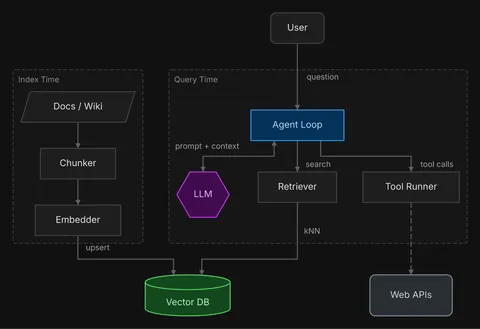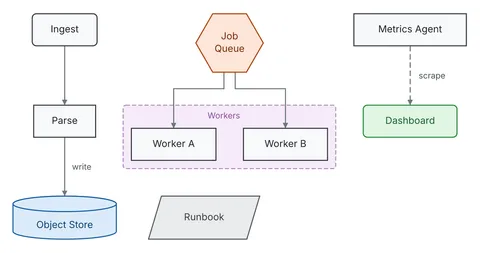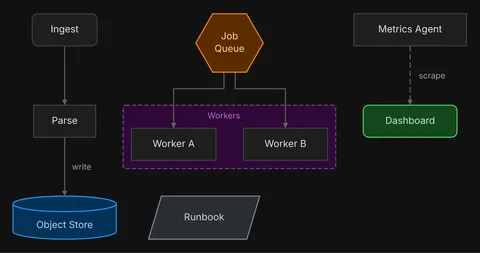
Render from JSON or Mermaid
diago render diagram.mmd.
Each JSON diagram type has a JSON Schema, and validation errors name the field, such as nodes[0].shape.
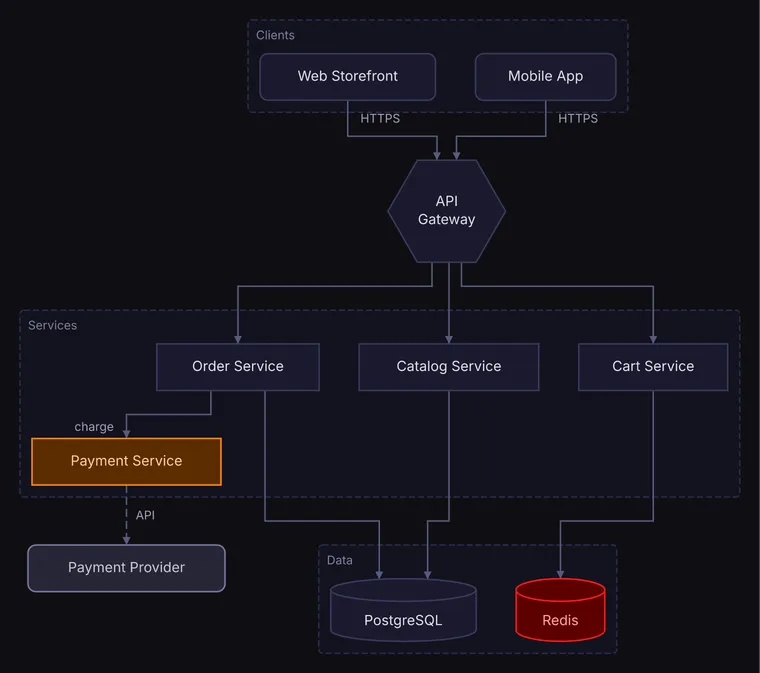
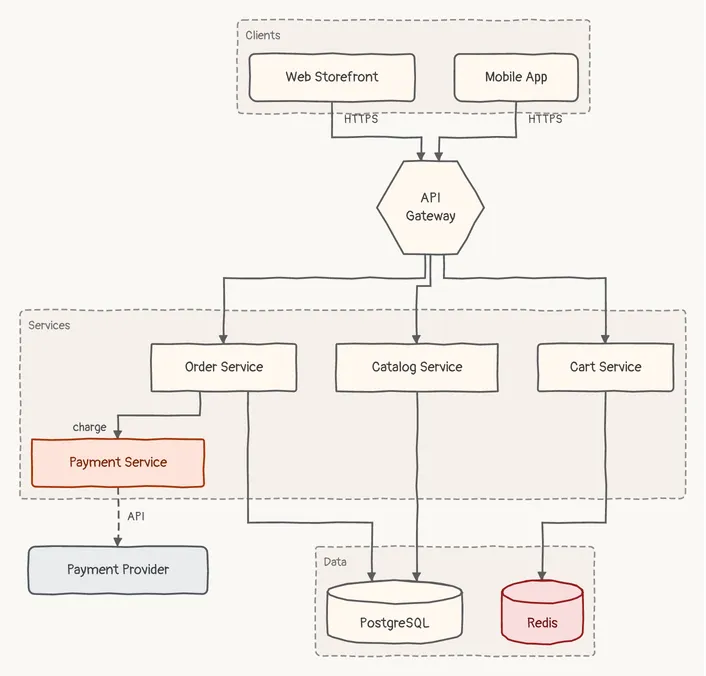
Describe what is connected to what in typed JSON; diago lays it out and draws it as SVG, PNG or text art, with draw.io and Excalidraw export in beta. Agents write it reliably, and the same spec always draws the same picture.
go install github.com/oxforge/diago/cmd/diago@latest


┌─ Clients ───────────────────────────────┐
│ │
│ ╭────────────────╮ ╭────────────╮ │
│ │ Web Storefront │ │ Mobile App │ │
│ ╰────────────────╯ ╰────────────╯ │
└───────────┼────────────────────┼────────┘
│ HTTPS │ HTTPS
│ │
└───────┐ ┌───────┘
▼ ▼
┌──────────────┐
│ API Gateway │
└──────────────┘
│ │ │
│ │ │
┌──────────────────┘ │ └──────────────────┐
│ │ │
┌─ Services ─────────────┼───────────────────────┼──────────────────────┼─────────┐
│ ▼ ▼ ▼ │
│ ┌────────────────┐ ┌──────────────────┐ ┌──────────────┐ │
│ │ Order Service │ │ Catalog Service │ │ Cart Service │ │
│ └────────────────┘ └──────────────────┘ └──────────────┘ │
│ charge │ │ │ │ │
│ │ │ │ │ │
│ ┌───────┘ │ │ │ │
│ ▼ │ │ │ │
│ ┌──────────────────┐ │ │ │ │
│ │ Payment Service │ │ │ │ │
│ └──────────────────┘ │ │ │ │
└────────────┼──────────────┼────────────────────┼──────────────────────┼─────────┘
╎ │ │ │
╎ API │ │ │
╎ └────────────┐ ┌──┘ ┌──────────┘
▼ │ │ │
╭──────────────────╮ ┌──────┼────┼──── Data ────┼──────┐
│ Payment Provider │ │ ▼ ▼ ▼ │
╰──────────────────╯ │ ╒════════════╕ ╒════════╕ │
│ │ PostgreSQL │ │ Redis │ │
│ └────────────┘ └────────┘ │
└─────────────────────────────────┘
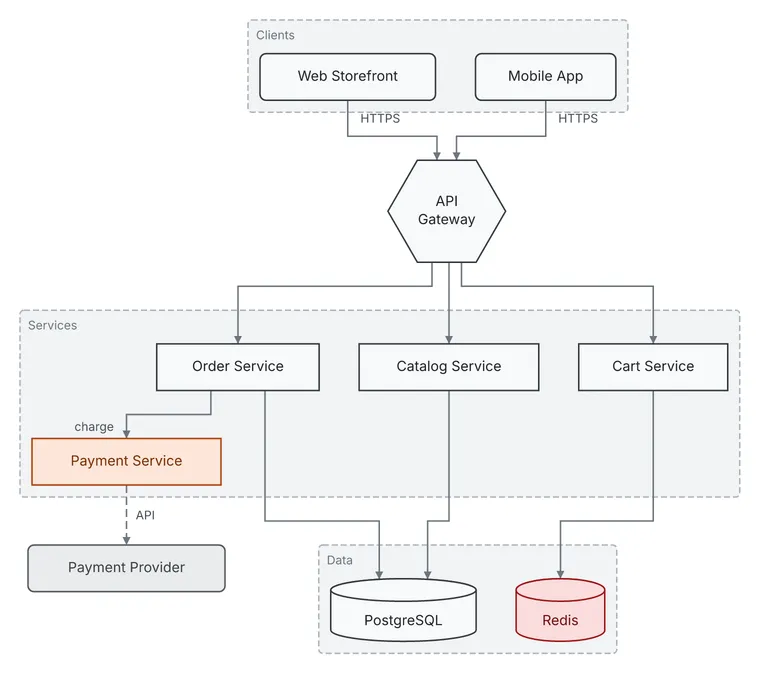
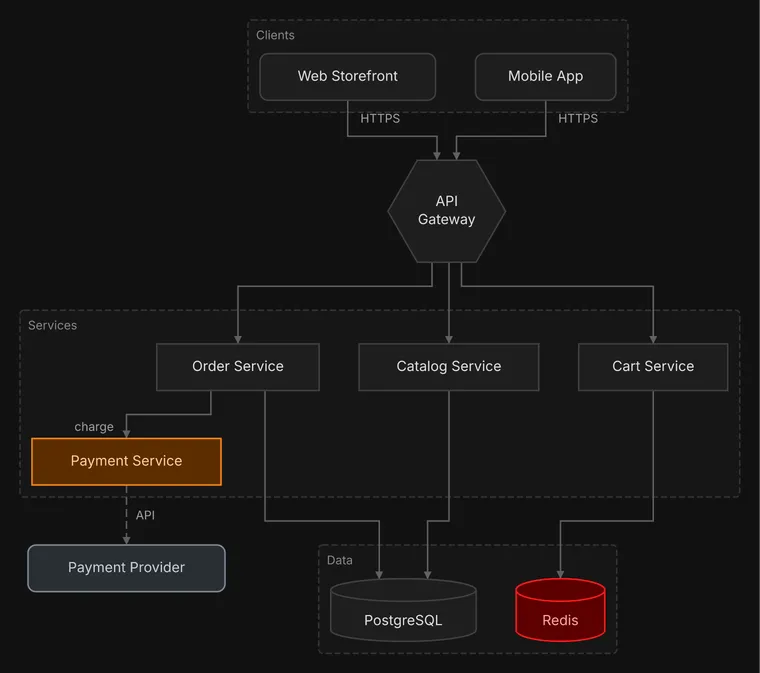
{ "type": "flow", "direction": "DOWN", "nodes": [ {"id": "web", "label": "Web Storefront", "shape": "rounded"}, {"id": "mobile", "label": "Mobile App", "shape": "rounded"}, {"id": "gateway", "label": "API Gateway", "shape": "hexagon"}, {"id": "catalog", "label": "Catalog Service"}, {"id": "cart", "label": "Cart Service"}, {"id": "orders", "label": "Order Service"}, {"id": "payments", "label": "Payment Service", "color": "orange"}, {"id": "provider", "label": "Payment Provider", "shape": "rounded", "color": "gray"}, {"id": "postgres", "label": "PostgreSQL", "shape": "cylinder"}, {"id": "redis", "label": "Redis", "shape": "cylinder", "color": "red"} ], "edges": [ {"id": "e-web-gateway", "from": "web", "to": "gateway", "label": "HTTPS"}, {"id": "e-mobile-gateway", "from": "mobile", "to": "gateway", "label": "HTTPS"}, {"id": "e-gateway-catalog", "from": "gateway", "to": "catalog"}, {"id": "e-gateway-cart", "from": "gateway", "to": "cart"}, {"id": "e-gateway-orders", "from": "gateway", "to": "orders"}, {"id": "e-orders-payments", "from": "orders", "to": "payments", "label": "charge"}, { "id": "e-payments-provider", "from": "payments", "to": "provider", "label": "API", "style": "dashed" }, {"id": "e-catalog-postgres", "from": "catalog", "to": "postgres"}, {"id": "e-orders-postgres", "from": "orders", "to": "postgres"}, {"id": "e-cart-redis", "from": "cart", "to": "redis"} ], "groups": [ {"id": "clients", "label": "Clients", "contains": ["web", "mobile"]}, {"id": "services", "label": "Services", "contains": ["catalog", "cart", "orders", "payments"]}, {"id": "data", "label": "Data", "contains": ["postgres", "redis"]} ]}Render from JSON or Mermaid
diago render diagram.mmd.
Each JSON diagram type has a JSON Schema, and validation errors name the field, such as nodes[0].shape.
Deterministic
Orthogonal routing
Text art for terminals
Diffs in one picture
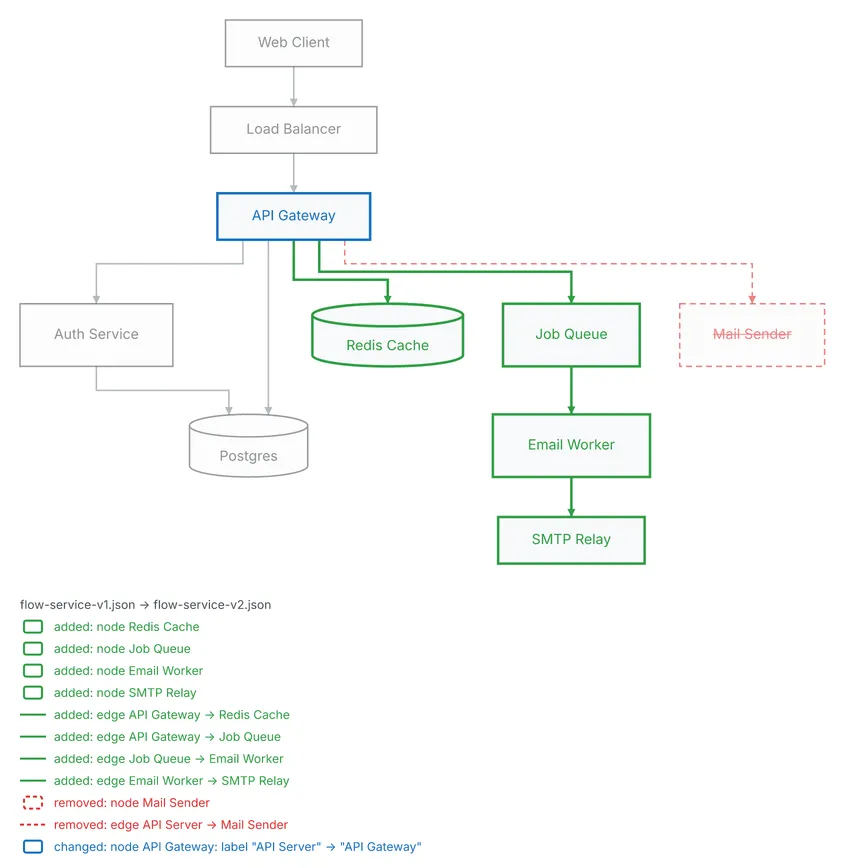
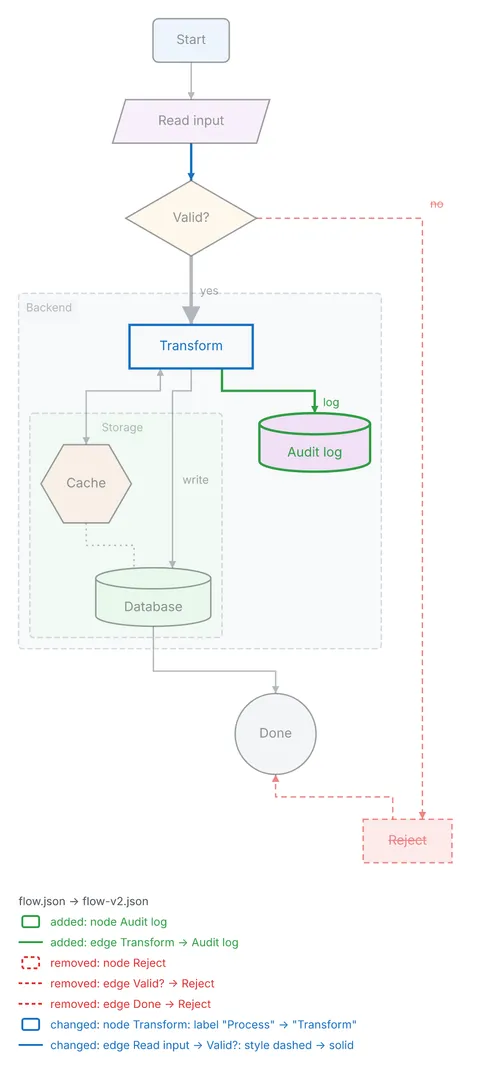
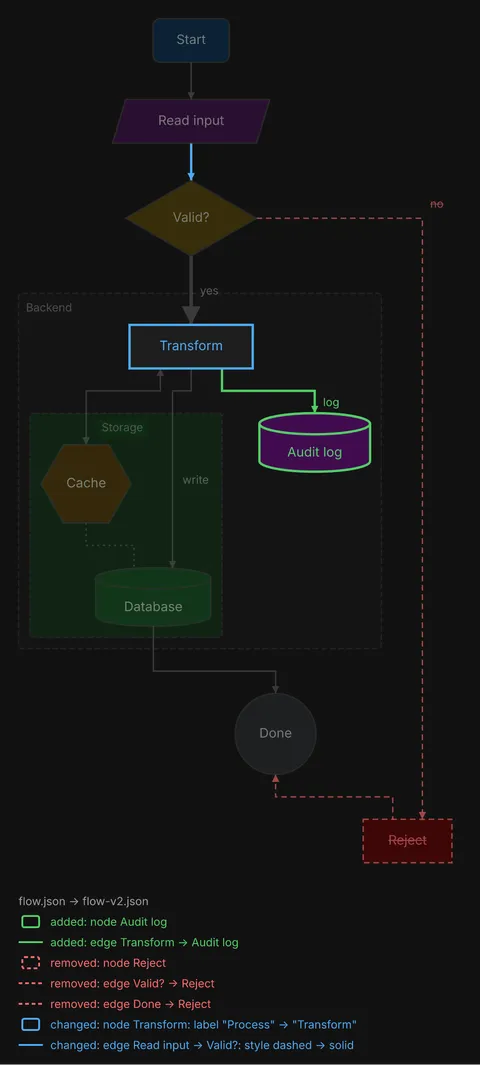
diago diff draws two versions as one picture, marks and lists what was added,
changed or removed, and, in flow and class diagrams, keeps the unchanged boxes close to where
they were.
An agent runs diago as a command: it reads a spec file and writes the diagram to stdout, with no server to connect.
The repository is also a Claude Code plugin, with two skills and a session hook. Install it with:
claude plugin marketplace add oxforge/diagoclaude plugin install diago@diagoCodex, Cursor and any other agent with a shell can run diago too: put one instruction block in the project's AGENTS.md or rules file.
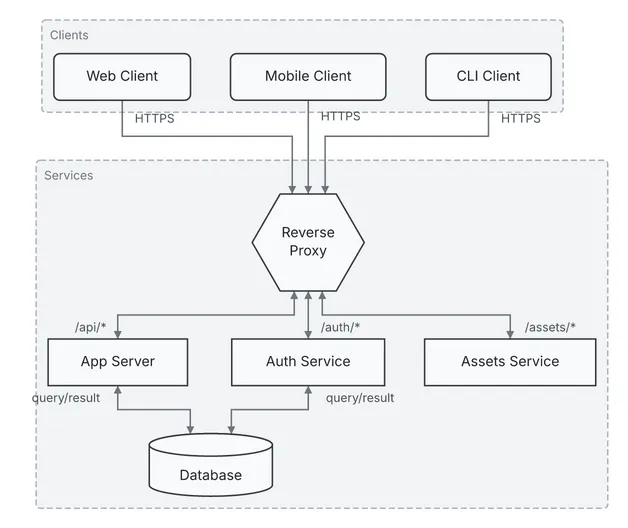
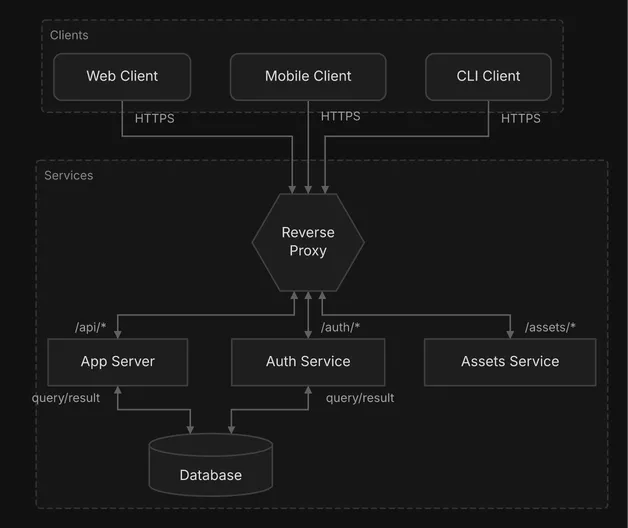
Each spec is shown whole, and each picture is what diago drew from it, unedited.
flow diagram
Two groups, a hexagon, a cylinder and eight labeled edges, five of them two-way. The spec holds no coordinates: diago places every box and routes every edge. See it in every theme and as text art, or edit it in the playground.
{ "type": "flow", "direction": "DOWN", "nodes": [ {"id": "web", "label": "Web Client", "shape": "rounded"}, {"id": "mobile", "label": "Mobile Client", "shape": "rounded"}, {"id": "cli", "label": "CLI Client", "shape": "rounded"}, {"id": "proxy", "label": "Reverse Proxy", "shape": "hexagon"}, {"id": "server", "label": "App Server", "shape": "rect"}, {"id": "auth", "label": "Auth Service", "shape": "rect"}, {"id": "assets", "label": "Assets Service", "shape": "rect"}, {"id": "db", "label": "Database", "shape": "cylinder"} ], "edges": [ {"id": "e-web-proxy", "from": "web", "to": "proxy", "label": "HTTPS", "style": "solid"}, {"id": "e-mobile-proxy", "from": "mobile", "to": "proxy", "label": "HTTPS", "style": "solid"}, {"id": "e-cli-proxy", "from": "cli", "to": "proxy", "label": "HTTPS", "style": "solid"}, { "id": "e-proxy-server", "from": "proxy", "to": "server", "label": "/api/*", "direction": "both" }, {"id": "e-proxy-auth", "from": "proxy", "to": "auth", "label": "/auth/*", "direction": "both"}, { "id": "e-proxy-assets", "from": "proxy", "to": "assets", "label": "/assets/*", "direction": "both" }, { "id": "e-server-db", "from": "server", "to": "db", "label": "query/result", "direction": "both" }, {"id": "e-auth-db", "from": "auth", "to": "db", "label": "query/result", "direction": "both"} ], "groups": [ {"id": "clients", "label": "Clients", "contains": ["web", "mobile", "cli"]}, {"id": "services", "label": "Services", "contains": ["proxy", "server", "auth", "assets", "db"]} ]}

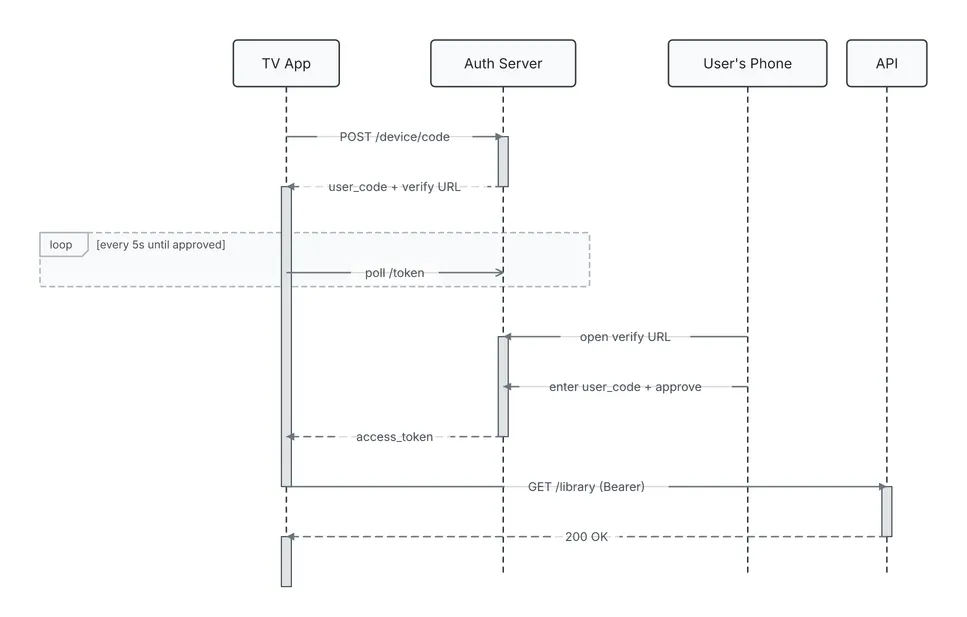
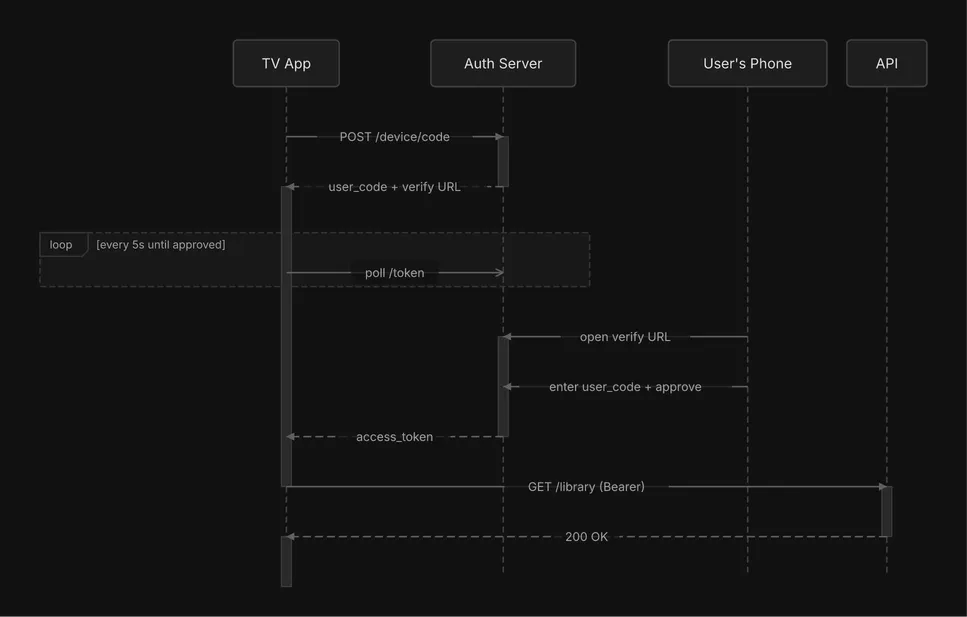
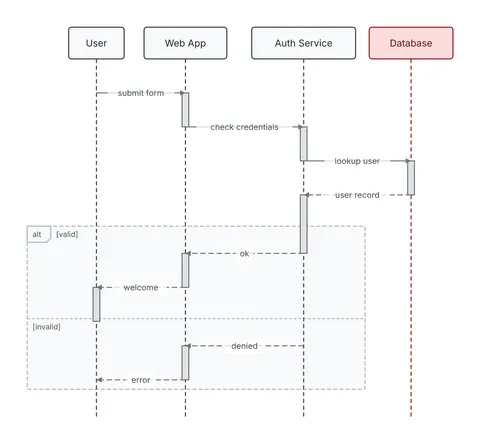
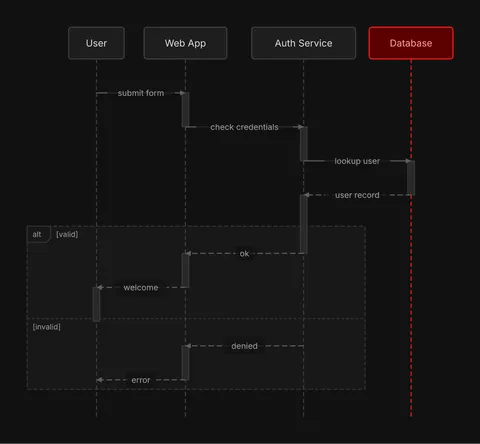
sequence diagram
Four actors, solid, dashed and async messages, and a loop fragment around the polling. See it in every theme and as text art, or edit it in the playground.
{ "type": "sequence", "actors": [ {"id": "tv", "label": "TV App"}, {"id": "auth", "label": "Auth Server"}, {"id": "phone", "label": "User's Phone"}, {"id": "api", "label": "API"} ], "interactions": [ {"from": "tv", "to": "auth", "label": "POST /device/code"}, {"from": "auth", "to": "tv", "label": "user_code + verify URL", "style": "dashed"}, {"from": "tv", "to": "auth", "label": "poll /token", "style": "async"}, {"from": "phone", "to": "auth", "label": "open verify URL"}, {"from": "phone", "to": "auth", "label": "enter user_code + approve"}, {"from": "auth", "to": "tv", "label": "access_token", "style": "dashed"}, {"from": "tv", "to": "api", "label": "GET /library (Bearer)"}, {"from": "api", "to": "tv", "label": "200 OK", "style": "dashed"} ], "fragments": [ { "type": "loop", "over": ["tv", "auth"], "sections": [{"label": "every 5s until approved", "start": 2, "end": 2}] } ]}

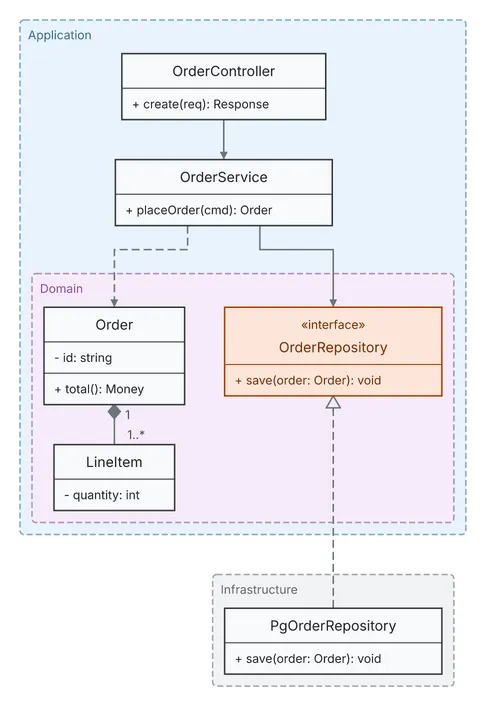
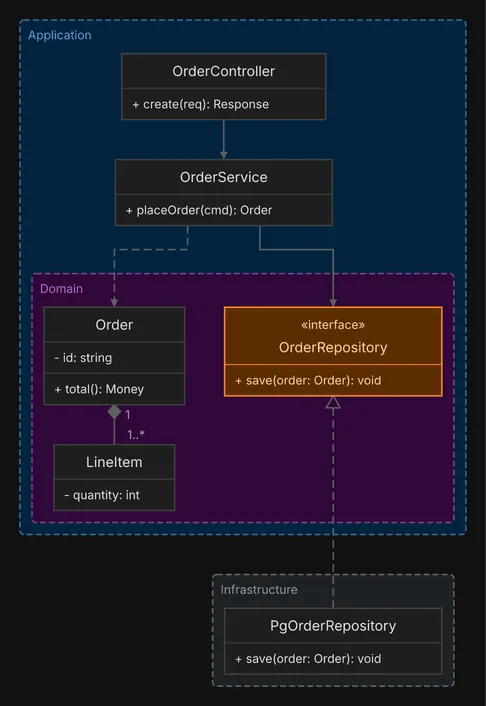
class diagram
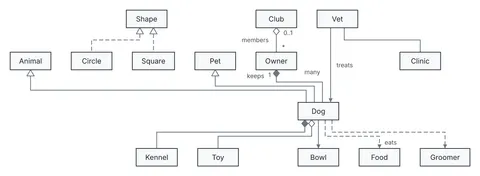
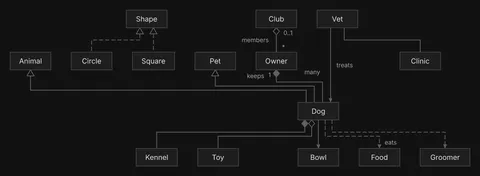
Three colored packages, one inside another, an interface and its implementation, four relation kinds and cardinalities. See it in every theme and as text art, or edit it in the playground.
{ "type": "class", "classes": [ { "id": "controller", "label": "OrderController", "methods": [{"visibility": "+", "text": "create(req): Response"}] }, { "id": "service", "label": "OrderService", "methods": [{"visibility": "+", "text": "placeOrder(cmd): Order"}] }, { "id": "order", "label": "Order", "attributes": [{"visibility": "-", "text": "id: string"}], "methods": [{"visibility": "+", "text": "total(): Money"}] }, { "id": "item", "label": "LineItem", "attributes": [{"visibility": "-", "text": "quantity: int"}] }, { "id": "repo", "label": "OrderRepository", "stereotype": "interface", "color": "orange", "methods": [{"visibility": "+", "text": "save(order: Order): void"}] }, { "id": "pgRepo", "label": "PgOrderRepository", "methods": [{"visibility": "+", "text": "save(order: Order): void"}] } ], "relations": [ { "id": "r-controller-service", "from": "controller", "to": "service", "kind": "association", "directed": true }, {"id": "r-service-order", "from": "service", "to": "order", "kind": "dependency"}, { "id": "r-order-item", "from": "order", "to": "item", "kind": "composition", "from_card": "1", "to_card": "1..*" }, { "id": "r-service-repo", "from": "service", "to": "repo", "kind": "association", "directed": true }, {"id": "r-pgRepo-repo", "from": "pgRepo", "to": "repo", "kind": "realization"} ], "packages": [ { "id": "app", "label": "Application", "color": "blue", "contains": ["controller", "service", "domain"] }, {"id": "domain", "label": "Domain", "color": "purple", "contains": ["order", "item", "repo"]}, {"id": "infra", "label": "Infrastructure", "color": "gray", "contains": ["pgRepo"]} ]}

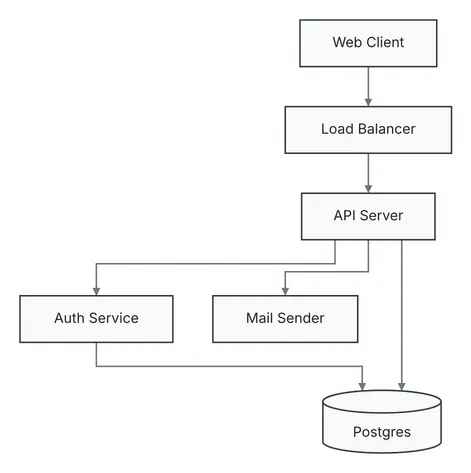
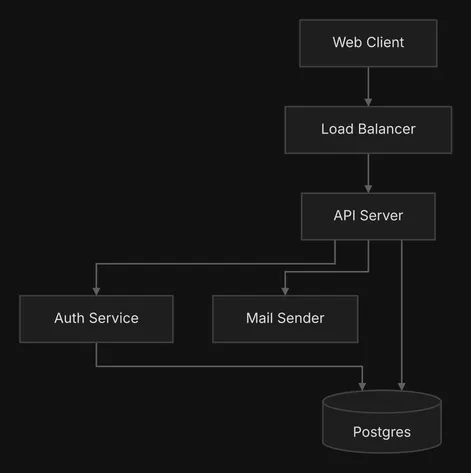
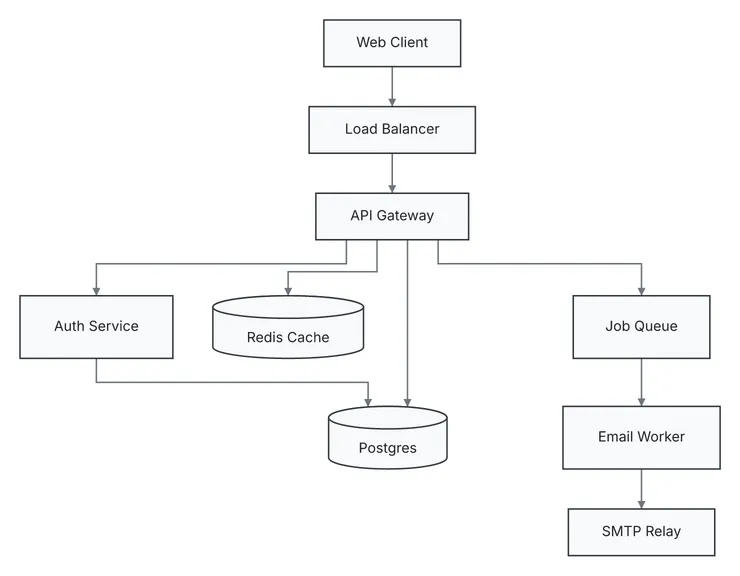
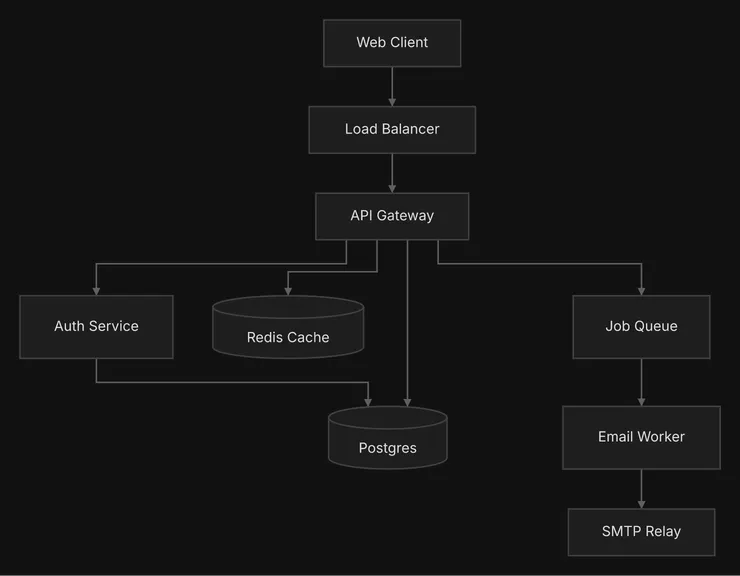
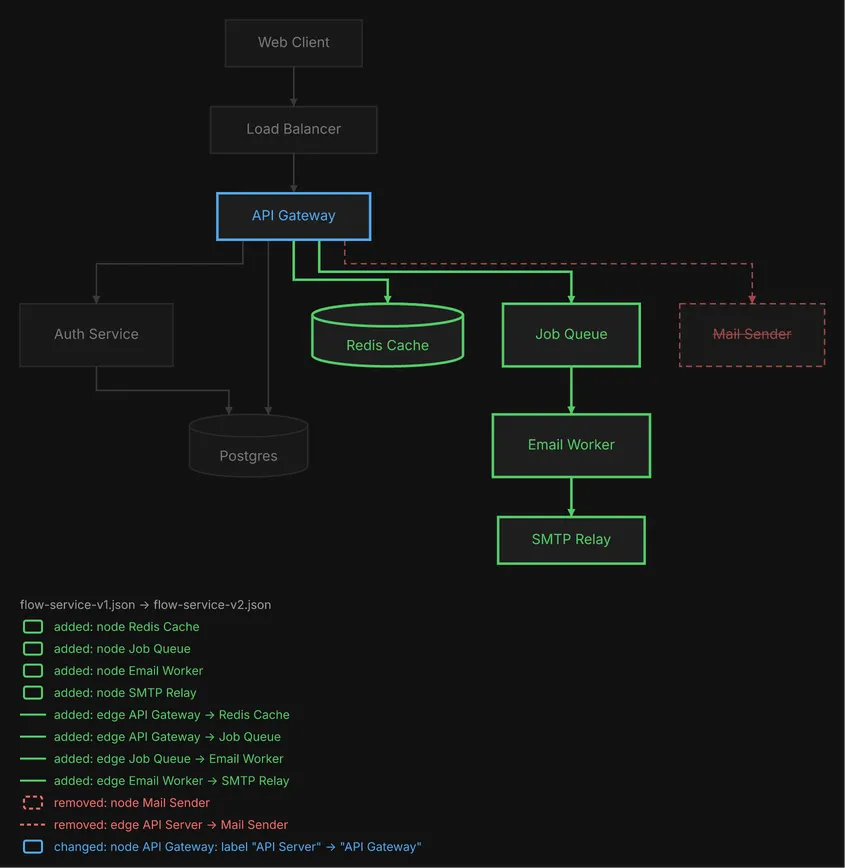
diago diff old.json new.json draws two versions of a spec as one picture. The API server becomes a gateway, the mail sender goes, and a cache, a job queue, an email worker and an SMTP relay join; the unchanged boxes keep their rows and their order. See it full size, or edit it in the playground.


┌────────────┐
│ Web Client │
└────────────┘
│
│
▼
┌────────────────┐
│ Load Balancer │
└────────────────┘
│
│
▼
┌────────────────┐
│ ~ API Gateway │
└────────────────┘
│ │ │ │ │
│ │ │ │ │
┌───────────────┘ │ │ │ └────────────────────────────────────────────────┐
│ │ │ └─────────────────────────────┐ │
│ │ └──────────┐ │ │
▼ │ ▼ ▼ ▼
┌──────────────┐ │ ╒════════════════╕ ┌──────────────┐ ┌────────────────┐
│ Auth Service │ │ │ + Redis Cache │ │ + Job Queue │ │ - Mail Sender │
└──────────────┘ │ └────────────────┘ └──────────────┘ └────────────────┘
│ │ │
│ │ │
└─────────────┐ │ │
▼ ▼ ▼
╒══════════╕ ┌────────────────┐
│ Postgres │ │ + Email Worker │
└──────────┘ └────────────────┘
│
│
▼
┌──────────────┐
│ + SMTP Relay │
└──────────────┘
flow-service-v1.json → flow-service-v2.json
added: node Redis Cache
added: node Job Queue
added: node Email Worker
added: node SMTP Relay
added: edge API Gateway -> Redis Cache
added: edge API Gateway -> Job Queue
added: edge Job Queue -> Email Worker
added: edge Email Worker -> SMTP Relay
removed: node Mail Sender
removed: edge API Server -> Mail Sender
changed: node API Gateway: label "API Server" → "API Gateway"
Added elements are green, changed ones blue, and removed ones red, dashed and struck through; the list under the picture names every change. The diffs guide covers ids, the change list and anchoring a render on its previous version.
More examples, each with its spec, its renders in every theme and its text art.
All examples