Login
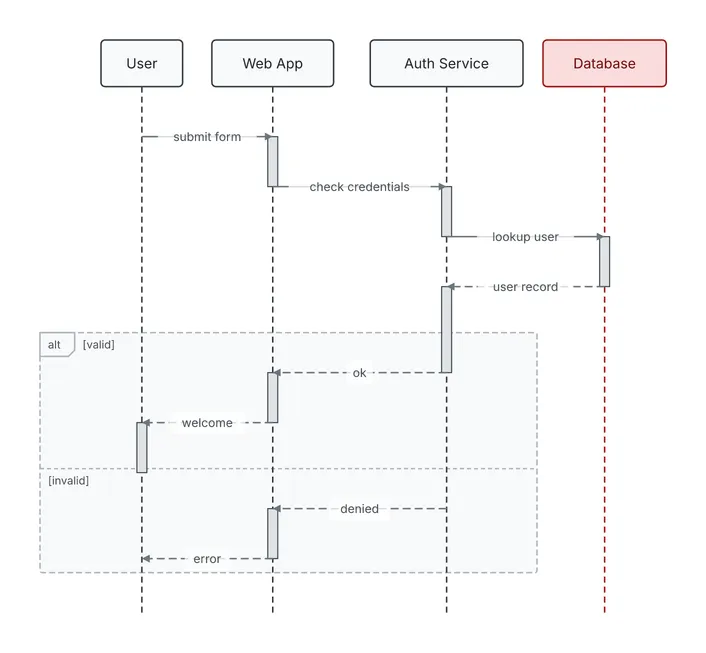
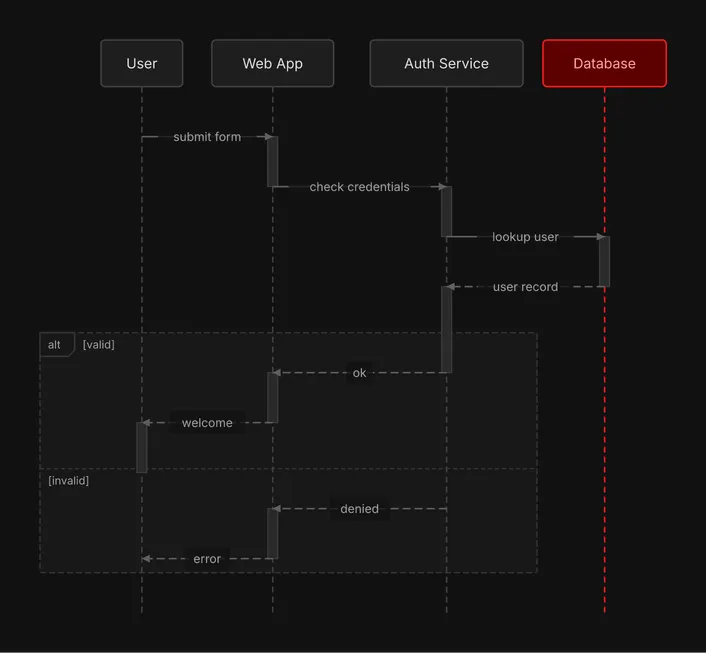
A sequence diagram. A user signs in through the web app and the auth service, with an alt fragment for valid and invalid credentials.
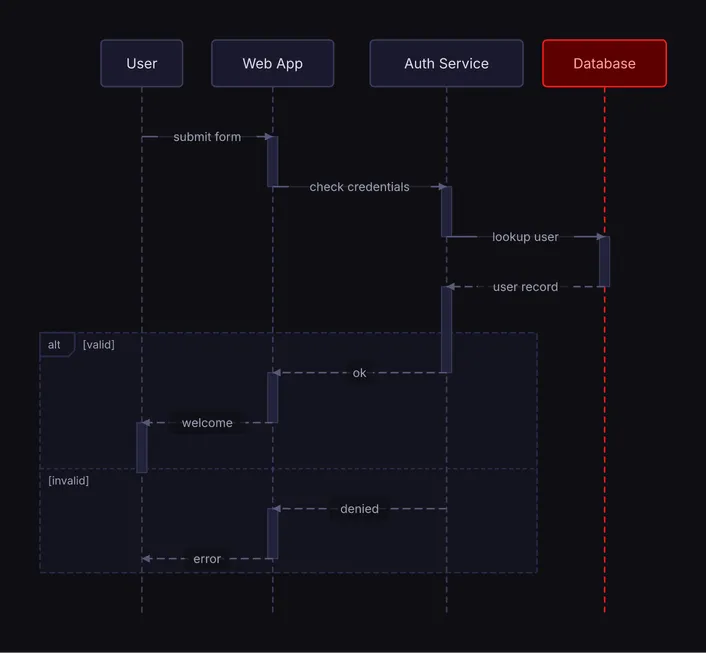
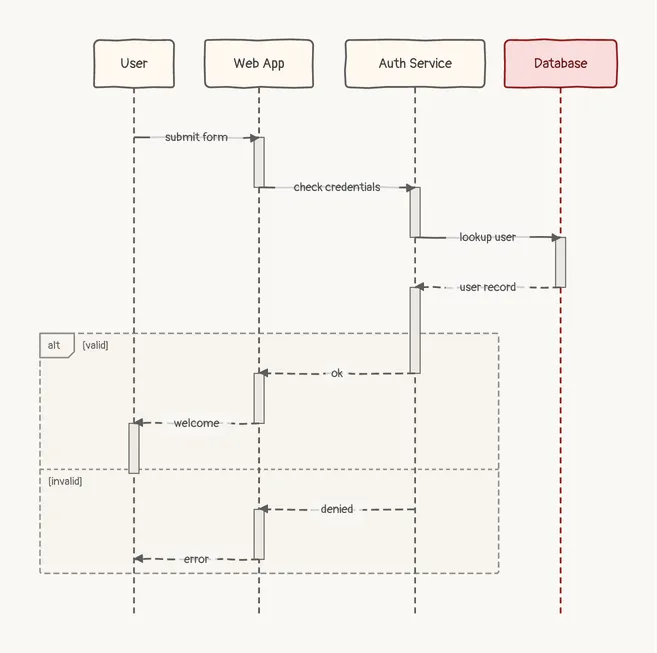
     ┌──────┐     ┌──────────┐       ┌──────────────┐  ┌──────────┐
     │ User │     │ Web App  │       │ Auth Service │  │ Database │
     └──────┘     └──────────┘       └──────────────┘  └──────────┘
         │              │                    │               │
         │              │                    │               │
         ├ submit form ─►                    │               │
         │              ┃                    │               │
         │              ├ check credentials ─►               │
         │              │                    ┃               │
         │              │                    ├─ lookup user ─►
         │              │                    │               ┃
         │              │                    ◄╌ user record ╌┤
         │              │                    ┃               │
  ╔══ alt [valid] ══════╪════════════════════╪═══════╗       │
  ║      │              ◄╌╌╌╌╌╌╌ ok ╌╌╌╌╌╌╌╌╌┤       ║       │
  ║      │              ┃                    │       ║       │
  ║      ◄╌╌ welcome ╌╌╌┤                    │       ║       │
  ║      ┃              │                    │       ║       │
  ╟╌╌ [invalid] ╌╌╌╌╌╌╌╌╪╌╌╌╌╌╌╌╌╌╌╌╌╌╌╌╌╌╌╌╌╪╌╌╌╌╌╌╌╢       │
  ║      │              ◄╌╌╌╌╌ denied ╌╌╌╌╌╌╌┤       ║       │
  ║      │              ┃                    │       ║       │
  ║      ◄╌╌╌ error ╌╌╌╌┤                    │       ║       │
  ╚══════╪══════════════╪════════════════════╪═══════╝       │
         │              │                    │               │
     ┌──────┐     ┌──────────┐       ┌──────────────┐  ┌──────────┐
     │ User │     │ Web App  │       │ Auth Service │  │ Database │
     └──────┘     └──────────┘       └──────────────┘  └──────────┘
Spec
{ "type": "sequence", "actors": [ {"id": "user", "label": "User"}, {"id": "web", "label": "Web App"}, {"id": "auth", "label": "Auth Service"}, {"id": "db", "label": "Database", "color": "red"} ], "interactions": [ {"from": "user", "to": "web", "label": "submit form"}, {"from": "web", "to": "auth", "label": "check credentials"}, {"from": "auth", "to": "db", "label": "lookup user"}, {"from": "db", "to": "auth", "label": "user record", "style": "dashed"}, {"from": "auth", "to": "web", "label": "ok", "style": "dashed"}, {"from": "web", "to": "user", "label": "welcome", "style": "dashed"}, {"from": "auth", "to": "web", "label": "denied", "style": "dashed"}, {"from": "web", "to": "user", "label": "error", "style": "dashed"} ], "fragments": [ { "type": "alt", "over": ["user", "web", "auth"], "sections": [ {"label": "valid", "start": 4, "end": 5}, {"label": "invalid", "start": 6, "end": 7} ] } ]}Draw it yourself
diago render login.json > login.svgOpen it in the playground to edit it in your browser.