Stock update
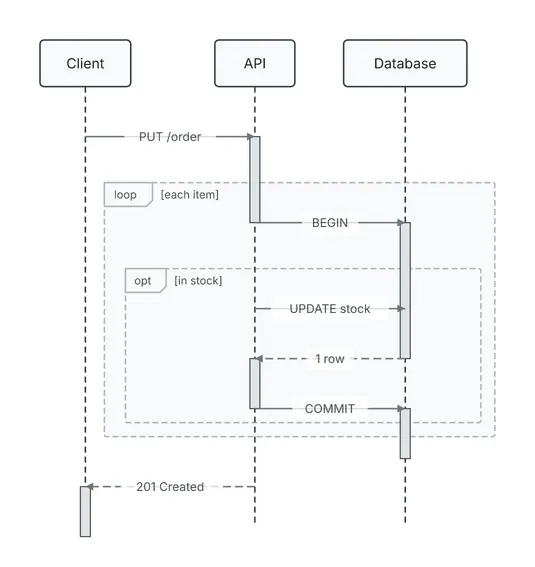
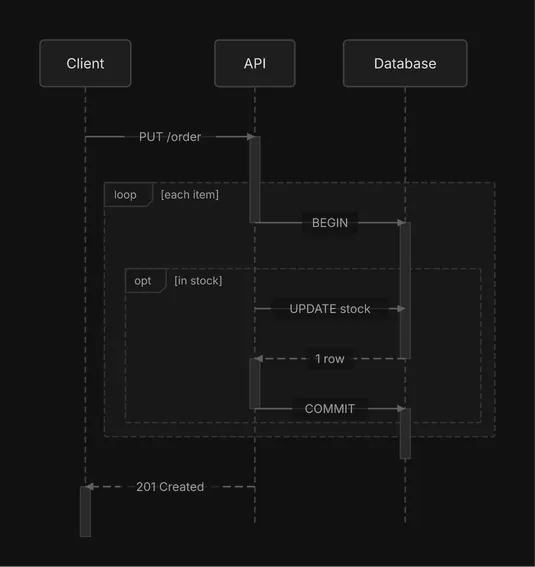
A sequence diagram. An opt fragment inside a loop: for each item of an order, the API begins a transaction and, when the item is in stock, updates the stock and commits.
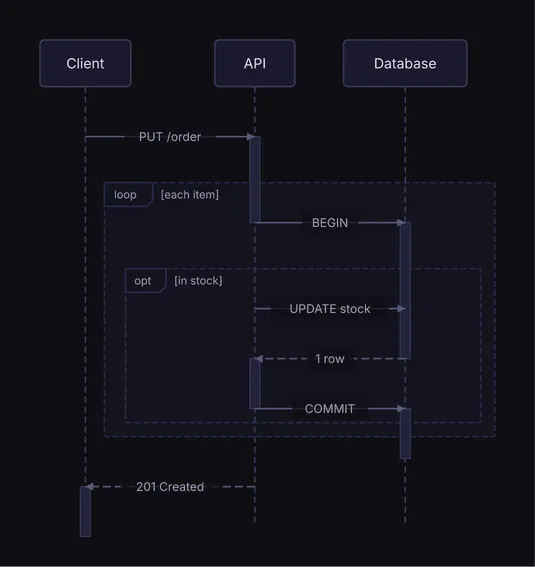
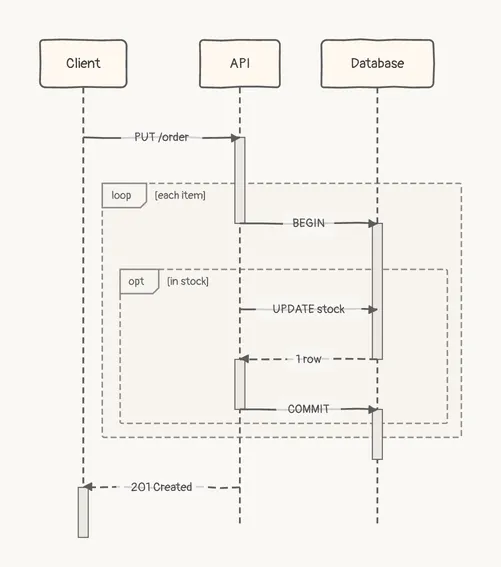
  ┌────────┐      ┌──────┐      ┌──────────┐
  │ Client │      │ API  │      │ Database │
  └────────┘      └──────┘      └──────────┘
       │              │               │
       │              │               │
       ├ PUT /order ──►               │
       │              ┃               │
       │      ╔══ loop [each item] ═══╪══════╗
       │      ║       ├──── BEGIN ────►      ║
       │      ║       │               ┃      ║
       │      ║╔══ opt [in stock] ════╪═════╗║
       │      ║║      ├ UPDATE stock ─►     ║║
       │      ║║      │               ┃     ║║
       │      ║║      ◄╌╌╌╌ 1 row ╌╌╌╌┤     ║║
       │      ║║      ┃               │     ║║
       │      ║║      ├─── COMMIT ────►     ║║
       │      ║╚══════╪═══════════════╪═════╝║
       │      ╚═══════╪═══════════════╪══════╝
       │              │               │
       ◄ 201 Created ╌┤               │
       ┃              │               │
  ┌────────┐      ┌──────┐      ┌──────────┐
  │ Client │      │ API  │      │ Database │
  └────────┘      └──────┘      └──────────┘
Spec
{ "type": "sequence", "actors": [ {"id": "client", "label": "Client"}, {"id": "api", "label": "API"}, {"id": "db", "label": "Database"} ], "interactions": [ {"from": "client", "to": "api", "label": "PUT /order"}, {"from": "api", "to": "db", "label": "BEGIN"}, {"from": "api", "to": "db", "label": "UPDATE stock"}, {"from": "db", "to": "api", "label": "1 row", "style": "dashed"}, {"from": "api", "to": "db", "label": "COMMIT"}, {"from": "api", "to": "client", "label": "201 Created", "style": "dashed"} ], "fragments": [ { "type": "loop", "over": ["api", "db"], "sections": [{"label": "each item", "start": 1, "end": 4}] }, { "type": "opt", "over": ["api", "db"], "sections": [{"label": "in stock", "start": 2, "end": 4}] } ]}Draw it yourself
diago render stock-update.json > stock-update.svgOpen it in the playground to edit it in your browser.