Password reset
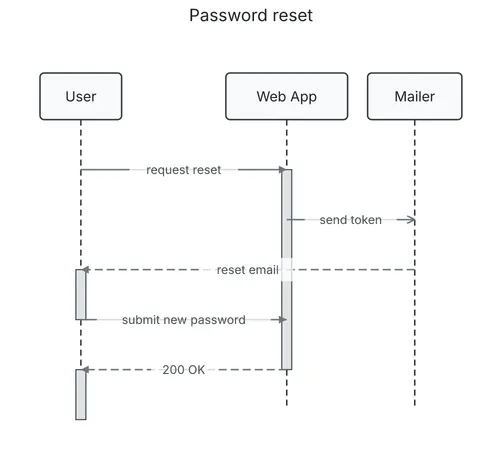
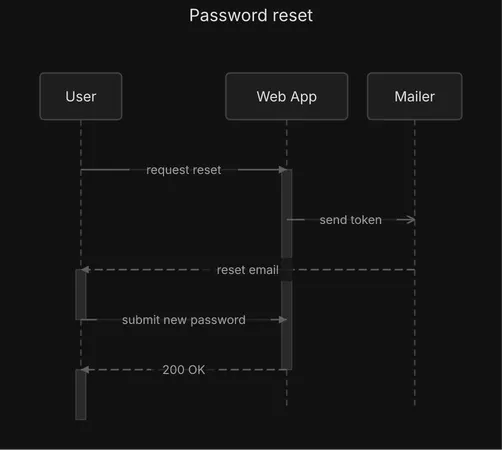
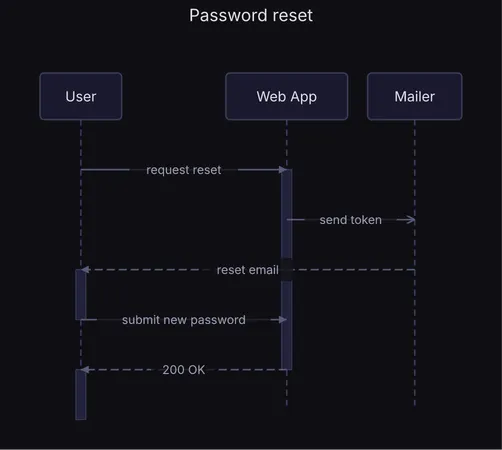
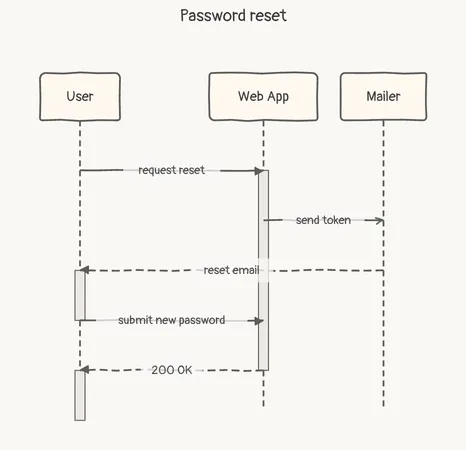
A sequence diagram. A reset email through the mailer, then a new password, under the diagram's title.
                 Password reset

  ┌──────┐             ┌──────────┐   ┌────────┐
  │ User │             │ Web App  │   │ Mailer │
  └──────┘             └──────────┘   └────────┘
      │                      │             │
      │                      │             │
      ├─── request reset ────►             │
      │                      ┃             │
      │                      ┠ send token ─▷
      │                      ┃             │
      ◄╌╌╌╌╌╌╌╌╌╌╌ reset email ╌╌╌╌╌╌╌╌╌╌╌╌┤
      ┃                      ┃             │
      ├ submit new password ─►             │
      │                      ┃             │
      ◄╌╌╌╌╌╌ 200 OK ╌╌╌╌╌╌╌╌┤             │
      ┃                      │             │
  ┌──────┐             ┌──────────┐   ┌────────┐
  │ User │             │ Web App  │   │ Mailer │
  └──────┘             └──────────┘   └────────┘
Spec
{ "type": "sequence", "title": "Password reset", "actors": [ {"id": "user", "label": "User"}, {"id": "web", "label": "Web App"}, {"id": "mail", "label": "Mailer"} ], "interactions": [ {"from": "user", "to": "web", "label": "request reset"}, {"from": "web", "to": "mail", "label": "send token", "style": "async"}, {"from": "mail", "to": "user", "label": "reset email", "style": "dashed"}, {"from": "user", "to": "web", "label": "submit new password"}, {"from": "web", "to": "user", "label": "200 OK", "style": "dashed"} ]}Draw it yourself
diago render password-reset.json > password-reset.svgOpen it in the playground to edit it in your browser.