OAuth device flow
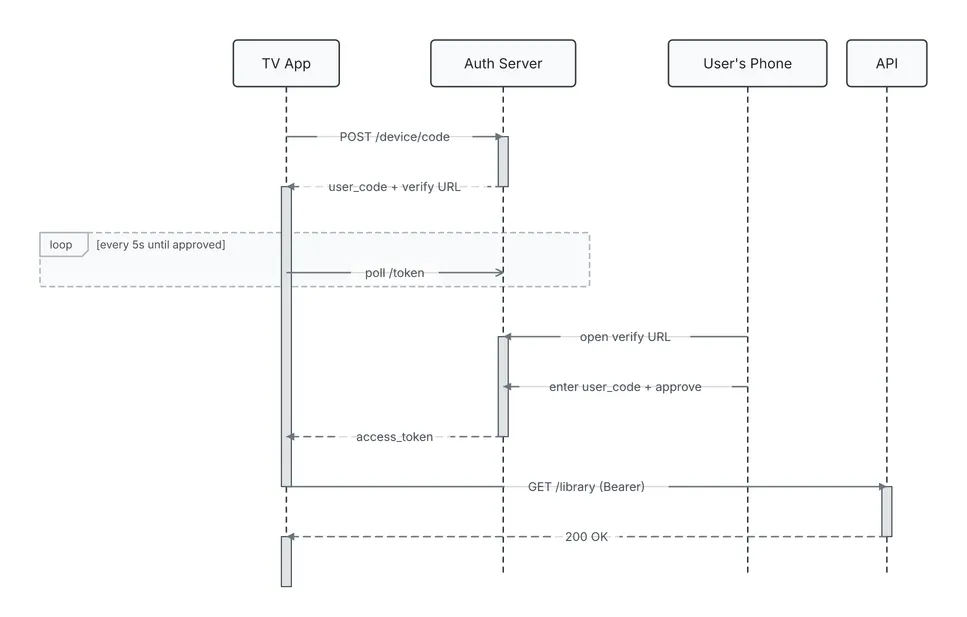
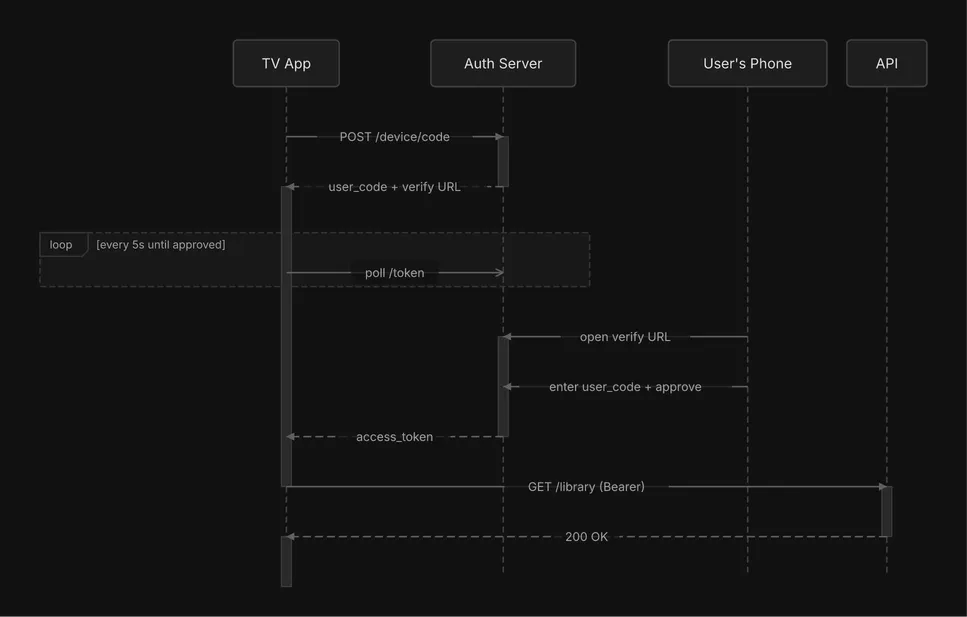
A sequence diagram. A TV app polls the auth server while the user approves on their phone, then calls the API.
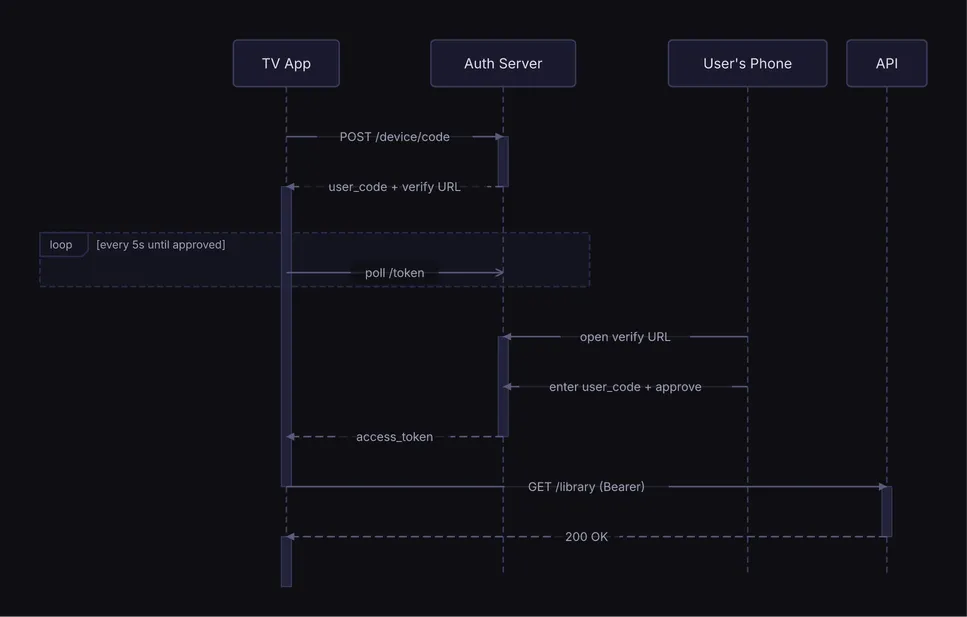
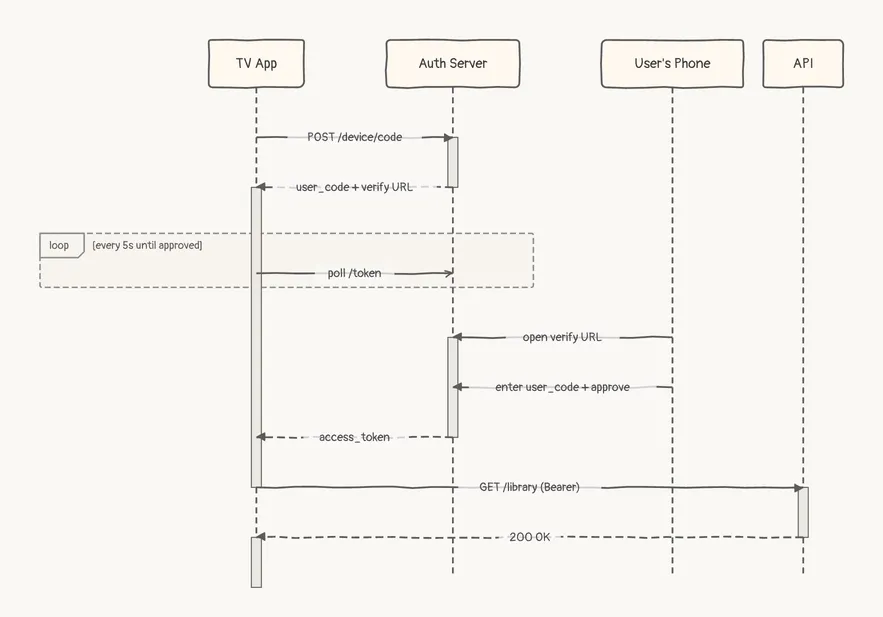
    ┌────────┐             ┌──────────────┐             ┌──────────────┐  ┌──────┐
    │ TV App │             │ Auth Server  │             │ User's Phone │  │ API  │
    └────────┘             └──────────────┘             └──────────────┘  └──────┘
         │                         │                            │             │
         │                         │                            │             │
         ├─── POST /device/code ───►                            │             │
         │                         ┃                            │             │
         ◄ user_code + verify URL ╌┤                            │             │
         ┃                         │                            │             │
  ╔══ loop [every 5s until approved] ══════╗                    │             │
  ║      ┠────── poll /token ──────▷       ║                    │             │
  ╚══════╪═════════════════════════╪═══════╝                    │             │
         ┃                         │                            │             │
         ┃                         ◄───── open verify URL ──────┤             │
         ┃                         ┃                            │             │
         ┃                         ◄ enter user_code + approve ─┤             │
         ┃                         ┃                            │             │
         ◄╌╌╌╌╌ access_token ╌╌╌╌╌╌┤                            │             │
         ┃                         │                            │             │
         ├────────────────────── GET /library (Bearer) ─────────┼─────────────►
         │                         │                            │             ┃
         ◄╌╌╌╌╌╌╌╌╌╌╌╌╌╌╌╌╌╌╌╌╌╌╌╌╌┼╌╌╌ 200 OK ╌╌╌╌╌╌╌╌╌╌╌╌╌╌╌╌╌┼╌╌╌╌╌╌╌╌╌╌╌╌╌┤
         ┃                         │                            │             │
    ┌────────┐             ┌──────────────┐             ┌──────────────┐  ┌──────┐
    │ TV App │             │ Auth Server  │             │ User's Phone │  │ API  │
    └────────┘             └──────────────┘             └──────────────┘  └──────┘
Spec
{ "type": "sequence", "actors": [ {"id": "tv", "label": "TV App"}, {"id": "auth", "label": "Auth Server"}, {"id": "phone", "label": "User's Phone"}, {"id": "api", "label": "API"} ], "interactions": [ {"from": "tv", "to": "auth", "label": "POST /device/code"}, {"from": "auth", "to": "tv", "label": "user_code + verify URL", "style": "dashed"}, {"from": "tv", "to": "auth", "label": "poll /token", "style": "async"}, {"from": "phone", "to": "auth", "label": "open verify URL"}, {"from": "phone", "to": "auth", "label": "enter user_code + approve"}, {"from": "auth", "to": "tv", "label": "access_token", "style": "dashed"}, {"from": "tv", "to": "api", "label": "GET /library (Bearer)"}, {"from": "api", "to": "tv", "label": "200 OK", "style": "dashed"} ], "fragments": [ { "type": "loop", "over": ["tv", "auth"], "sections": [{"label": "every 5s until approved", "start": 2, "end": 2}] } ]}Draw it yourself
diago render oauth-device-flow.json > oauth-device-flow.svgOpen it in the playground to edit it in your browser.