Diffs
diago diff old.json new.json draws one picture of what changed between two specs of a flow,
sequence or class diagram: the union of both, with every element marked.
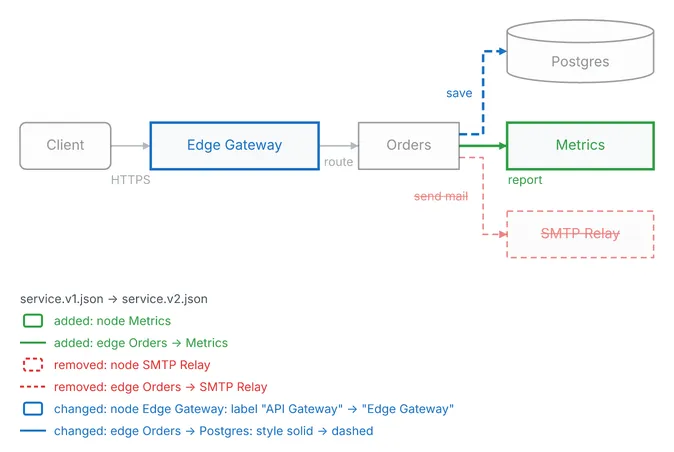
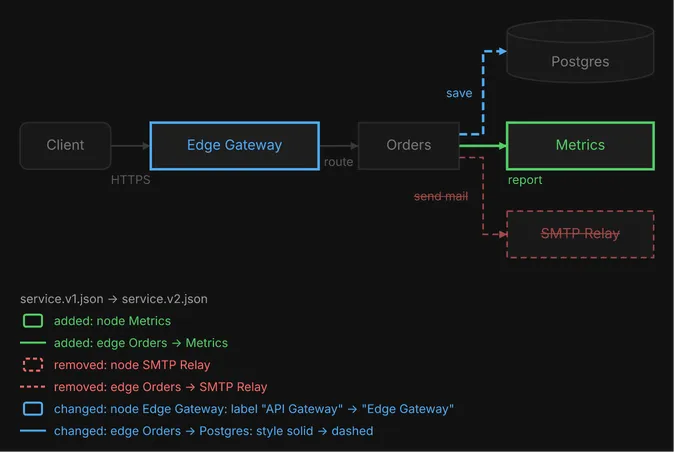
diago diff old.json new.json > diff.svgdiago diff old.json new.json -format textHere is a flow diagram, drawn as text art. Version 2 adds a Metrics node and the edge to it, removes the SMTP Relay and its edge, relabels the gateway, and makes the database edge dashed.
                                                 save ╒══════════════╕
                                                   ┌╌►│   Postgres   │
                                                   ╎  └──────────────┘
                                                   ╎
                                      ┌────────┐   ╎
  ╭────────╮    ┌────────────────┐    │        │╌╌╌┘  ┌──────────────┐
  │ Client │───►│ ~ Edge Gateway │───►│ Orders │─────►│  + Metrics   │
  ╰────────╯    └────────────────┘    │        │───┐  └──────────────┘
           HTTPS                route └────────┘   │ report
                                                   │
                                                   │  ┌──────────────┐
                                                   └─►│ - SMTP Relay │
                                            send mail └──────────────┘

service.v1.json → service.v2.json
added: node Metrics
added: edge Orders -> Metrics
removed: node SMTP Relay
removed: edge Orders -> SMTP Relay
changed: node Edge Gateway: label "API Gateway" → "Edge Gateway"
changed: edge Orders -> Postgres: style solid → dashed
In text art a status shows as a marker on the label: + added, - removed, ~ changed. In SVG
and PNG it shows as color, and the theme’s palette sets it:
- Added elements are green.
- Changed elements are blue.
- Removed elements are red, dashed, faded and struck through, and still take up their own space in the picture, never overlapping an element that stays.
- Unchanged elements are faded in the theme’s neutral colors.
Color carries the status only. An element keeps its own fill, but its own color never reaches
its outline, wire or label, so avoid green, blue and red in a spec you plan to diff.
The change list
Section titled “The change list”Every diff lists its changes, one line each: under the picture in SVG and PNG, each line led by a
sample in its status’s style, and as a footer in text art. A changed line names the fields that
differ, as old → new, by their spec keys:
service.v1.json → service.v2.jsonadded: node Metricsremoved: node SMTP Relaychanged: edge Orders -> Postgres: style solid → dashedAn element with no label reads none → "read/write" when one is added.
The first line is a caption naming the two sides: a file by its base name, a revision as
arch.json @ HEAD~3 (a1b2c3d). It is there even when nothing changed.
Ids decide what changed
Section titled “Ids decide what changed”A diff matches elements by id, which is why each node and edge should have one of its own (see
flow diagrams). Change a label and keep the id, and the element is reported
as changed. Change the id, and the old element is reported as removed and a new one as added. An
edge without an id is matched by its ends, as from->to#n, which breaks when you rename a
node, and a labeled edge without an id raises the edge-without-id advisory
in a diff.
Unchanged boxes stay close
Section titled “Unchanged boxes stay close”A flow or class diff is laid out anchored on the old diagram: each box that did not change keeps
its row (its column, in a diagram drawn RIGHT or LEFT) and its order within it wherever the
new structure allows. It does not keep its exact position, since an added box can widen a row and
move its neighbors, but it stays close to where it was, so the eye goes to what changed. The same
anchoring is available to an ordinary render: a later version of a diagram keeps its surviving
nodes close to where they were, instead of the layout starting over.
diago render -previous v1.svg v2.json > v2.svg-previous takes an SVG that diago rendered, a layout JSON saved on its own, or the previous
spec. It works on flow and class diagrams. A sequence diff is not anchored: it draws the actors
and messages of both versions, every message on a row of its own, removed ones included, so an
added message moves the rows after it down. The messages keep the new version’s order, and a
removed message stays between the neighbors it had.
A sequence diff
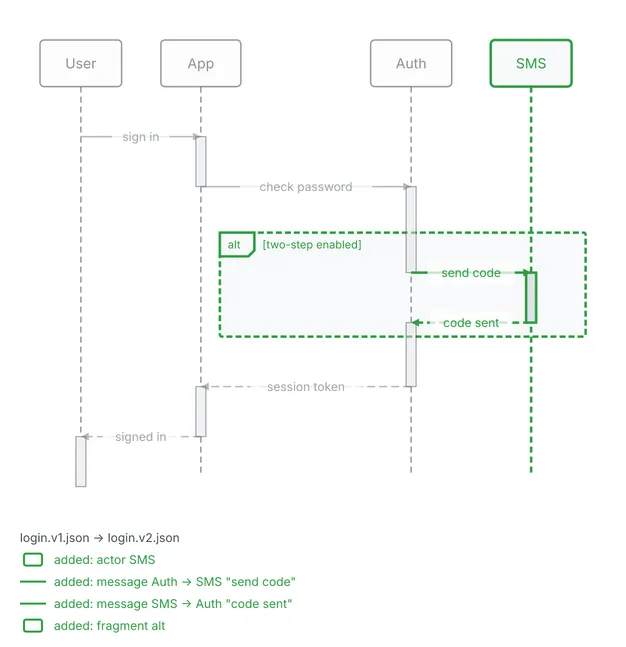
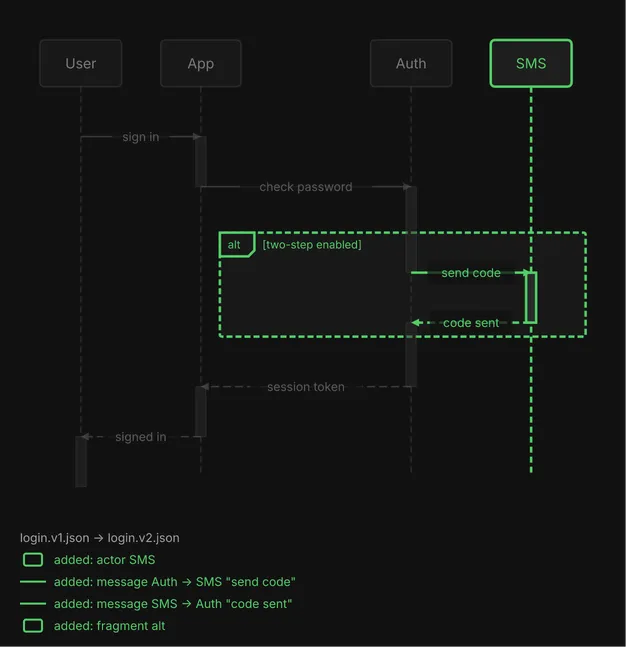
Section titled “A sequence diff”Version 2 of this login adds an SMS actor, the two messages to it, and an alt fragment around
them. A removed message would keep its row but open no activation bar.
  ┌──────┐     ┌──────┐          ┌──────┐      ┌────────┐
  │ User │     │ App  │          │ Auth │      │ + SMS  │
  └──────┘     └──────┘          └──────┘      └────────┘
      │            │                 │              │
      │            │                 │              │
      ├─ sign in ──►                 │              │
      │            ┃                 │              │
      │            ├ check password ─►              │
      │            │                 ┃              │
      │            │          ╔══ alt [+ two-step enabled] ══╗
      │            │          ║      ├ + send code ─►        ║
      │            │          ║      │              ┃        ║
      │            │          ║      ◄ + code sent ╌┤        ║
      │            │          ╚══════╪══════════════╪════════╝
      │            │                 ┃              │
      │            ◄╌ session token ╌┤              │
      │            ┃                 │              │
      ◄ signed in ╌┤                 │              │
      ┃            │                 │              │
  ┌──────┐     ┌──────┐          ┌──────┐      ┌────────┐
  │ User │     │ App  │          │ Auth │      │ + SMS  │
  └──────┘     └──────┘          └──────┘      └────────┘

login.v1.json → login.v2.json
added: actor SMS
added: message Auth -> SMS "send code"
added: message SMS -> Auth "code sent"
added: fragment alt
In text art the stamps go on actor labels, message labels and fragment guards. An unlabeled changed message shows the bare marker.
A class diff
Section titled “A class diff”In a class diff every member line of every class has a two-character status column before its
visibility glyph: + , - , ~ , or two spaces when unchanged. A removed member keeps its row,
and the change list adds one line per changed member. This is a class whose amount attribute is
removed and which gains a refund method:
  ┌────────────────────┐  │     ~ Payment      │  ├────────────────────┤  │ - - amount: Money  │  ├────────────────────┤  │   + pay(): void    │  │ + + refund(): void │  └────────────────────┘
changed: class Payment, removed attribute - amount: Moneychanged: class Payment, added method + refund(): void
Relations in the list are named in the spec’s orientation: from then to.
Versions in git
Section titled “Versions in git”A spec kept in a git repository can be diffed across revisions without copying files out:
diago diff arch.json # its latest changediago diff HEAD~3:arch.json arch.json # three commits ago against the file on diskdiago diff v1.2:arch.json HEAD:arch.json # a tag against the last commitWith one path, diago draws the file’s latest change: the newest version committed along first
parents from HEAD whose content differs from the file on disk, against the file on disk.
Uncommitted edits show against HEAD; a clean file shows what its last change did, and a commit
that only renamed the file is skipped. A symbolic link is refused, on disk or at a revision: git
keeps the link’s text, not the spec it points to, so pass that file instead. Any spec argument
can be REV:PATH, render’s and -previous included. PATH is relative to the current
directory, and the repository is the one that contains it. The caption says which versions were
compared: arch.json @ a1b2c3d → arch.json.
Flags and exit codes
Section titled “Flags and exit codes”-format takes svg (the default), png or text, and -theme, -scale and -width work as
they do for render; -theme overrides the new spec’s theme field. draw.io and Excalidraw are
not available for diffs.
| Exit | Meaning |
|---|---|
| 0 | the diff was drawn; identical inputs draw everything unchanged, with the caption alone |
| 1 | an invalid spec on either side (not JSON, a missing or unknown type, a field of the wrong JSON type, or a validation error), with fields prefixed before. and after. |
| 2 | a usage or internal error, such as a file that cannot be read, a git failure, or a diff stopped after 10 seconds |
The full flag list is in the CLI reference.