Sequence spec
A sequence diagram is a timeline of messages between actors. It suits API flows, protocol
handshakes and any interaction where the order of the messages matters. A spec is one JSON object
with "type": "sequence". Messages are drawn top to bottom in the order of interactions.
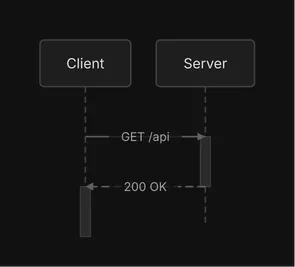
{ "type": "sequence", "activations": true, "actors": [ {"id": "client", "label": "Client"}, {"id": "server", "label": "Server"} ], "interactions": [ {"from": "client", "to": "server", "label": "GET /api", "style": "solid"}, {"from": "server", "to": "client", "label": "200 OK", "style": "dashed"} ]}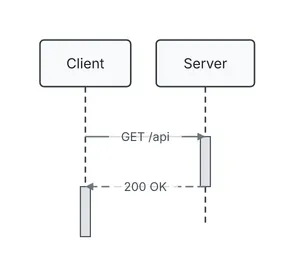
For how to draw well with it, see the Sequence diagrams guide.
A key diago does not know is ignored and reported by check as
unknown-field. No id may hold a control character, U+FFFE or
U+FFFF. Every text field is drawn on one line: a newline or other control character in it prints
as its escape (\n). A spec that breaks a rule below is a validation error on the field’s path,
such as interactions[2].from, and exits 1.
Top level
Section titled “Top level”| Field | Type | Default | Allowed values | Notes |
|---|---|---|---|---|
type |
string | required | sequence |
|
title |
string | none | any text | A band above the diagram in SVG and PNG, a centered first line in text art. Never part of the layout. |
theme |
string | default |
default, dark, midnight, sketch, or a theme file in DIAGO_THEME_DIR |
The theme the render uses unless -theme overrides it. Text art takes none. A name that does not load is a validation error on theme. |
actors |
array of actor | required | at least one | Drawn left to right in this order. |
interactions |
array of interaction | none | A sequence may have no messages. | |
fragments |
array of fragment | none | ||
activations |
boolean | true |
true, false |
false hides the activation bars on the lifelines. |
ignore |
array of string | none | an advisory rule name each | Silences those rules for this spec. An unknown name is a validation error. See Advisories. |
A sequence spec has no direction, and no flat, groups or edge ids: those belong to flow and
class diagrams.
| Field | Type | Default | Allowed values | Notes |
|---|---|---|---|---|
id |
string | required | Unique, not empty. Interactions and fragments refer to it. | |
label |
string | required | The text in the header box. Not empty. | |
color |
string | the theme’s | red, green, blue, yellow, orange, purple, gray, or #rrggbb |
Interaction
Section titled “Interaction”One message from an actor to an actor. Its position in interactions, counting from 0, is the
index that fragment sections refer to.
| Field | Type | Default | Allowed values | Notes |
|---|---|---|---|---|
from |
string | required | an actor id |
|
to |
string | required | an actor id |
|
label |
string | none | The message text, drawn on the arrow. | |
style |
string | solid |
solid, dashed, async |
solid is a call, dashed a return, and async a message with an open arrowhead. |
color |
string | the theme’s | red, green, blue, yellow, orange, purple, gray, or #rrggbb |
Fragment
Section titled “Fragment”A fragment draws a labeled box around a range of messages, split into sections, with its type in a tab at the top-left corner.
| Field | Type | Default | Allowed values | Notes |
|---|---|---|---|---|
type |
string | required | alt, opt, loop, par, break |
|
over |
array of string | required | actor ids | The actors the box spans, at least one. The box also widens to every actor that a message in its sections reaches. |
sections |
array of section | required | At least one. |
Section
Section titled “Section”| Field | Type | Default | Allowed values | Notes |
|---|---|---|---|---|
label |
string | none | The guard or caption, such as valid token. May be left out or empty, but an alt section with no label is reported as unlabeled-alt-section. |
|
start |
integer | required | 0 up to the last interaction index |
The first interaction in the section, after the previous section’s end. |
end |
integer | required | start up to the last interaction index |
The last interaction in the section, inclusive. |
A fragment’s sections run in order without overlapping. Two fragments nest (one’s range inside
the other’s) or stay apart; ranges that cross are an error. A fragment whose range lies inside
another’s is drawn nested inside it; more than three levels is reported as deep-nesting. This
fragment splits the last two messages into two branches:
{ "type": "alt", "over": ["auth", "db"], "sections": [ {"label": "user found", "start": 1, "end": 2}, {"label": "no such user", "start": 3, "end": 3} ]}Using the schema in an editor
Section titled “Using the schema in an editor”The JSON schema for sequence specs is served at /schemas/sequence.json. Map it to
your spec files in your editor’s JSON settings to get completion and the allowed values of every
enum. Do not put a "$schema" key in the spec itself: diago reports it as unknown-field
(unknown key "$schema" is ignored), so the editor’s own schema mapping is the way.