Output formats
diago render -format <name> writes one of five formats to stdout. diago diff writes the first
three. The rest of this page says what each is good for.
The default, and the canonical output: every other image format is made from it. It carries its own fonts, so it looks the same wherever it is opened, and it is deterministic: the same spec and theme give the same bytes, so an unchanged diagram makes no change in version control.
diago render spec.json > diagram.svgA flow or class SVG also embeds its layout, which is what -previous reads back (see
Diffs).
A PNG is the SVG rasterized by resvg, which must be
installed. -scale multiplies the size (default 2), and -width sets the width in pixels and
overrides -scale.
diago render -format png spec.json > diagram.pngdiago render -format png -scale 3 spec.json > big.pngdiago render -format png -width 800 spec.json > fixed.pngText art
Section titled “Text art”-format text (or txt) draws the diagram in Unicode box-drawing characters, to read in a
terminal, a code block or a pull request. It is meant to be read where an image cannot be shown.
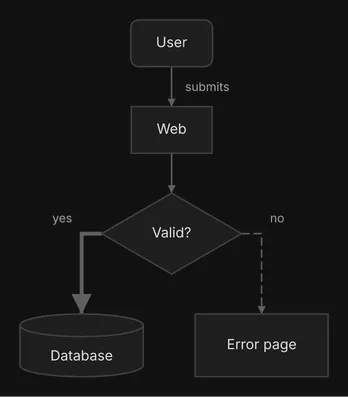
diago render -format text spec.json{ "type": "flow", "direction": "DOWN", "nodes": [ {"id": "user", "label": "User", "shape": "rounded"}, {"id": "web", "label": "Web"}, {"id": "ok", "label": "Valid?", "shape": "diamond"}, {"id": "db", "label": "Database", "shape": "cylinder"}, {"id": "err", "label": "Error page"} ], "edges": [ {"id": "user-web", "from": "user", "to": "web", "label": "submits"}, {"id": "web-ok", "from": "web", "to": "ok"}, {"id": "ok-db", "from": "ok", "to": "db", "label": "yes", "style": "thick"}, {"id": "ok-err", "from": "ok", "to": "err", "label": "no", "style": "dashed"} ]}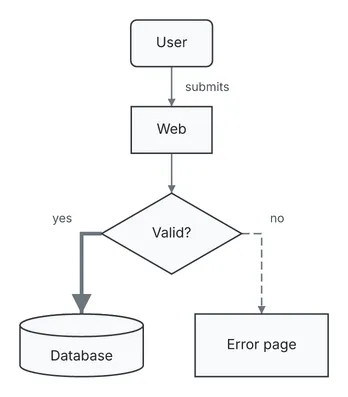
             ╭──────╮
             │ User │
             ╰──────╯
                 │
                 │ submits
                 ▼
             ┌──────┐
             │ Web  │
             └──────┘
                 │
                 │
                 ▼
          ┌────────────┐
          │ ◇ Valid? ◇ │
          └────────────┘
          yes ┃    ╎ no
              ┃    ╎
        ┌━━━━━┘    └╌╌╌╌╌╌┐
        ▼                 ▼
  ╒══════════╕     ┌────────────┐
  │ Database │     │ Error page │
  └──────────┘     └────────────┘
Text art is laid out on its own, in whole character cells, so node positions differ from the SVG of the same spec even though both are orthogonal. What it keeps of the spec:
- Shapes:
rect,rounded,cylinderanddiamondare told apart.hexagonandparallelogramdraw as a box, andcirclelikerounded, so a role shown only by one of those shapes should also be in its label. - Edge styles:
solid,dashed,dottedandthickare drawn with different line characters. - Color: dropped. Never let color carry meaning alone.
An edge label sits next to a wire that runs along its row. When a label cannot be placed without
overwriting other ink, the text renderer drops it and the render prints the text-label-dropped
advisory on stderr. Rename the label to something shorter, or leave
the edge unlabeled. check never lays out, so it cannot report this one: only a text render does.
draw.io and Excalidraw
Section titled “draw.io and Excalidraw”For a diagram someone will edit by hand, -format drawio writes diagrams.net XML and
-format excalidraw writes Excalidraw JSON. Both are made from the laid-out diagram, not from the
SVG, and both are for flow diagrams only: a sequence or class spec is an error.
diago render -format drawio spec.json > diagram.drawiodiago render -format excalidraw spec.json > diagram.excalidrawdiago diff does not write them.
Which one fits where
Section titled “Which one fits where”| The reader sees it in | Use |
|---|---|
| A chat reply in a terminal | text art, in a fenced text block, at most 100 columns wide |
| A chat reply in a graphical app, or an unknown one | the same text art, then the SVG file’s path so the colored diagram can be opened |
| A Markdown file kept in git | a PNG beside it with alt text, and its spec JSON so it can be regenerated (SVG when resvg is missing) |
| A design note or plan written for review | text art and an image link, with versions and diffs |
| An HTML page | SVG files shown with <img>; for a page that follows light and dark mode, a <picture> with a prefers-color-scheme: dark source for the dark theme |
| A diagram someone will edit by hand | draw.io or Excalidraw, flow only beta |
For an HTML page, never paste SVG markup inline: diagrams share element ids, and a diff’s styles would apply to the whole page.