Flow spec
A flow diagram is a directed graph: nodes, the edges between them, and optional groups. It suits
architecture diagrams, flowcharts, data pipelines and decision trees. A spec is one JSON object
with "type": "flow".
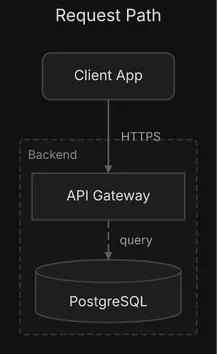
{ "type": "flow", "title": "Request Path", "direction": "DOWN", "nodes": [ {"id": "client", "label": "Client App", "shape": "rounded"}, {"id": "api", "label": "API Gateway", "shape": "rect"}, {"id": "db", "label": "PostgreSQL", "shape": "cylinder"} ], "edges": [ {"id": "client-api", "from": "client", "to": "api", "label": "HTTPS"}, {"id": "api-db", "from": "api", "to": "db", "label": "query", "style": "dashed"} ], "groups": [{"id": "backend", "label": "Backend", "contains": ["api", "db"]}]}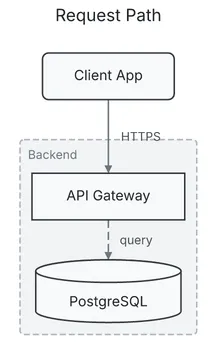
For how to draw well with it, see the Flow diagrams guide.
Field names match in any case (Nodes reads as nodes), and a key diago does not know is
ignored and reported by check as unknown-field, with the
nearest known key as a suggestion. No id may hold a control character, U+FFFE or U+FFFF. A
spec that breaks a rule below is a validation error on the field’s path, such as
nodes[1].shape, and exits 1.
Top level
Section titled “Top level”| Field | Type | Default | Allowed values | Notes |
|---|---|---|---|---|
type |
string | required | flow |
|
title |
string | none | any text | A band above the diagram in SVG and PNG, a centered first line in text art. Never part of the layout. A newline or other control character prints as its escape (\n); only a node’s label breaks into lines. |
theme |
string | default |
default, dark, midnight, sketch, or a theme file in DIAGO_THEME_DIR |
The theme the render uses unless -theme overrides it. Text art takes none. A name that does not load is a validation error on theme. |
direction |
string | AUTO |
DOWN, UP, RIGHT, LEFT, AUTO |
The way the diagram flows. AUTO lets the engine choose from the shape of the graph. Upper case only. |
nodes |
array of node | required | at least one | |
edges |
array of edge | none | A flow may have nodes only. | |
groups |
array of group | none | ||
ignore |
array of string | none | an advisory rule name each | Silences those rules for this spec. An unknown name is a validation error. See Advisories. |
Every edge is routed orthogonally, in right-angle segments. There is no diagram-level style to
choose. A top-level style, hints or alignment key was removed and is reported as
removed-field.
| Field | Type | Default | Allowed values | Notes |
|---|---|---|---|---|
id |
string | required | Unique, not empty. Edges and groups refer to it. It must not contain -> or end in @ and digits (such as db@2): derived edge ids and layout anchoring use those forms. |
|
label |
string | required | The text in the box. Not empty. A \n starts a new line. |
|
shape |
string | rect |
rect, rounded, circle, diamond, cylinder, hexagon, parallelogram |
|
color |
string | the theme’s | red, green, blue, yellow, orange, purple, gray, or #rrggbb |
Fill, stroke and text are derived from it, so they stay consistent. |
| Field | Type | Default | Allowed values | Notes |
|---|---|---|---|---|
id |
string | from->to#n |
Stable across edits: diffs and -previous anchoring key on it. n counts every edge between the same pair in spec order. When present it must not be empty or repeat another edge’s id. |
|
from |
string | required | a node id |
|
to |
string | required | a node id |
May equal from, a self-loop. |
label |
string | none | Drawn beside the edge. A newline or other control character prints as its escape (\n); only a node’s label breaks into lines. |
|
style |
string | solid |
solid, dashed, dotted, thick |
|
direction |
string | forward |
forward, backward, both, none |
Where the arrowheads go: forward at the target, backward at the source, both at both ends, none at neither. |
color |
string | the theme’s | red, green, blue, yellow, orange, purple, gray, or #rrggbb |
|
flat |
boolean | false |
true, false |
A link that implies no order. See below. Not allowed on a self-loop. |
Give every edge an explicit id. A labeled edge without one is reported as edge-without-id
under render -previous and diff, where ids decide which edge is which.
Flat edges
Section titled “Flat edges”A flat edge does not take part in ranking: its ends stay wherever the rest of the diagram puts
them, side by side when it allows, and the edge is routed on the finished layout. Use it for links
between peers that would otherwise be forced into a hierarchy they do not have, such as
replication between two sites that each serve their own traffic.
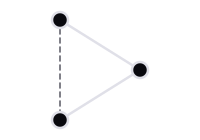
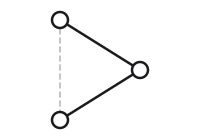
{"id": "east-west", "from": "east_db", "to": "west_db", "label": "async", "style": "dashed", "flat": true}Two peer sites, each with its own web, API and database, joined by one flat edge between their databases sit side by side; without it they stack.
A flat edge helps between nodes that other edges already place. A node whose only edges are flat
is laid out as an unconnected node, wherever there is room and not beside its partner, so keep one
of its links ordinary: a standby database with nothing else attached keeps its replication edge
from the primary ordinary, which puts it under the primary. When no clean route exists between
the ends, the edge is laid out as an ordinary edge and the render warns with flat-edge-ranked.
The warning belongs to the format rendered: text art and SVG are laid out differently and can
decide a flat edge differently.
A group draws a frame around the nodes and groups it contains.
| Field | Type | Default | Allowed values | Notes |
|---|---|---|---|---|
id |
string | required | Unique among groups, and not the id of a node. It must not contain -> or end in @ and digits (such as db@2): derived edge ids and layout anchoring use those forms. |
|
label |
string | required | Drawn on the frame. A newline or other control character prints as its escape (\n); only a node’s label breaks into lines. |
|
contains |
array of string | none | node ids and group ids | A group id makes a child group, drawn inside its parent. A node or group belongs to at most one group. A group with nothing in it is reported as empty-group. |
color |
string | the theme’s | red, green, blue, yellow, orange, purple, gray, or #rrggbb |
Groups nest up to 3 levels. A fourth level, or a group that contains itself, is a validation
error on groups. Deeper groups are drawn with progressively different fill shading, so nesting
reads at a glance:
"groups": [ {"id": "cloud", "label": "Cloud", "contains": ["services", "db"]}, {"id": "services", "label": "Services", "contains": ["api", "auth"]}]Using the schema in an editor
Section titled “Using the schema in an editor”The JSON schema for flow specs is served at /schemas/flow.json. Map it to your
spec files in your editor’s JSON settings to get completion and the allowed values of every enum.
Do not put a "$schema" key in the spec itself: diago reports it as unknown-field
(unknown key "$schema" is ignored), so the editor’s own schema mapping is the way.