Claude Code
The diago repository is also a Claude Code plugin. It has two skills and a session hook, and together they make the agent draw a diagram when it has something with structure to show you, in a format your screen can display.
Install and update
Section titled “Install and update”The plugin needs diago on your PATH (see getting started). Add the repository as a
marketplace, then install the plugin from it:
claude plugin marketplace add oxforge/diagoclaude plugin install diago@diagoThe plugin follows diago’s releases: the marketplace pins it to the latest release, so its skills
match the binary go install …@latest installs. After a release, update it:
claude plugin marketplace update diagoclaude plugin update diago@diagoTo try a checkout’s skills, start Claude Code with claude --plugin-dir /path/to/diago.
What the agent then does
Section titled “What the agent then does”When the agent is about to present something with structure, it decides whether a diagram makes that faster to grasp. The moments are:
- explaining how existing code works;
- proposing a design, or asking you to choose between approaches;
- reporting a debugging root cause;
- summarizing a change it made or proposes;
- presenting a plan’s task order;
- writing a document for you to review.
A diagram has to earn its place: connections among three or more things, a path through three or more parties or steps, an order or dependencies, a type model, a state machine, or a before and after of any of these. Lists, single facts, numbers and two-step sequences stay prose or tables. The agent draws at most two diagrams per reply, each of 3 to 12 nodes, and only what it verified from code it read or commands it ran.
It picks the format by where you read it:
- In a terminal, text art in a fenced
textblock, at most 100 columns wide. - In a graphical host (a desktop app, an IDE, the web), the same text art, then the SVG file’s path on its own line, where clicking it opens the colored diagram.
- In a Markdown file tracked by git, a PNG beside the file with alt text, and the spec next to it so it can be regenerated.
- In an HTML page, SVG files shown with
<img>. - For a diagram you will edit by hand, a draw.io or Excalidraw file (flow diagrams only, and in beta).
Every diagram is a spec file the agent writes, checks with diago check -strict, and reads as
text art itself before you see it.
Changes are diff diagrams
Section titled “Changes are diff diagrams”When the agent changes or proposes to change structure in code, architecture or business logic,
it shows the before and the after as one diff diagram. It builds both
sides from the code, never from memory: version 1 from the base, version 2 from the result. Every
element that stays keeps its id, so only real changes are marked, and in a flow or class
diagram the unchanged boxes stay close to where they were.
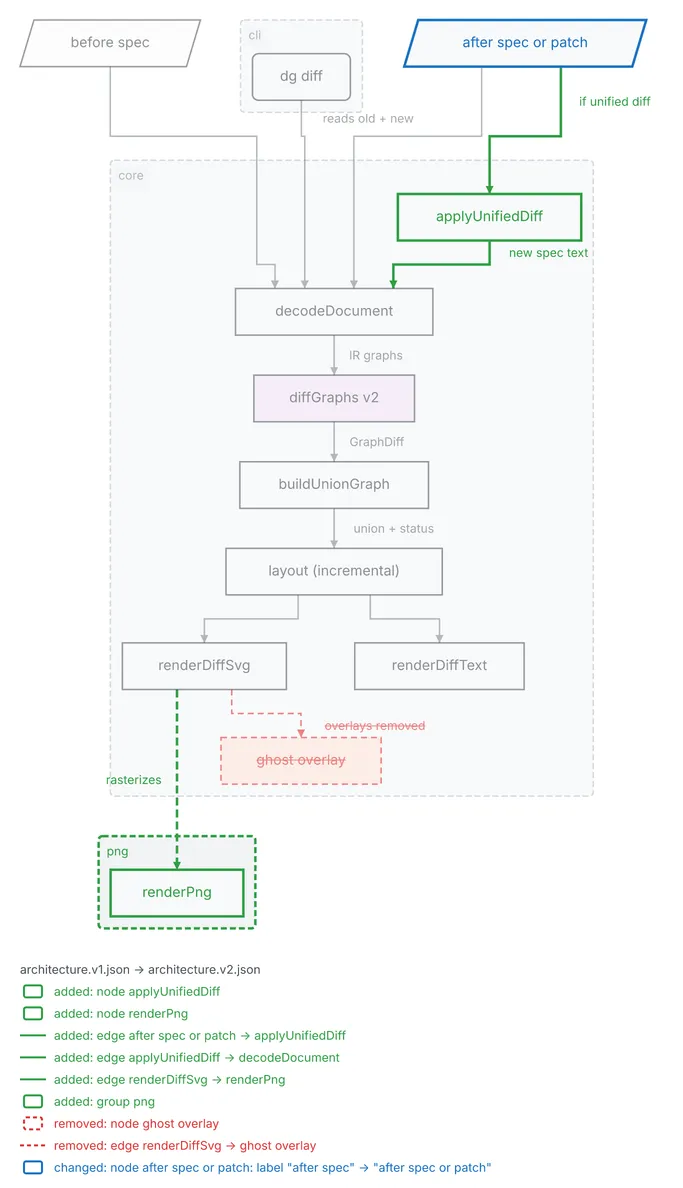
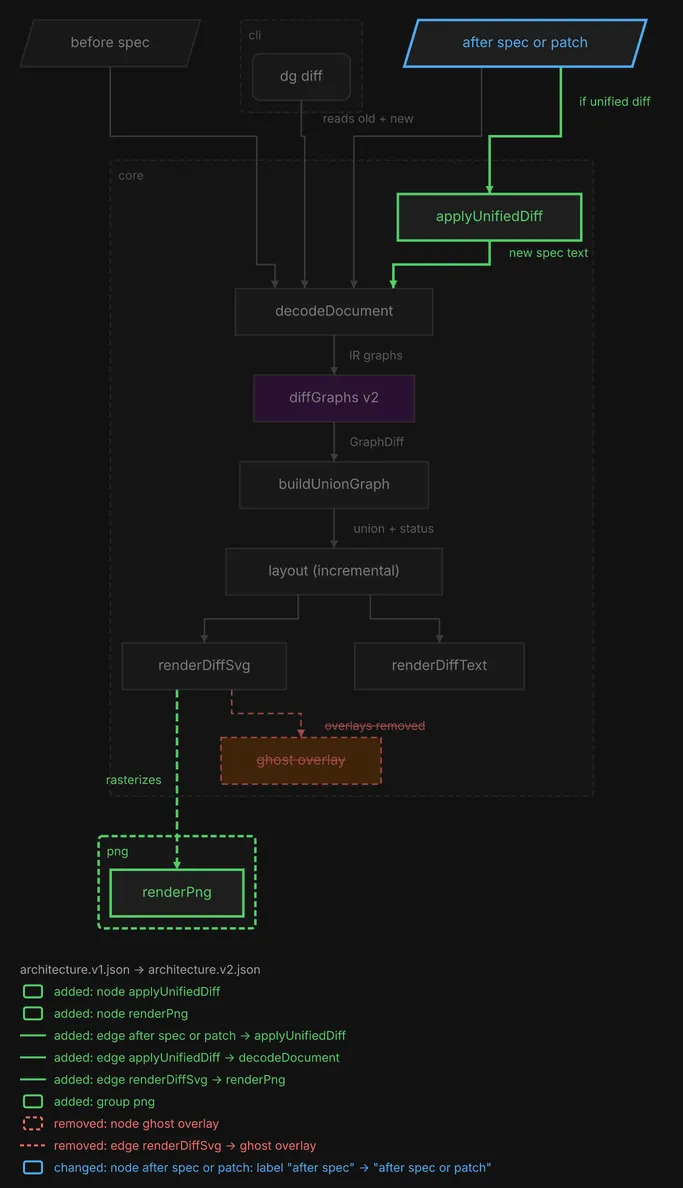
Here is the diff of a design document’s architecture after one round of review. The first version of the design drew the diff command’s rendering path with a ghost overlay. The second removes that overlay, adds a patch input and PNG output, and relabels one input.
  ┌──────────────┐     ┌─ cli ──────────┐      ┌────────────────────────┐
  │ before spec  │     │                │      │ ~ after spec or patch  │
  └──────────────┘     │  ╭──────────╮  │      └────────────────────────┘
          │            │  │ dg diff  │  │                │      │
          │            │  ╰──────────╯  │                │      │
          │            └────────┼───────┘                │      │ if unified diff
          │                     │                        │      │
          │                     │                        │      │
          └───────────────┐     │     ┌──────────────────┘      │
                          │     │     │                ┌────────┘
                          │     │     │                │
        ┌─ core ──────────┼─────┼─────┼────────────────┼────────────┐
        │                 │     │     │                ▼            │
        │                 │     │     │     ┌────────────────────┐  │
        │                 │     │     │     │ + applyUnifiedDiff │  │
        │                 │     │     │     └────────────────────┘  │
        │                 │     │     │  new spec text │            │
        │                 │     │     │                │            │
        │                 │     └──┐  │  ┌─────────────┘            │
        │                 └───────┐│  │  │                          │
        │                         ▼▼  ▼  ▼                          │
        │                   ┌────────────────┐                      │
        │                   │ decodeDocument │                      │
        │                   └────────────────┘                      │
        │          reads old + new   │                              │
        │                            │ IR graphs                    │
        │                            ▼                              │
        │                   ┌────────────────┐                      │
        │                   │ diffGraphs v2  │                      │
        │                   └────────────────┘                      │
        │                            │                              │
        │                            │ GraphDiff                    │
        │                            ▼                              │
        │                  ┌──────────────────┐                     │
        │                  │ buildUnionGraph  │                     │
        │                  └──────────────────┘                     │
        │                            │                              │
        │                            │ union + status               │
        │                            ▼                              │
        │                ┌──────────────────────┐                   │
        │                │ layout (incremental) │                   │
        │                └──────────────────────┘                   │
        │                       │        │                          │
        │                       │        │                          │
        │           ┌───────────┘        └─────┐                    │
        │           ▼                          ▼                    │
        │  ┌────────────────┐         ┌────────────────┐            │
        │  │ renderDiffSvg  │         │ renderDiffText │            │
        │  └────────────────┘         └────────────────┘            │
        │       ╎      ╎ overlays removed                           │
        │       ╎      ╎                                            │
        │       ╎      └╌╌╌╌╌╌╌╌┐                                   │
        │       ╎               ▼                                   │
        │       ╎     ┌──────────────────┐                          │
        │       ╎     │ - ghost overlay  │                          │
        │       ╎     └──────────────────┘                          │
        └───────┼───────────────────────────────────────────────────┘
                ╎ rasterizes
                ╎
                ╎
     ┌─ + png ──┼─────────┐
     │          ▼         │
     │  ┌──────────────┐  │
     │  │ + renderPng  │  │
     │  └──────────────┘  │
     └────────────────────┘

architecture.v1.json → architecture.v2.json
added: node applyUnifiedDiff
added: node renderPng
added: edge after spec or patch -> applyUnifiedDiff
added: edge applyUnifiedDiff -> decodeDocument
added: edge renderDiffSvg -> renderPng
added: group png
removed: node ghost overlay
removed: edge renderDiffSvg -> ghost overlay
changed: node after spec or patch: label "after spec" → "after spec or patch"
The agent says in one line what changed, shows this art, and in a graphical host gives the path of the diff SVG too. When most elements changed, a diff is noise, so it shows the new version alone and says it is a rewrite.
Documents for review
Section titled “Documents for review”When the agent writes or revises a document for you to review, such as a design spec, an implementation plan or a design note, it adds diagrams to the document itself:
- a design spec gets an
architectureflow diagram when it names three or more components, a sequence diagram for each key runtime path (at most two), a class diagram for three or more related types, and a state diagram when the spec has a state machine; - an implementation plan gets exactly one
tasksflow diagram, a node per task with an edge wherever one task consumes another’s output; - any other document gets what a chat reply would, at most four diagrams.
Each diagram is a versioned spec in a folder beside the document, and the text art and an image
link are written into the document between marker lines. When you give feedback, the agent
revises the document and bumps only the diagrams whose structure changed, then adds a
## Changes since v1 section under the title: one line of prose per change, and the diff of each
changed diagram. At the review gate it prints each changed diagram’s diff art in chat first, and
tells you that node ids are stable, so you can refer to a box by its id.
The repository’s skills/illustrating/example/ is a real design spec treated this way, and the
diagram above comes from it.
The two skills and the hook
Section titled “The two skills and the hook”diago:diagramming is how to draw a good diagram. It covers the diagram type to choose, size,
direction (by the tight axis of the medium: width in a terminal, height in a slide), shapes, edge
styles, color, groups and themes, each checked against what diago renders. Text art keeps fewer
shapes than SVG and no color, so the skill says which role must also be in a label. It also holds
the CLI reference and a cheatsheet of the JSON shapes.
diago:illustrating is when and where to show one. It holds the moments and the budget
above, the format for each medium, the diff-diagram procedure and the review-document protocol.
It never falls back to Mermaid or hand-drawn ASCII: if diago is missing, it tells you once that
go install github.com/oxforge/diago/cmd/diago@latest enables diagrams.
The SessionStart hook puts the standing rule in every session’s context, about 150 tokens:
before presenting anything with structure, decide whether a diagram helps, and if so use
diago:illustrating, with a change shown as a diff diagram. It words the rest for the host. In a
terminal session (Claude Code’s cli and sdk-cli entrypoints) it asks for text art in a fenced
block; elsewhere it asks for the text art and then the SVG file’s path. It also tells the agent
where the plugin’s diago-render script is, and, when diago is not on the hook’s PATH, to
tell you once how to install it and not to draw by hand. The hook never blocks a session.
Disable the plugin to drop it.
diago-render
Section titled “diago-render”The plugin ships a script, diago-render, that does the mechanics of a folder of diagrams. It
lives in the plugin’s own directory, as $CLAUDE_PLUGIN_ROOT/scripts/diago-render, not in your
project: the SessionStart hook tells the agent its path, and the agent runs it. It needs only
diago on PATH. Its usage:
diago-render <diagrams-dir> [--embed <doc.md>] [--strict] [--png]The folder holds specs named <slug>.v<N>.json. For every slug, the script renders the highest
version N to <slug>.v<N>.txt and <slug>.v<N>.svg, laid out anchored on the highest lower
version, so unchanged flow and class elements stay close to where they were. When a lower
version exists it also writes the diff against it, as <slug>.v<P>-v<N>.diff.txt and .svg. It
lints each spec, relays the advisories as diago-render: lint … lines on stderr, and prints one
line per slug with the text art’s width, such as
architecture v2 (diff v1->v2) width=87 diff-width=95 ok. The output is deterministic: identical
inputs give byte-identical files.
--embed <doc.md>replaces everything between each<!-- diago:begin <slug> -->and<!-- diago:end <slug> -->pair in the document with the text art in a fenced block and a link to the image. A<slug>.diffmarker embeds the latest diff. It is idempotent.--pngwrites and links PNGs instead of SVGs, which needsresvgonPATH. Use it when the folder is tracked by git, since each SVG embeds its font and runs around 500 KB.--strictturns any lint warning into a failure.